Python Modulo Operator (%): Complete Guide with Examples
 Kimberly Fessel
What do you do with leftovers? Reheat them? Transform them into something else? Toss them out? With the Python modulo operator, you get your leftovers from floor division. What you choose to do with those remainders is up to you.
In this article, we’ll cover what the modulo operator is, what it does, and how you can use it with integers and floats. We will show you some tricky gotchas with negative numbers, and we’ll compare the modulo operator to other Python options like math.fmod() and divmod(). There’s a lot to explore, so let’s begin.
What Is the Modulo Operator in Python and How Does it Work?
Python’s modulo operator gives you the remainder after a floor division calculation. That remainder, also called the modulus, is basically the same one you may have found in an elementary math course. But in today’s computer age, the modulo operation turns out to be incredibly useful to solve real-world problems involving cycles, patterns, and constraints.
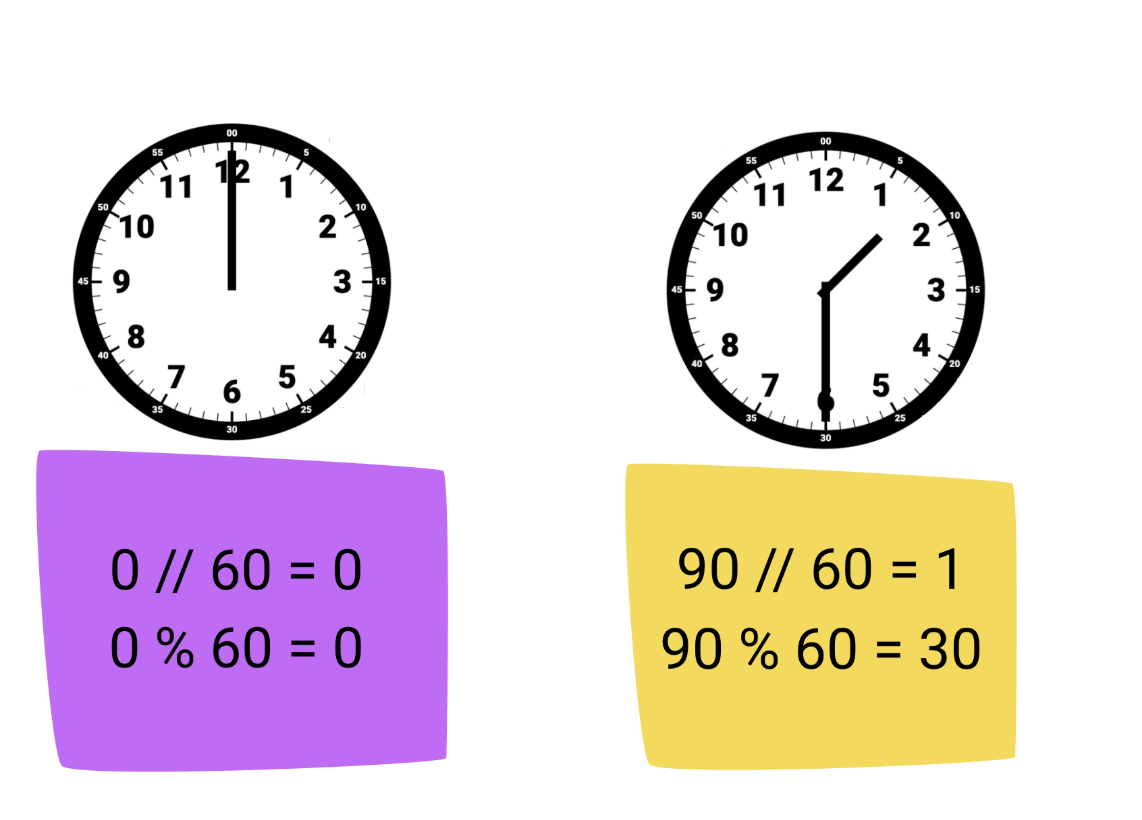
For a deeper dive into how the modulo operator works, consider a standard clockface. Start at midnight with both the minute and hour hands straight up. The minute hand travels around the face in a clockwise direction as minutes elapse until sixty minutes have passed. The hour hand has then incremented to one, and the minute hand resets to its initial, zero-minute position. It then continues along its path from 0 to 59 minutes until another hour goes by.
Here, the hour hand represents floor division between the minutes elapsed and 60. The minute hand tells us the modulus, or remainder, of that division. After 90 minutes, for example, the time is 1:30 – one hour with 30 minutes remaining.
Python Syntax and Basic Usage
You can find the modulus in Python with the modulo operator, which is represented by the percent sign (%). Place it between two numbers to find the remainder of floor division between them. For example:
When you divide 7 by 2, you get 3 with a remainder of 1. The modulo operator returns the remainder, 1.
Here are a few other cases to demonstrate how the Python modulo operator works:
How Does Modulo Relate to Integer Division and the Floor Division Operator?
We mentioned earlier that the modulo operator gives you the remainder of floor division, sometimes also called integer division. For instance, the floor division of 7 and 2 is 3; the remainder is 1, the modulus.
The floor division operator in Python is two forward slashes, //, while % represents modulo. These two operators are intimately linked. In fact, Python guarantees modular arithmetic; that is:
a = b * (a // b) + (a % b)
where * represents multiplication and Python uses + for addition. Let’s double-check this formula for the example we just covered. Set a = 7 and b = 2, and compute the right-hand side of the equation:
Modulo Operation with Integers
Most of the time, you’ll use the modulo operator (%) with integers in Python. The examples you’ve seen so far show you exactly how it works behind the scenes: divide the two values and whatever remains after that computation serves as the remainder and will be returned by the modulo operator.
Python’s modulo operation returns an int if both operands are integers. You can pass integers with very small or very large magnitudes into modulo:
Checking Even or Odd Numbers Using Modulo
You’ll see the modulo operator in a variety of places in Python, but one of the most popular ways to use it involves testing for even or odd numbers. An integer modulo 2 always gives one of two possible outcomes: 0 for even numbers or 1 for odd numbers.
This helps you write code with separate outcomes for even or odd numbers, and your code continues working even for extreme values. Say that you’d like to build a table for your website with alternate shading: light gray for even rows, white for odd rows. You could use the modulo operator to program the color of your table rows:
You only need one modulo calculation here since the modulus will be 0 or 1 for all integers, and this code works even if row_number gets very big.
Modulo with Floating-Point Numbers and Floating-Point Precision
While it’s less common, you may also use the modulo operator on floating-point numbers. The modulus definition still works for floats:
a % b = b * (a // b) - a
For example:
The number 2 goes into 6.5 just 3 times, and after that, you’re left with a remainder of 0.5.
You may include a floating-point number as one or both of the operands of the modulo operator. Just note that any time a float goes into the modulo operator, you’ll receive a float in the Python results. Practically speaking, this means you’ll get a precise, but approximate, output; however, pay careful attention if a floating-point number serves as the divisor of your modulo operator.
Consider dividing 0.3 by 0.1. You’d expect the output of floor division to be 3 with a modulus of 0. But here’s what could happen in Python:
Floating-point numbers aren’t exact, so when you divide 0.3 by 0.1, Python comes up with 2.9999999999999996, a number close to, but not exactly, 3. Floor division says to round that number down to the nearest whole number (2.0), and modulo ask for the leftover part (0.09999999999999998).
You’ll want to add checks to your code if you expect floating-point numbers. You could scale values to the nearest integer (e.g. work in tenths or hundredths), or check your modulus (say, x) with comparison operators (x % 0.1 < 1e-9 or (0.1 - (x % 0.1)) < 1e-9) instead of strict equalities (x % 0.1 == 0).
Handling Negative Numbers in Python and Other Languages
You’ve seen the modulo operator for positive numbers so far, but what happens for negative operands? This is one area where Python differs from other programming languages.
Python takes a mathematical approach to handling negative numbers with the modulo operator. The result of a % b in Python always has the same sign as the divisor (b). That means:
Python follows the mathematical arithmetic calculation you saw before:
a % b = a - b * (a // b)
Plugging in a = -5 and b = 3, -5 // 3 yields -2 since Python always rounds down toward negative infinity. The resulting equation simplifies to +1 once the negatives cancel out in the second term.
The behavior of modulo is different in languages like C, Java, and JavaScript. There, the modulus result a % b has the same sign as the dividend (a). Those programming languages handle integer division by truncating toward zero instead of negative infinity. So, -5 % 3 gives us -2 in C, Java, and JavaScript since -5 divided by 3 is -1 with -2 left over.
Python’s behavior of matching the sign of the divisor ultimately gives you cleaner code and works well for many real-world applications. Given the divisor, b, Python guarantees that the output of % always lies between 0 and b. You’ll stay within a set cycle with Python and never fall outside that range.
If you’re doing a cyclical problem in Python, you can keep track of where you are in the cycle simply with:
index = i % n
where i is your counter and n is the size of your cycle. This naturally extends to cyclical problems such as those with time. Here’s how you can update your minutes given your starting point and an offset: minute = (current_minute + offset) % 60
This calculation works even if offset is negative. Python still gives you a positive minute value because the sign of the output matches the divisor, 60.
Modulo Operator vs. divmod() vs math.fmod()
Two other standard Python functions can also help with modular arithmetic. The divmod() function takes in your dividend and divisor and returns both the quotient and remainder as a tuple. You won’t need to import any libraries to use divmod(); it’s a built-in function in the Python codebase. Here’s how it works:
The first value of the returned tuple is the outcome of floor division, while the second is your modulus.
The other function, fmod(), comes from the math library, so you’ll need to add import math to the top of your code to use it. You’ll input your dividend followed by your divisor to math.fmod(), but you’ll only get the modulus as a float in the output. This function differs from %, however, because it handles negatives like C, Java, and JavaScript. The sign of the math.fmod() output matches your dividend instead of your divisor. For example:
Here’s a side-by-side comparison of all three methods for finding the modulus in Python:
Operation | Output | Definition | Sign of Remainder Matches | Example for (-5, 3) | Typical Use Case |
|---|---|---|---|---|---|
% | Remainder only | a - b * (a // b) | Divisor | 1 | Cycles, indexing |
divmod() | (Quotient, Remainder) | (a // b, a % b) | Divisor | (-2, 1) | Problems that need quotient + remainder results |
math.fmod() | Remainder only (float) | a - b * math.trunc(a / b) | Dividend | -2 | When you need C-style handling of negatives |
Precedence Among Arithmetic Operators
You’ll often need to piece several mathematical operations together in your Python code. Python follows PEMDAS (parentheses, exponents, multiplication and division, addition and subtraction) when evaluating multiple mathematical operations in the same equation. The modulo operator, %, gets the same precedence as multiplication and division in Python. Exponentiation binds more tightly than modulo, so ** is evaluated first.
Here’s an example:
According to PEMDAS, first multiply 4 by 2, which gives us 8. Next, you do the modulo operation since it has the same precedence as multiplication; 8 modulo 3 is 2. Finally, add 5 and 2 to get 7 then subtract 1 to get the result, 6.
Practical Examples and Use Cases
You’ve seen several earlier examples of Python’s modulo operator in this article, but after you’ve learned how it works in general, you’ll be ready to apply the modulo operation to solve plenty of real-world programming challenges. Here are several use cases for inspiration.
Cycling through Lists
Lists of items appear frequently throughout Python code, and the modulo operator provides a clean way for you to cycle through those list items without going out of bounds.
Say you have three favorite coffee shops you visit in a circular pattern. You could use Python and modulo to determine which coffee shop to visit each day of April:
Round-Robin Scheduling
Round-robin scheduling comes in handy if you need to assign tasks to people or even machines and provides a natural extension of using modulo to cycle through lists. This code snippet shows you how to distribute work among three servers based on incrementing request IDs:
Unit Conversion: Seconds to Hours and Minutes
Conversion for cyclic units like seconds, minutes, and hours also requires modular arithmetic. You can use the modulo operator, or a function like divmod() that gives you both the quotient and remainder, for tasks such as converting seconds into hours and minutes:
Leap Year Check
Ever wonder if 1924 was a leap year? With the modulo operator, you can easily find out. Just build a little function to check if the year is divisible by 4. If it is, it’s a leap year (as long as it’s not also divisible by 100… unless it’s also divisible by 400).
Common Errors and How to Fix Them
As useful as the modulo operation is, there are a few issues you’ll want to avoid or fix if they arise. Let’s discuss the most common errors you’ll see with modulo.
ZeroDivisionError
You probably know that dividing by zero is a big no-no in mathematics and computer programming. Remember that floor division (//) is part of the modulus calculation in Python, so you’ll want to skip zero as the divisor operand of modulo as well. You’ll get a ZeroDivisionError like this one if you accidentally do:
When faced with an error like that, just double-check that your modulo operator divisor never hits zero and adjust as needed.
Unexpected Sign with Negatives
The output of the modulo operator always matches the sign of the divisor in Python, but results may still feel surprising when you first start computing the modulus for negative numbers, especially if you’re already familiar with modulo in other programming languages like C, Java, or JavaScript that follow a different convention.
If it’s your first time doing remainder calculations with negative operands in Python, pay special attention to the expected and actual outputs. The modulus always falls somewhere between 0 and the divisor in Python. If the divisor is positive, your remainder will be as well. If your divisor is negative, however, you’ll get a negative modulus back.
Wrapping Up
The modulo operator (%) returns the remainder after doing floor division (//) in Python. You’ll find it useful for a variety of real-world applications, including checking for even and odd numbers, converting units of time, and scheduling round-robin tasks. While modulo does work for floating-point numbers and negative values, you’ll want to pay close attention to how Python handles each to avoid unexpected results or coding errors.
If you’d like to learn more about the modulo operator, try out the AI Tutor. This prompt can get you started:
