Python Exponent: 5 Methods for Exponentiation + Applications

 Kimberly Fessel
If you’ve ever calculated a circle’s area from its radius or checked your account balance with compound interest, you’ve used exponents. They’re an essential part of many of the world’s most famous equations (Hello, E = mc2!), and of course, you can code exponents in Python.
What may surprise you, however, is the sheer number of ways to perform exponentiation in Python. In this article, we’ll cover not 1, not 2, but 5 different Pythonic techniques to raise a base value to a power. You’ll need to carefully consider your options when selecting an exponentiation method for your problems, so keep reading for a head-to-head performance breakdown along with a few edge-case “gotchas.”
What is Exponentiation in Python?
Exponentiation in Python follows similarly to mathematics. When we raise a value (x) to a power (p), you can start by thinking of multiplying that value by itself p times.
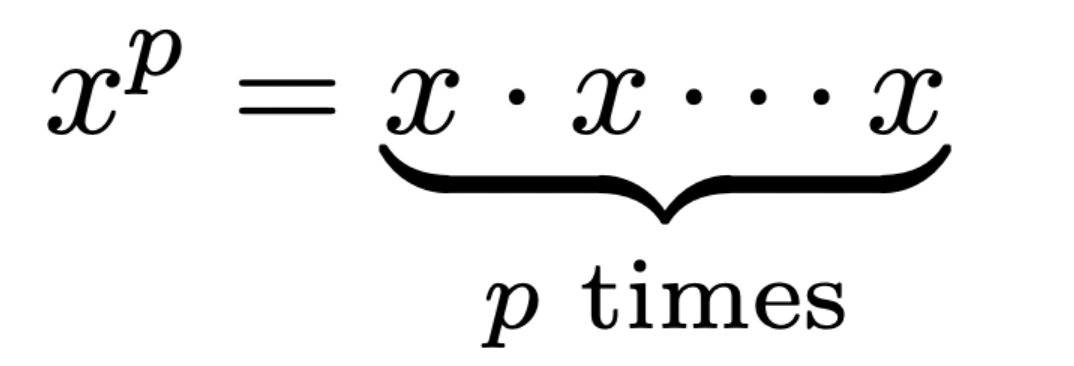
The most common method for raising a value to a power in Python is with the exponent operator, which is represented by two asterisks, **.
Method 1: The Exponent Operator (**)
You’ll frequently see exponentiation in Python with the exponent operator, **, sometimes referred to as the power operator. Just place it between the base and the power you want to raise it to. For instance:
Python interprets this as 5 raised to the power 2, or 5 squared, and returns your result, 25.
Here are a few more examples for further illustration:
Operator Precedence in Code Examples
Python follows the PEMDAS (parentheses, exponentiation, multiplication and division, addition and subtraction) convention for arithmetic operators precedence. When you include multiple operators in one calculation, Python begins by evaluating expressions in parentheses from the inside out. Next, it performs all exponentiation before completing any multiplication and division calculations from left to right. Floor division (//) and modulo (%) share that same level. Python saves addition and subtraction for last, again from left to right.
Check out these examples to see arithmetic precedence in action:
Negative Values
You’ve seen Python’s exponent operator for non-negative values, but what happens when the base or the power dips below zero? Let’s start with the math.
Negative Base
In mathematics, multiplying a negative value by itself gives you a positive result. For example
That means any time you raise a negative base to an even power, the negatives cancel out with each other to yield a positive result. If you raise a negative number to an odd power, however, one negative sign won’t have a partner to cancel with, and you’ll be left with a negative-valued result.
Python works like this, too, with one big caveat. You must put parentheses around the negative value in your exponentiation. Exponentiation gets higher precedence than subtraction, so without the parentheses, Python executes the exponentiation first and recognizes the negative after the fact. Here’s that situation in code:
Negative Exponent
If, instead, you would like to raise a value to a negative exponent, you’ll just need to remember what that means mathematically. Raising to a negative exponent in math means the same as taking one over the value raised to the positive power.
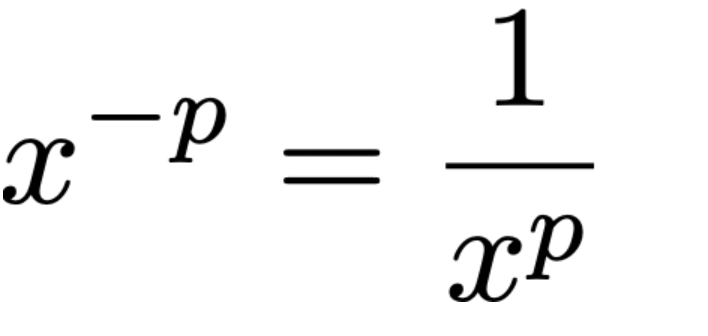
The negative sign tells you the calculation should take place in the denominator.
Python also follows this convention:
Raising 2 to -2 gives us ¼, returned as the Python floating-point value 0.25.
Fractional Exponents
Python also accepts fractional, or decimal, exponents. Raising a base to a fractional power has the same effect as finding its root. For instance, you can find the square root of 36 by raising it to the ½, or 0.5, power:
Notice that you’ll receive a float when you enter a fractional (decimal) exponent, unless you begin from a negative base, in which case your result will be a complex number.
Floating-Point Arithmetic and Precision
When you supply the exponent operator with integers for both the base and exponent, Python gives you an int output. If either value is a floating-point number, on the other hand, you’ll receive a float back from Python. Integer exponentiation has no overflow ceiling because Python uses arbitrary-precision integers.
Python’s floating-point numbers typically have about 15-17 decimal digits of precision. You may land on exact values when processing fractional exponents, but then again, you may not. Taking the cubed root of 125 may return a value extremely close, but not quite equivalent to, 5:
Since you expect approximate values for floats, you can safeguard your code by not comparing them directly against integers with the equality operator (==). Try the function isclose() from the math module to check for tolerance instead:
Method 2: Built-in pow() Function
Python comes with a built-in function called pow() for raising a base value to a power. pow() comes with standard Python; you won’t need to import any extra modules or libraries to use it. It has two required arguments: the base and the exponent.
Modular Exponentiation
You’ll find the major difference between the exponent operator (**) and pow() when adding a third, optional argument to pow(). That argument, mod, applies the modulo operator to the result. So pow(x, p, m) calculates:
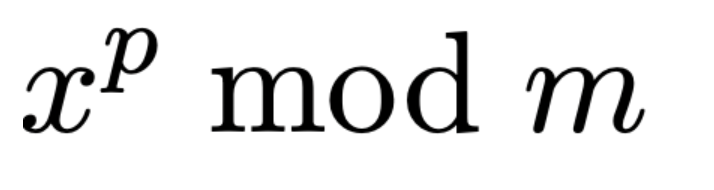
You can think of this as first computing the exponentiation and then doing the modulo operation. For example:
Methods 3 and 4: math.pow() and math.exp()
Your third and fourth options for doing exponentiation in Python come from the math module.
math.pow()
The math.pow() function works similarly to **; however, math.pow(x, p) always returns a floating-point number. You may pass int or float arguments, but the function immediately converts inputs to floating-point values.
You may choose to use math.pow() if you explicitly want a float for compatibility with other scientific computing functions.
math.exp()
The math module’s exp(x) raises Euler’s number, e (≈ 2.7182818…), to the power x. It also always returns a float. It’s a carefully optimized function designed not to lose precision.
Method 5: numpy.power()
The NumPy library comes with a function for doing exponentiation. Call numpy.power(x, p) to raise x to the power p. Unlike Python’s built-in exponentiation, numpy.power() works element-wise when x and/or p are arrays. It also uses optimized, compiled routines, making it significantly faster than Python loops for large datasets.
In the final example, NumPy uses broadcasting to align shapes between the two arrays, applying element-wise exponentiation across all combinations of values. If you encounter any issues with negative or fractional exponents, you may need to convert inputs to floats (as we did with -1. in the final example) so NumPy can correctly compute non-integer results.
Which Method Should You Use for Mathematical Calculations?
Speed is just one factor when choosing between the multiple ways to do exponentiation in Python. You’ll also want to consider the computation type and return type of each technique. Below you’ll find a handy table to put it all together.
Method | Computation Type | Output Type | Best Use Case | Key Advantage |
|---|---|---|---|---|
| Scalar | int, float, or complex | General-purpose | Simple and flexible |
| Scalar | int, float, or complex | Same as ** | Functional form |
| Modular | int | Large exponent with modulus | Fast, avoids huge numbers |
| Scalar | float | Explicit float exponentiation | Consistent float behavior |
| Vectorized | ndarray | Array-based computations | Fast, supports broadcasting |
Applications to Finance, Data Science, Data Analysis, Machine Learning, and Cryptography
Exponentiation shows up in plenty of real-world problems involving population growth or decay, distance calculations, and binary growth rates for computer memory sizes. Whether your interests lie in finance, biology, data science, data analysis, machine learning, or cryptography, you’ll need exponents to perform calculations. Here are a few of the many ways exponentiation comes up in practice.
Compound Interest
The classic formula for calculating compound interest arrives at a final amount, A, by multiplying your principal investment, P, with an expression involving your annual interest rate, r, the number of times interest compounds yearly, n, and the time in years, t:
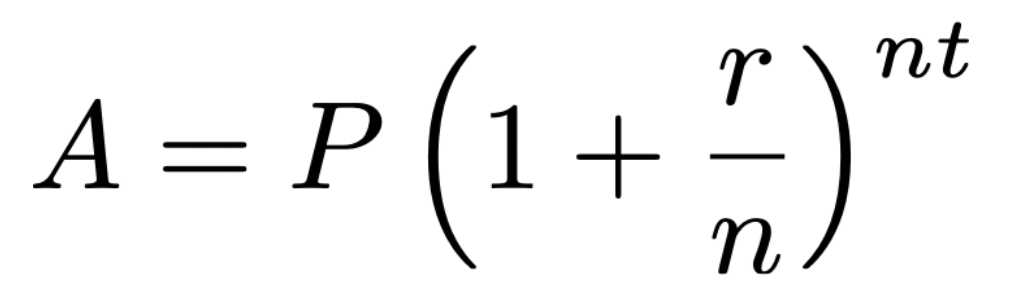
This formula involves exponentiation, which you can translate into Python code like the following for an initial $1,000 investment at 5%, compounded monthly over 10 years:
Sigmoid Function
The sigmoid function is used in machine learning for binary classification. The sigmoid function, or logistic function, lies at the heart of the algorithm.
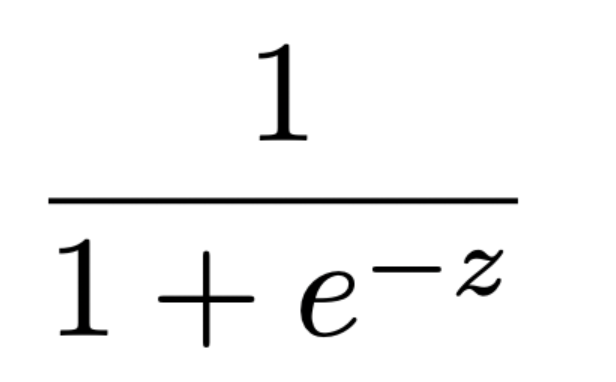
where z is a linear combination of the input features:
The sigmoid function takes any input from negative to positive infinity and maps it to a value between 0 and 1, which is perfect for binary probabilities.
You can code up your own sigmoid function in Python by leveraging math.exp():
RSA Algorithm
The RSA algorithm is a public-key cryptosystem that enables secure communication, digital signatures, and key exchange. It uses exponentiation with a modulus to securely encode and decode messages. The algorithm relies on the fact that modular exponentiation is easy to compute, but hard to reverse without the private key.
Here’s a simple demonstration of the RSA algorithm in Python where we use pow(x, p, m) for fast modular exponentiation:
Wrapping Up
You can calculate exponents in Python with many different techniques. You’ll typically use the standard exponent operator (**), but keep other variants in mind for modular exponentiation (pow(x, p, m)) or vectorized exponentiation (numpy.power(x, p)). Just remember to consider speed as well as computation type and data type when selecting the right method for your use case.
Try out the AI Tutor to continue your personal exponentiation growth. You can kick off your dialogue using this prompt:
