Encapsulation in Python: All You Need to Know

 William Imoh
Encapsulation in Python is a fundamental concept you have to understand when learning object-oriented programming. It helps keep your code neat inside a class, making it organized, safe, and easy to work with. When you encapsulate data, you get to choose what everyone can see and what stays hidden inside a class. It makes things easier when your code grows, and you need a reliable structure to prevent errors.
Without encapsulation, your classes set no boundaries on what other code can change. Another part of your program can change key internal data at any time, leading to unsafe updates. It shows why you must control how different parts of your program reach your data. Controlling data access is important for code security, data protection, and code maintainability. It prevents unauthorized access that could cause glitches or expose security issues.
This guide will teach you the fundamentals of encapsulation in Python. You’ll learn how to create public, protected, and private attributes. It will also show you how to use getter and setter methods to control access to your data.
What is encapsulation in Python?
Encapsulation in Python is the practice of hiding a class's internal details and exposing only what is necessary to prevent accidental modification. The goal is to help separate the interface (what the user sees) from the implementation (how it works behind the scenes). It achieves this through naming conventions, e.g., the underscore prefixes, and using techniques such as name mangling. Closures achieve something similar without a class, keeping state private to a function.
Encapsulation restricts direct access to an object's internal state by using access modifiers: public, protected, and private attributes. It's about grouping data members (attributes or variables) and the code that works with them (methods) into a single unit (class). Then you rely on controlled access to show some parts of the class while keeping the rest internal.
Understanding access modifiers and naming conventions
In Python, developers categorize attributes into three access levels: public, protected, and private. But unlike other programming languages, such as Java and C++, Python doesn't have access modifiers with strict enforcement. Instead, Python supports encapsulation through naming conventions (e.g., single underscores and double underscores) to signal access intent rather than enforced access modifiers.

Access modifiers are keywords in object-oriented programming that control which parts of your code can access certain class members, i.e., attributes (or variables) and methods. They often group access modifiers into three main categories:
Public members: You can access public members from anywhere in your class.
Protected members: You can access protected members within the class hierarchy. This means you can access them within the same class and its subclasses (child classes). But it's not advisable to use them in external classes (even though Python doesn't strictly enforce this rule).
Private members: You can access them only within the class itself.
Public, protected, and private members have definitions similar to those of public, protected, and private attributes. They're all closely related, but there's a subtle difference in how broad the terms are.
For instance, when you mention "private members," you are talking about everything in the class, such as private methods (functions) and variables that are private. On the other hand, "private attributes" refer only to the private variables.
Implementing encapsulation in Python
Now that you have a good understanding of what Python encapsulation is all about, let's go further and see how it works in practice.
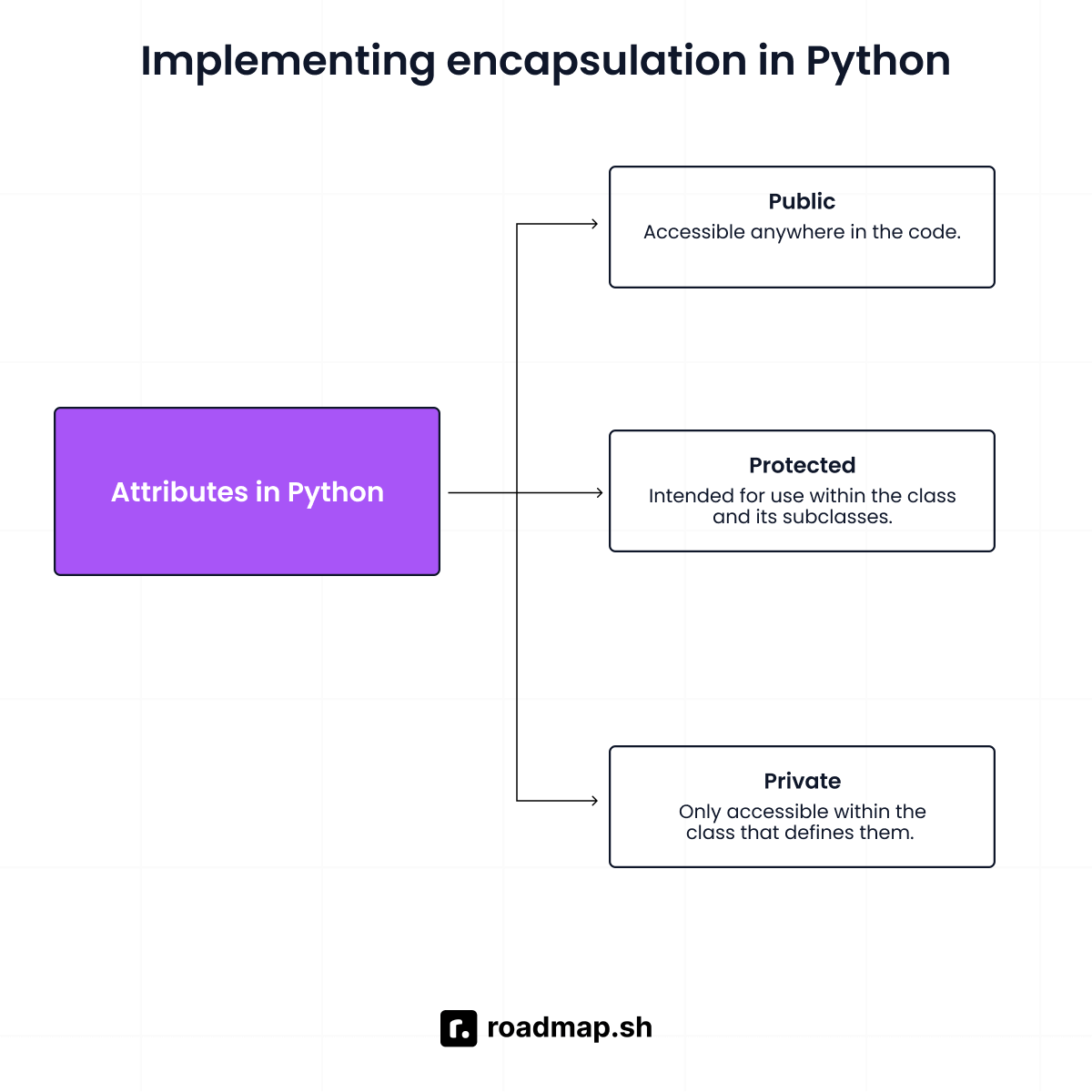
Python achieves encapsulation through classes and conventions that control the visibility of attributes (or variables) and methods. In the next section, you’ll see how to use these conventions to implement encapsulation in Python.
Public attributes and methods
Public attributes are accessible from anywhere (inside and outside the class). Python developers use them to store data (names, labels, display values, etc.) that must be accessible to other parts of the program. They're part of your class's public API that anyone can access whenever they want.
Public attributes do not start with an underscore (e.g., name, my_name), so they’re always open to direct access from outside the class. Also, all attributes (or variables) and methods are public by default unless indicated otherwise in the naming conventions.
In the above example:
The variables
fieldandageare set up (initialized) in the class using the__init__method.Public attributes are the data (
fieldandage), while increase_age is the public method for handling code updates, i.e., performing actions that change the data.Use person1.field or person1.age to view the data or replace them with new information.
Public attributes can be accessed directly, which can cause problems because changes may bypass validation and break the object’s intended behavior. It's a good idea to use getter and setter methods to control access to an object's private data. Use public attributes when external code needs to read or change data directly, without restricting access.
Protected attributes using a single underscore
Python uses a single underscore prefix (e.g., _name) to show protected attributes. They support internal use within the class and its subclasses (children) that inherit from it.
Python doesn't block access to protected attributes. The underscore sign acts as a visual warning to other developers to proceed with caution. It signals that the data is meant only for use within the class, and no one should change it from outside the class.
Even though they can be accessed directly from outside the class, the rule is that you shouldn't do so. However, they remain accessible to any subclasses that inherit them. A subclass usually sets them up by calling super().init(), so the parent's constructor runs first.
Private attributes using double underscore
The primary use of private attributes is to store internal data, including sensitive information such as passwords and encryption keys. Developers use private attributes only for internal use within the class itself, and not directly from outside the class or its subclasses. Python uses a double-underscore prefix (__) (e.g., __name) to denote a private attribute that triggers name mangling.
Name mangling hides the original names of private members, e.g., attributes (or variables) and methods, making them less accessible. It makes it harder to access these attributes from outside the class, but it is still achievable.
In the above example:
The variable
__passwordis set up (initialized) in the class using the__init__method.__internal_security_checkis a private method used for internal implementation details, such as validation checks and performing other secret background tasks.When you attempt to call the private method (
vault.__internal_security_check) or access the private attribute, it'll result in an attribute error.If you want to interact with the private data (
vault), you must use the public methodverify_password.
You can directly access private attributes via name mangling. However, developers generally consider it a bad practice because it breaks the class's intended encapsulation.
For example, in our code, name mangling will rewrite the private attribute password by adding an underscore and the class name as prefixes. So __password will become _SecureVault__password to prevent accidental external access. However, you’ll only be able to see this during runtime using tools like dir(), as the mangled name will hide in the code.
Getter and setter methods
Getter and setter methods are basic concepts in object-oriented programming (OOP). They're the tools you use to manage access to private or protected attributes. Both methods help promote code reusability and flexibility in your program's logic. If a getter needs to hand back several fields at once, Python lets you return multiple values as a tuple.
Getter methods, also known as accessors, help retrieve (get) the value of an attribute. They give you a way to get the value of an attribute without showing how it's stored. Getter methods have a simple implementation: they usually just return the attribute value, making them easy to use. But they can also perform internal logic, such as calculating or converting the value before returning it.
On the other hand, setter methods, also known as mutators, help modify (set) the value of an attribute. They give you a way to check new data, perform calculations, or alert the system before saving the attribute's value. Setter methods have a more complex implementation than getter methods because they must check and process input data.
The @property decorator in Python allows you to access a method, like an attribute, without using parentheses. It helps you to add validation and logic to getters and setters without making your code harder to read. On the other hand, the @age.setter decorator defines what happens when you assign a value to a property. The @property decorator lets you read or get a value, while the @age.setter decorator lets you change or set that value.
Practical use cases for encapsulation in Python
Knowing when and why to use Python encapsulation will help you write more modular code. Let’s look at some practical situations in which encapsulation in Python proves helpful:
Financial calculations and transactions
Financial institutions need firm control over account balances and detailed transaction records. For example, developers use encapsulation to build secure systems that bankers use to protect data, manage customer accounts, and generate reports. It ensures that only the right people can access and make changes, reducing the risk of data leaks and errors. Below is a code example to show this:
In the above example, the public methods (deposit() and withdraw()) are the only way to update the balance (__balance). They include validation logic to ensure you can only add or remove the right amounts of money.
Game object state management
Encapsulation helps in managing game object states by protecting internal data and behavior. For example, game developers use encapsulation to manage object behavior and debug faster. It allows only specific methods to access or change an object’s state, helping prevent unintended changes that could break gameplay mechanics. Below is an example of using encapsulation for game object state management:
API configuration objects
Encapsulation keeps internal state and API configuration safe when building API clients. DevOps engineers, for example, use encapsulation to keep secrets such as API keys out of the class itself and load them from environment variables instead. Below is an example of using encapsulation to manage API configuration objects:
Now that you understand how encapsulation can be helpful in real life, let's go over some common mistakes to avoid when using it. Optional settings are usually defaulted to None so a caller can tell an unset value from a blank one.
Common mistakes to avoid
The following are mistakes to avoid when using encapsulation in Python:
Overusing private attributes
Don't bother using private attributes when they aren’t needed. Using them too much makes things more complicated than they need to be. If the data is simple and doesn't need protection or validation, just make it public.
Only use private attributes if you have a good reason, like for validation logic, computed values, or sensitive data that you don't want modified.
Accessing mangled names directly
Just because you can access a name-mangled attribute doesn't mean you should. Use the provided public methods to interact with the object's internal state instead.
Accessing a name-mangled attribute undermines encapsulation and leaves your code vulnerable to changes.
Creating getters and setters for everything
People who know languages like Java often bring their getter-setter habits to Python. However, Python’s object-oriented programming style encourages a more flexible way of working.
Use getters and setters only when needed to keep your code organized and protect internal implementation details. It helps make your code more Python-friendly and easier to maintain.
Mixing internal and external state
When creating objects with encapsulation, keep internal state separate from external state. Mixing both states makes it harder to isolate specific parts of your code for testing. It can make your tests more likely to break and behave in unexpected ways.
Design a clear, focused public interface that reflects your object's purpose. Avoid exposing methods or attributes that serve only internal tasks. Doing this helps you write well-organized code that is easier to test and maintain.
Best practices for Python encapsulation
Follow these best practices to use encapsulation in Python well in your code:
Use the
@propertydecorator: Rather than writing separate getter and setter methods, use the @property decorator to create properties. It lets you perform validation behind the scenes without changing the public syntax.Clear naming conventions: Use underscores in variables and method names to clarify intended access levels to other developers.
Document intended access: Use docstrings to make it clear what users can and cannot access. Docstrings are short descriptions written inside triple quotes (
""") to help explain your code. Always use docstrings for all class members, especially for protected or private members. It guides developers and users through your intended access, making the internal logic much easier to follow.
Wrapping up
Encapsulation focuses on protecting data from unintended access and providing controlled interfaces instead. It improves security, promotes code reuse, and allows safe changes to implementation details.
If it seems confusing at first, don't worry, that's just part of the learning process. It'll get easier as you keep learning. With consistent practice, encapsulation will change the way you approach and write Python code.
Ready to put your understanding to the test? Challenge yourself with our interactive quiz on Python encapsulation. Get quick feedback and personalized explanations for every question to help you remember what you've learned.
