Python Nonlocal Keyword Explained by Our Experts

 William Imoh
Python manages variables using clear scope rules. Most of the time, local and global variables are enough. But when you work with nested functions, things change. Inner functions cannot modify outer function variables by default. This happens because Python resolves names using its LEGB scope rules (Local, Enclosing, Global, Built-in), and nested functions sit in the “Enclosing” layer.
This is where the Python nonlocal keyword becomes important. The nonlocal keyword allows an inner function to access and update a variable defined in its enclosing function. This makes it useful for closures, decorators, and callback-based logic.
Let’s use this guide to understand how nonlocal works in Python, when to use it, and how it helps you write cleaner and more predictable code.
What is the Python nonlocal keyword?
The nonlocal keyword tells Python that a variable used inside an inner function belongs to the nearest enclosing function, not the inner function’s local scope. nonlocal only refers to a variable in the nearest enclosing function scope where that name already exists. It can’t “skip around” to any outer scope, and it won’t work for module-level variables.
This lets the inner function reuse and update that existing variable instead of creating a new local one.
With nonlocal, you can share and update state inside nested functions without using global variables or forcing values to bounce back through return statements.
To understand nonlocal, you need a quick view of Python’s name lookup rules. Python uses the LEGB scope model, and nonlocal works specifically within that model.
Python’s LEGB scope model and where nonlocal fits

LEGB stands for Local, Enclosing, Global, Built-in. It’s the rule Python uses to decide which variable a name refers to inside a function. This matters in nested functions because nonlocal works specifically with the Enclosing scope.
When Python sees a name inside a function, it looks it up in this order and uses the first match:
Local (L): Variables created in the current function (the default for assignments).
Enclosing (E): Variables in the nearest enclosing function when using nested functions. This is where the nonlocal keyword applies.
Global (G): Variables at the module level. Use the global statement to modify global variables. Nonlocal does not work here.
Built-in (B): Python’s built-in
identifierlikeprint,len, andrange.
Here’s a short example that shows how Python walks through these scopes:
The nonlocal statement works at the enclosing scope level. When used inside an inner function, it tells Python to reference a variable from the nearest enclosing function, instead of creating a new local variable.
Here, count is defined in the outer function, accessed inside the inner function, and updated correctly without touching the global scope. If Python cannot find the variable in any enclosing scope, it raises a SyntaxError instead of silently creating a new variable.
How nonlocal allows updates without creating a new local variable
By default, when you assign to a name inside a function, Python assumes it is a local variable, based on its name lookup rules. This is true even if a variable with the same name exists in an outer function. In nested functions, this often causes a problem: you can read an outer variable, but the moment you try to update it (like value += 5), Python assumes you mean a new local variable.
The nonlocal keyword changes that. It tells Python to use the variable from the nearest enclosing function, so updates modify the existing value instead of creating a new local one.
If you remove nonlocal here, Python raises an error because it treats value as a local variable inside inner(), but it’s referenced before it gets a local value.
This behavior is especially useful in nested functions where state must persist across calls, such as counters or functions that return other functions. By preventing the creation of unnecessary local variables, nonlocal keeps variable updates predictable and aligned with Python’s scope rules.
Implementing nonlocal in Python
The nonlocal keyword works only inside nested functions. In other words, you can use it only when you have an inner function defined inside an outer function. It links the inner function to a variable in the enclosing scope, so you can update that variable without creating a new local variable.
Basic syntax and behavior
nonlocal marks a variable as coming from the nearest enclosing function, so assignments update that same variable instead of creating a new local one.
What happens here:
xstarts in the outer function.inner()declaresnonlocal x, so Python uses the nearest enclosing scope.The updated value becomes visible in both the inner and outer function.
If you remove nonlocal x and still assign x = x + 5, Python tries to create a new local variable named x, and you’ll usually get an error because the local x is referenced before assignment.
The error Python raises:
Why does this error occurs?
In Python, any assignment inside a function makes that variable local by default. So even though x exists in the outer function, Python assumes x inside inner() is a new local variable. When the right-hand side tries to read x, that local variable does not exist yet — so Python raises an error.
How nonlocal fixes this
Declaring nonlocal x tells Python to use the variable from the enclosing function, not create a new local one. This allows the update to work as intended.
Working with closures
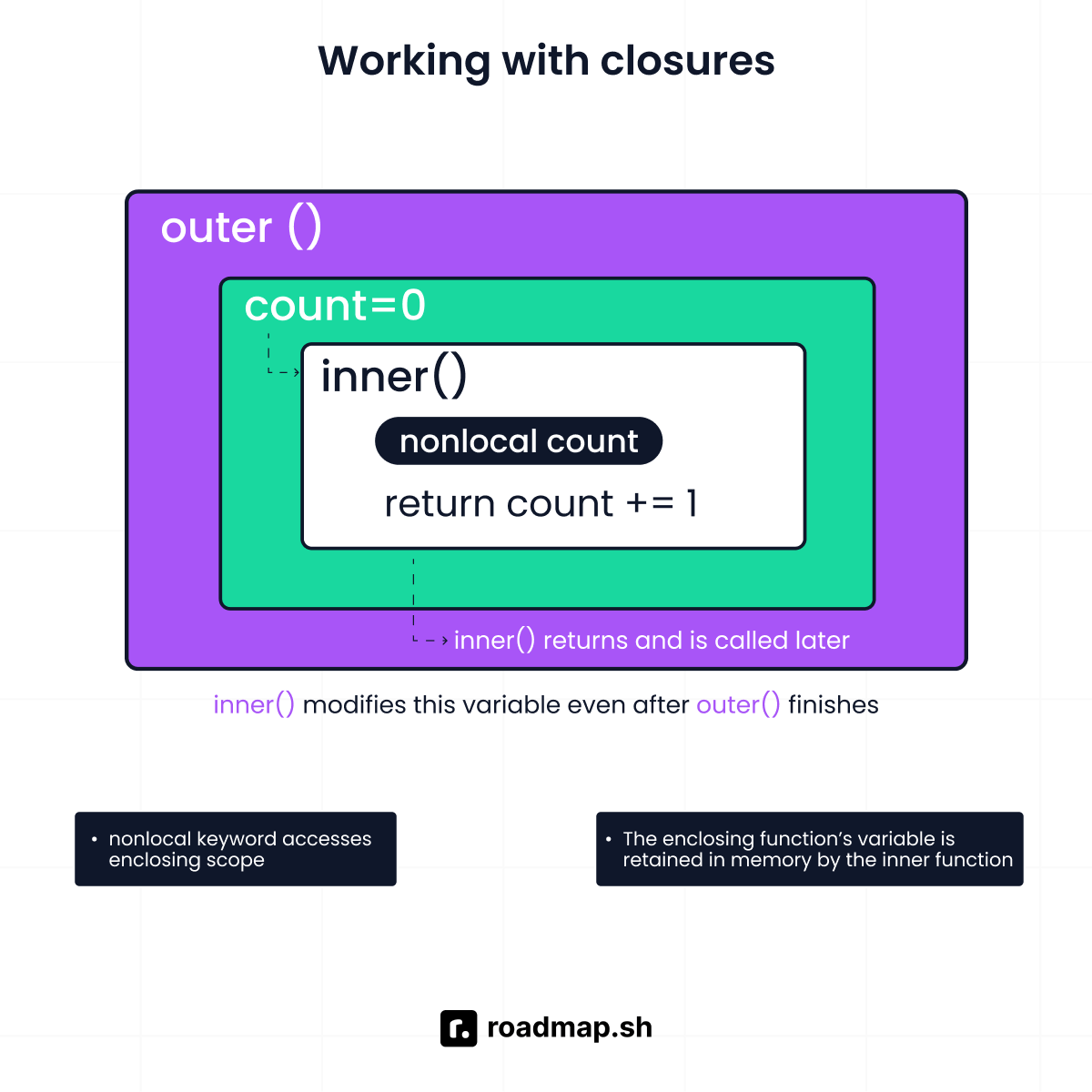
A closure happens when a returned function remembers variables from its enclosing function, even after the outer function has finished running. This is a common place where nonlocal becomes useful.
Example of counter function using nonlocal
How scope works in this example
countis created insidemake_counter(), so it belongs to the enclosing scope.increment()is returned and continues to exist aftermake_counter()finishes.Because
increment()assigns tocount, Python would normally treatcountas a local variable.Declaring
nonlocal counttells Python to reuse thecountfrom the enclosing function instead of creating a new local one.
Using the closure
Each call updates the same count value, even though make_counter() has already returned. This works because the closure preserves the enclosing scope, and nonlocal allows that preserved variable to be updated.
Why nonlocal is required here
Without nonlocal, the assignment count += 1 would create a new local variable inside increment(), breaking the counter and raising an error. nonlocal makes the scope relationship explicit and allows safe state updates inside closures.
Practical insight: Use nonlocal when you want shared state in nested logic without using a global variable and without passing variables around every time. It keeps the state close to the function that owns it, which makes your code easier to maintain.
Common pitfalls when using nonlocal
The nonlocal statement is simple, but scope mistakes are common. These pitfalls usually happen because Python treats assignments inside a function as creating a new local variable unless you clearly point to the right scope.
Also, many nonlocal mistakes are caught when Python compiles the function body (before the function actually runs), because scope is resolved early.
Using nonlocal without an enclosing variable
nonlocal works only when the variable already exists in an enclosing function (the enclosing scope). If the name does not exist in the nearest enclosing scope, Python throws an error message at compile time.
Typical error message:
Fix: Define the variable in the parent function first.
This ensures nonlocal x points to a real variable in the enclosing scope, not an undefined name.
Trying to modify global variables unintentionally
A common confusion is expecting nonlocal to work with the global scope. It does not. nonlocal is non global by design. It only targets variables in outer function scopes. If the variable lives at the module level, use the global statement to modify global variables.
That fails because there is no enclosing function scope holding x.
Correct approach for global:
Practical tip: If you want encapsulated code, avoid global variables. Prefer an enclosing function with nonlocal, especially for counters and state.
Using nonlocal in deeply nested structures without clarity
With multiple nested functions, nonlocal always targets the nearest enclosing variable with the same name. This can get confusing when several outer scopes have a variable with the same name.
Output:
This is correct behavior, but it’s easy to misread in real source code.
Make it clearer:
Use unique variable names when you have deeply nested logic.
Keep nesting shallow when possible.
Consider passing variables as arguments or returning values if it improves readability, especially when passing variables makes the data flow obvious.
Quick checklist (to avoid scope bugs)
Use
nonlocalonly for variables inside nested functions that exist in an enclosing scope.Don’t use
nonlocalfor global scope values; use the global statement only when needed.In multiple nested functions, remember
nonlocalbinds to the nearest enclosing scope, not the upper scope you “meant.”Watch out for the same name across different scopes. This is where most “why didn’t it update?” bugs come from.
Python nonlocal vs. global: Understanding the differences
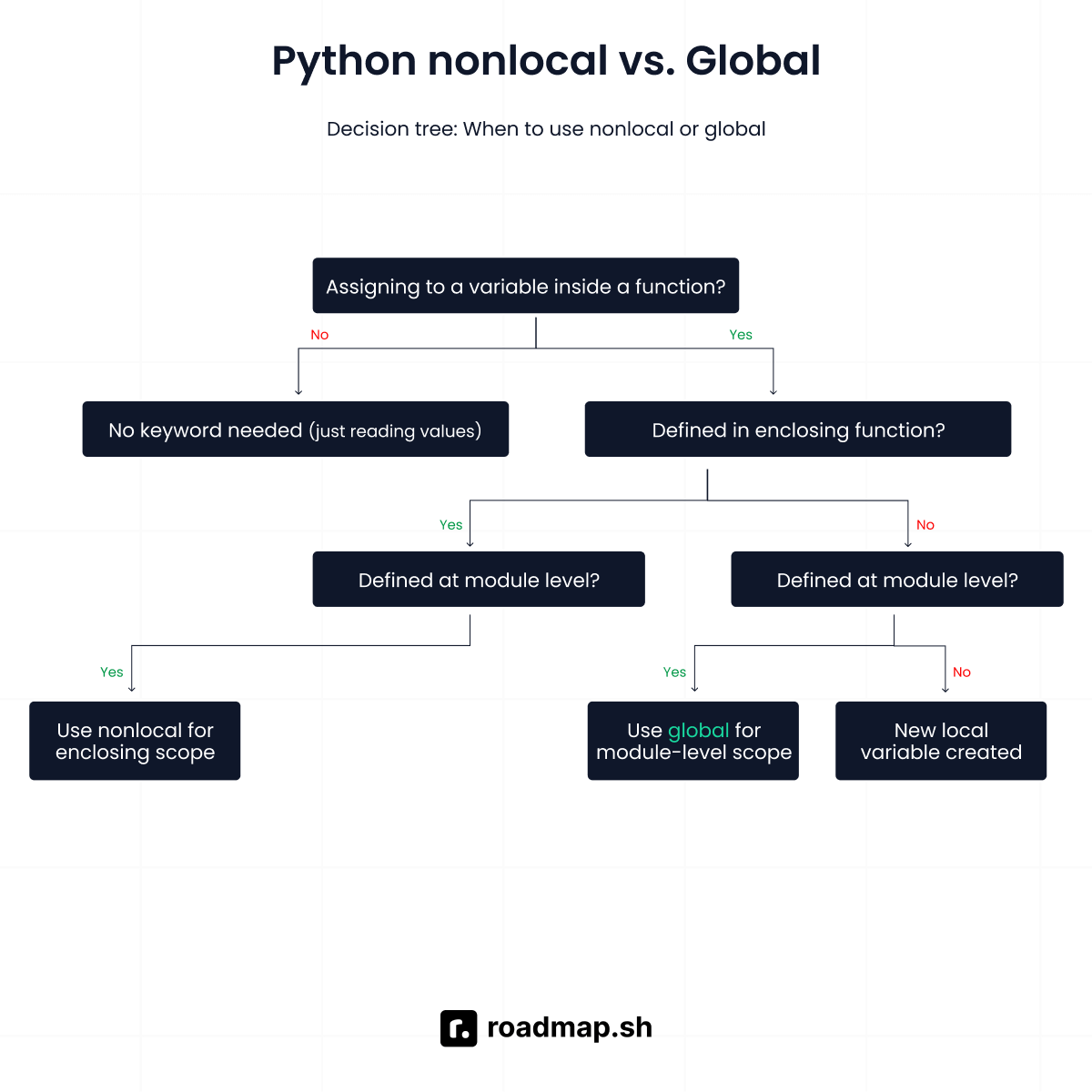
Both nonlocal and global allow a function to modify variables defined outside its local scope, but they operate at very different levels of Python’s scope system. The key difference lies in how far each keyword can reach and which scope it is allowed to modify.
Choosing the wrong one can lead to unclear data flow and hard-to-debug code.
Python nonlocal
The nonlocal keyword is used inside nested functions to update variables defined in an enclosing function scope. It allows an inner function to reuse and modify an existing variable instead of creating a new local one. This keeps state local to the function, not exposed at the module level.
When nonlocal is the right choice?
Use nonlocal when:
You are working with nested functions.
A function needs to remember or update state across calls.
The state should stay private to the enclosing function.
Example: Keeping state local with a counter
Why this fits:
countlives in the enclosing function, not global scope.The returned function updates the same value on every call.
State remains encapsulated and easy to reason about.
This pattern is common in counters, closures, and function factories.
Python global
The global keyword allows a function to modify variables defined at the module level. Unlike nonlocal, it does not require nested functions and affects the entire file.
When global is appropriate?
Use global when:
The variable represents shared application state.
The value must be accessed or updated across multiple functions.
The variable logically belongs to the module, not a single function.
Example: Updating a module-level variable
Why this fits:
The variable represents global application data.
Multiple functions may need access.
The state is intentionally shared at the module level.
This is common for configuration flags, counters, or environment-wide values.
nonlocal vs. global: Comparison table
The following table compares nonlocal and global side by side:
Aspect |
|
|
|---|---|---|
Scope reach | Enclosing function scope | Module-level (global) scope |
Requires nested functions | Yes | No |
Keeps state local | Yes | No |
Affects entire module | No | Yes |
Best for | Closures, counters, returned functions | Shared module state |
Impact on readability | High clarity | Can reduce clarity |
Impact on testing | Easier to isolate | Harder to mock |
Risk of side effects | Low | Higher |
Practical applications of nonlocal
The nonlocal keyword is most valuable in small, focused designs where state needs to persist but should not escape into the global scope. Below are common, real-world applications that show when nonlocal improves clarity, safety, and maintainability.
Building counters inside nested functions
Counters are a natural fit for nonlocal because they require state to persist across calls while remaining private to the function.
What’s happening here
visitsis created in the outer function.count()runs multiple times and needs to updatevisits.nonlocal visitstells Python to reuse the outer variable instead of creating a new one.Each call to
count()increases the samevisitsvalue.
This is a clean way to build counters without using globals.
Creating simple memoization patterns
Memoization stores results so you do not repeat the same work. Closures with nonlocal are a lightweight way to do this.
What’s happening here
cachelives in the outer function and stores past results.square()checks the cache before doing the calculation.nonlocal cacheallows updates to the same dictionary.Once a value is stored, future calls return it instantly.
This keeps caching logic local and avoids polluting global space.
Managing shared state in closures
Some utilities need a shared on-off or status value. nonlocal allows inner functions to update that shared state safely.
In this code,
enabledstarts asFalsein the outer function.toggle()flips the value each time it runs.nonlocal enabledensures the same variable is updated.The state persists between calls.
This pattern works well for feature flags and switches.
Avoiding globals in small utilities
Small tracking utilities often tempt developers to use global variables. nonlocal keeps everything contained.
What’s happening here
totalcounts how many timestrack()is called.The value stays private to the tracker.
nonlocalensures updates affect the same counter.No global state is exposed.
This improves readability and makes testing easier.
When to use nonlocal in Python
The nonlocal keyword is helpful when you want an inner function to update state defined in an outer function without touching global variables. It gives you a way to share and modify data inside nested functions while keeping that state private and controlled.
Use nonlocal when it improves clarity
nonlocal is a good choice in these situations:
Preserving state in small utilities: When a function needs to remember information across calls, such as counters, toggles, or trackers,
nonlocalkeeps the state close to the logic that uses it.Avoiding classes for simple state: If you only need a small amount of state, using
nonlocalinside a closure can be simpler and more readable than creating a full class.Refactoring callbacks and handlers: In event-driven or callback-based code,
nonlocallets inner functions update shared state without passing variables through multiple layers of arguments.Keeping state out of the global scope:
Nonlocalprevents accidental side effects by limiting where variables can be modified, making the code easier to test and reason about.
When to consider alternatives
Nonlocal is not always the best solution. Consider other designs when:
The logic becomes deeply nested: Multiple levels of nested functions can reduce readability. In these cases, passing variables explicitly or using a class may be clearer.
State needs to be shared widely: If many functions across a module need access to the same data, nonlocal may be too restrictive. A class or well-defined global state may be more appropriate.
Data flow should be explicit: Passing arguments and returning values can make dependencies clearer, especially in larger codebases.
Practical rule of thumb
Use nonlocal when state belongs to a function and should stay close to it. Avoid nonlocal when the state needs broader access or when the nesting makes the code harder to follow.
When used carefully, nonlocal improves clarity, limits side effects, and keeps Python code clean and maintainable.
Best practices to keep in mind when using nonlocal
The nonlocal keyword is powerful, but it works best when used deliberately. Following a few best practices can help you avoid hidden bugs and keep your code easy to understand.
Use nonlocal when refactoring improves clarity
nonlocal is often useful when refactoring code that relies on repeated argument passing or unnecessary globals. If a small utility or callback needs shared state, using nonlocal can simplify the design and reduce boilerplate.
However, always ask whether the refactor actually improves readability. If the logic becomes harder to follow, a different design may be better.
Avoid relying too much on hidden state
Because nonlocal allows inner functions to modify outer variables, it can introduce hidden state. Overusing this pattern can make it difficult to track where values change.
If the state grows complex or affects many parts of the code, consider using:
Explicit function arguments and return values
A small class to manage state
Clear data flow is often easier to maintain than implicit updates.
Remember that nonlocal only works in nested functions
The nonlocal keyword only works inside nested functions. It cannot be used in a normal function and does not apply to global scope variables.
If there is no enclosing function that defines the variable, nonlocal will raise an error. Always confirm that the variable exists in the enclosing scope before using it.
Wrapping up
nonlocal makes sense when you’re working with a function inside another function, and the inner function needs to modify a variable defined in the outer scope. It keeps that state private to the function where it belongs, without leaking it into the global scope.
You’ll most often see nonlocal used in patterns like counters, callbacks, and simple utilities where state needs to persist across function calls but remain private. As your logic grows more complex, this keyword also helps you recognize when it’s time to switch to clearer alternatives, such as returning values explicitly or introducing a small class.
Check out the Python roadmap for a deeper, step-by-step understanding of core Python concepts like scope, functions, and closures.
