Python Division: Operators, Floor Division, and Examples
 Kimberly Fessel
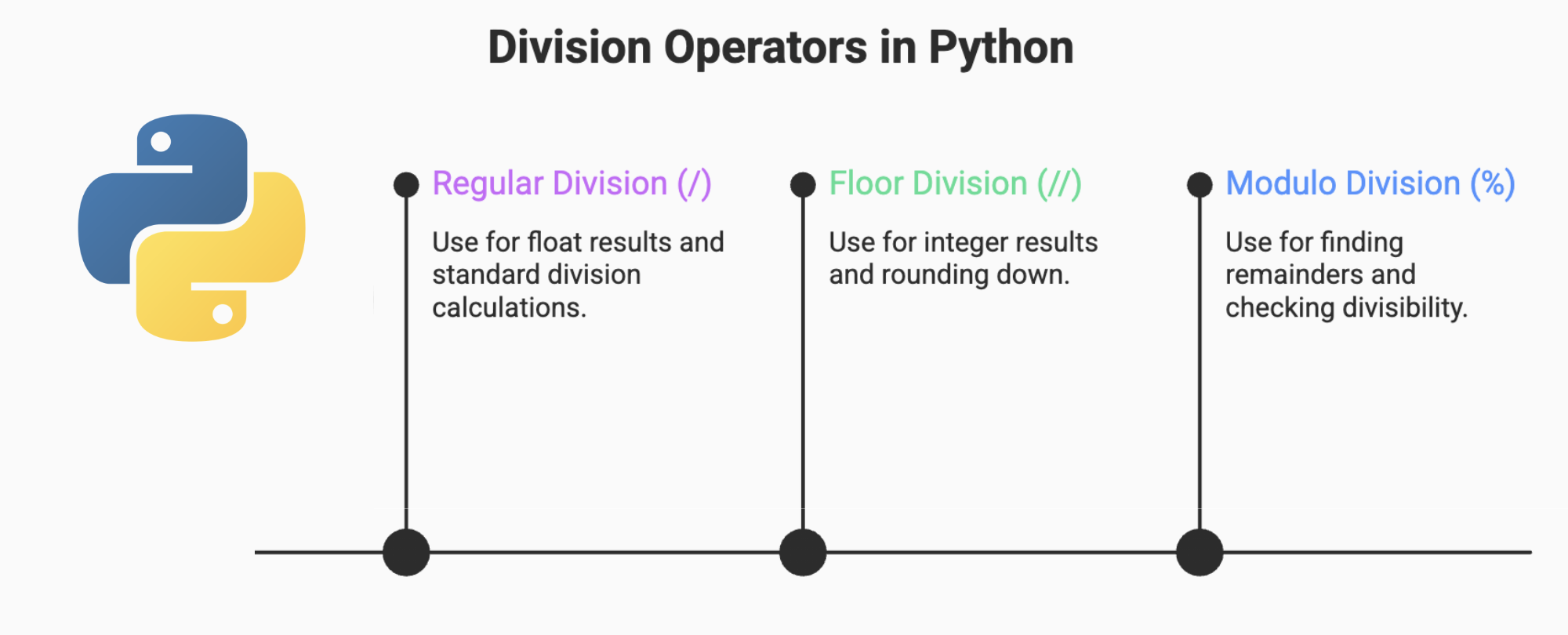
Computers provide us with amazing tools to perform mathematical calculations at an ultra-fast speed, but it’s up to us humans (or at least our AI chatbots) to translate the mathematical problems we have in mind into code. The arithmetic operators you’re accustomed to have specific symbols associated with them in coding languages like Python. But, in the case of division, Python actually gives us two different operators: one for regular division (/) and one for floor division (//).
In this article, we will analyze the two main types of division in Python and provide practical code examples. We will also have a look at some of the most common use cases and potential pitfalls. Let’s get started.
Regular Division (True Division) in Python (/)
When you first think about division, you’re probably thinking of Python’s regular division operator, which is represented by a single forward slash, /. This operator gets the division results you would get with a pencil and paper:
Standard division (/) is sometimes called “float division” because it returns a floating-point number when operating on integers and floats. Even when you write code to divide two integers, like in the last example, Python still returns a floating-point value, 0.5. True division continues to give back a float when you have mixed input types, such as dividing an integer by a float or vice versa.
Floor Division (//) in Python
The second way to divide numbers in Python code is called floor division. It’s represented by two forward slashes, //. Floor division works by flooring the result down to the nearest whole number. Here are several examples:
These examples all involve integers, so the floor division operator (//) gives us an integer back. If one of the inputs is a floating-point number, however, floor division returns a float. Here are several examples with different types illustrating that point:
Notice that the floor division operator does not round to the nearest integer; it always rounds down. With standard division, 7 / 4 = 1.75, but you get 1 out of floor division since it goes to the next integer down.
Integer Quotient and Remainder: Modulo (%) and divmod()
When you do regular division in Python with the forward slash operator, /, you won’t need to think much about the integer quotient and remainder since standard division approximates the division up to a precise decimal place. For floor division, though, another way to think about 7 divided by 4 is that 4 goes into 7 one time with 3 left over. Floor division gives us the quotient (1) and throws away the rest (3).
If you would like to know the leftover amount instead of throwing it away, you can use Python’s modulo operator, %. The modulo operator gives you the remainder of your division, and it works with both integers and floats:
Finally, you might also try Python’s divmod() function. The divmod() function is part of Python’s standard codebase, so you won’t need to import any additional packages to use it. It takes two arguments, the numerator and the denominator of your division. The function then returns a tuple with two values: the quotient and the remainder of dividing your values. For example:
Floor Division with Negative Numbers
What happens if you use floor division on negative numbers? Remember that floor division always rounds down toward negative infinity, and in the case of negative numbers, you’ll actually get a more negative number out.
With standard division, -3 / 2 = -1.5, but with floor division, continue to go down to the nearest integer: -3 // 2 = -2. This may feel unintuitive, but actually -2 < -1.5. When floor division rounds down, you get a lower negative number.
Examples and Real-World Use Cases
The examples you’ve seen so far give you concrete illustrations of how division works in Python, but after getting the hang of it, you’ll likely want to use division for more complex situations. Here are a few examples of real-world use cases for the regular and floor division operators in Python code.
Conversion. Given a total number of seconds, return the length of time in minutes.
pythonRates. Determine how fast a vehicle traveled based on the distance covered in a given amount of time.
pythonPagination. Find out which page an item belongs on (floor division).
pythonData bins. Group values into ranges (e.g. 0-9, 10-19, etc.)
python
Common Errors: Backslash and Arithmetic Precedence
When dividing in Python, you’ll likely hit your stride quickly, but there are a few common issues to watch out for. Review these tips to avoid errors and get up and running with division even faster.
No Backslashes
Firstly, make sure you’re using forward slashes for both standard division (/) and floor division (//). Do not use a backslash (\) for either operation. You will receive a syntax error like the one below if you do.
Arithmetic Operator Precedence
You’ll also want to pay attention to operator priority when doing division in Python. Python follows the same arithmetic operator precedence as regular math. If you remember the acronym PEMDAS, you’re in good shape. PEMDAS stands for Parentheses, Exponents, Multiplication & Division, and Addition & Subtraction. In a mathematical expression, Python evaluates expressions in parentheses first, working from the inside out. Next, it does all the exponentiation, which is represented by two asterisks (**). All the multiplication and division follow from left to right, and finally, it does your addition and subtraction, again from left to right.
For example, the equation:
6 + (5 - 1) / 2 ** 2 = 7
Python evaluates this equation in the following order:
Parentheses:
5 - 1 = 4Exponents:
2 ** 2 = 4Multiplication and Division:
4 / 4 = 1Addition and Subtraction
6 + 1 = 7
If you’d like any other behavior, such as adding 6 to the numerator before dividing, you’ll need to explicitly add more parentheses like this:
(6 + (5 - 1)) / 2 ** 2 = 2.5
Edge Cases: Zero, Booleans, and Large Integers
In addition to common errors, note that Python division may raise errors or give unintuitive results for some edge cases. Keep an eye out for each of these situations to make sure you don’t have any bugs in your code.
ZeroDivisionError
You may come across a ZeroDivisionError when doing division in Python. This means you have attempted to divide a number by zero, which is not allowed in standard mathematics or in computer programming. Python will typically try to give you a hint at where the zero division has occurred, so you can correct your mistake. For example:
Since 1 - 1 = 0, this calculation cannot serve as your denominator, and Python lets you know you have a ZeroDivisionError and points you toward your issue.
Booleans in Division
You’ve already seen examples of dividing integers and floats in Python, but you can also divide the Boolean values True and False. When evaluating True and False in arithmetic computations, Python treats True as a 1 and False as a 0. Here are some examples of Boolean division in Python:
True / True = 1.0
False / True = 0.0
Just remember not to divide by False since it will be considered a zero, which isn’t allowed in Python. If you do happen to divide by False, expect to see a ZeroDivisionError as discussed above.
Division for Extreme Integer Values
Regular division in Python (/) generally returns a float, which has limited precision of about 15-17 digits. When you divide very large (positive or negative) integers, you’ll get an approximation with standard division:
10 ** 60 / 3 = 3.3333333333333335e+59
Unlike many other languages, Python uses arbitrary-precision integers, so the int data type is limited only by your machine’s memory. If you use integer floor division instead, you’ll get an exact result:
10 ** 60 // 3 = 333333333333333333333333333333333333333333333333333333333333
You can then get the remainder using Python’s modulus operation if needed:
10 ** 60 % 3 = 1
Handling Division with User Input
When your code divides input from a user, you’ll want to add safeguards to ensure the user has entered sensible values. Check to make sure:
The values are integers, floats, or may be treated as such.
The denominator is not zero.
You can use the Python function isinstance() to check for valid input data types, and you should give the user feedback, warning them if their denominator evaluates to zero.
The user will likely expect standard division, so be sure to say if your program utilizes floor division. You should also consider what your program should do if the user’s values have very large magnitudes. Namely, you should decide if regular division gives you enough precision, if you should switch to floor division and modulus, or if extreme values shouldn’t be allowed as inputs.
Wrapping Up
You can use Python code to quickly divide numbers for a wide variety of math applications. You’ll even get to choose from two division operators: one for standard division (/), which typically gives you a floating point result, or one for floor division (//), which rounds down and gives you a whole number result.
If you want more practice implementing division in Python, try out the AI tutor, starting from the prompt below:
