How Browsers Work
What your browser does to turn HTML into the page you see
What you'll learn
- What a browser and its engine do
- How HTML becomes the DOM tree
- How style, layout and paint turn the DOM into pixels
- How JavaScript, the cache and tabs fit in
A browser fetches web pages and draws them on your screen. Chrome, Safari, Firefox and Edge each have an engine that does the work: Blink in Chrome and Edge, WebKit in Safari and Gecko in Firefox. First the browser fetches the page. It finds the server's IP address with DNS, sets up a secure connection, sends an HTTP request and gets back HTML.
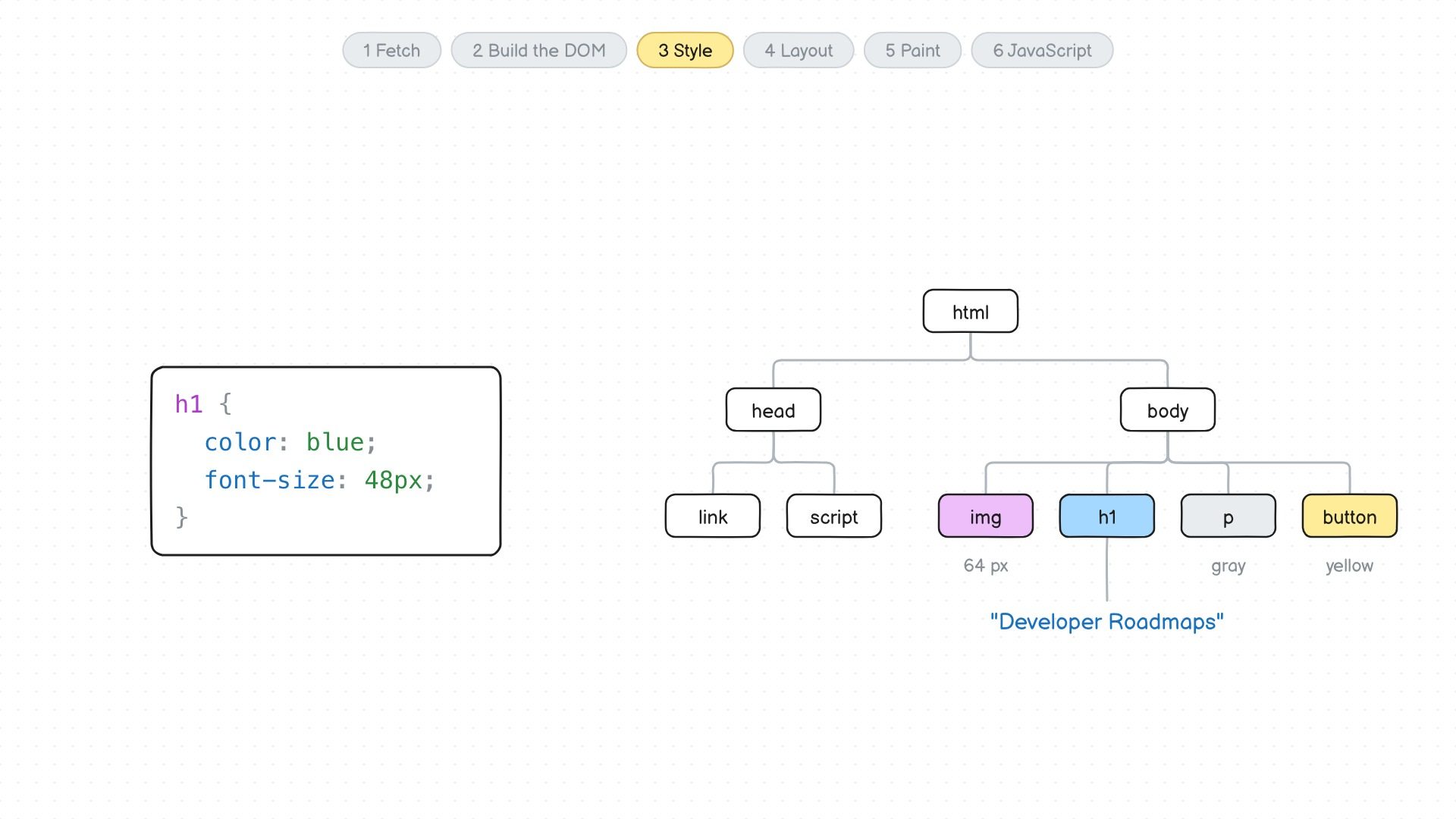
HTML is just text. The browser reads it from top to bottom and builds the DOM, a tree with a node for each tag. It also asks for the CSS, JavaScript and images the page links to, without waiting for one file before asking for the next. It matches the CSS rules to the nodes to work out each one's style, works out where everything goes and how big it is (layout), then fills in the pixels (paint).
JavaScript makes the page interactive. The JavaScript engine, like V8 in Chrome, runs code that can change the DOM, and the browser then updates the layout and paints again. The cache keeps files you've already downloaded, so pages load faster next time. Each tab usually runs in its own process, so a crash in one tab doesn't take down the others, and one site can't read what's open in another tab.