Computer Hardware for Cyber Security
What each part inside your computer does, and why it matters for security
What you'll learn
- What the CPU, RAM, storage and other parts of a computer do
- How a computer starts up: firmware, boot loader and Secure Boot
- How disk encryption and the TPM protect your files
- Why RAM, GPUs, MAC addresses and USB drives matter for security
Every part of a computer either stores data, moves it, or runs code. The motherboard connects them all, and the processor (CPU) runs every program, starting with the very first one when you press power.
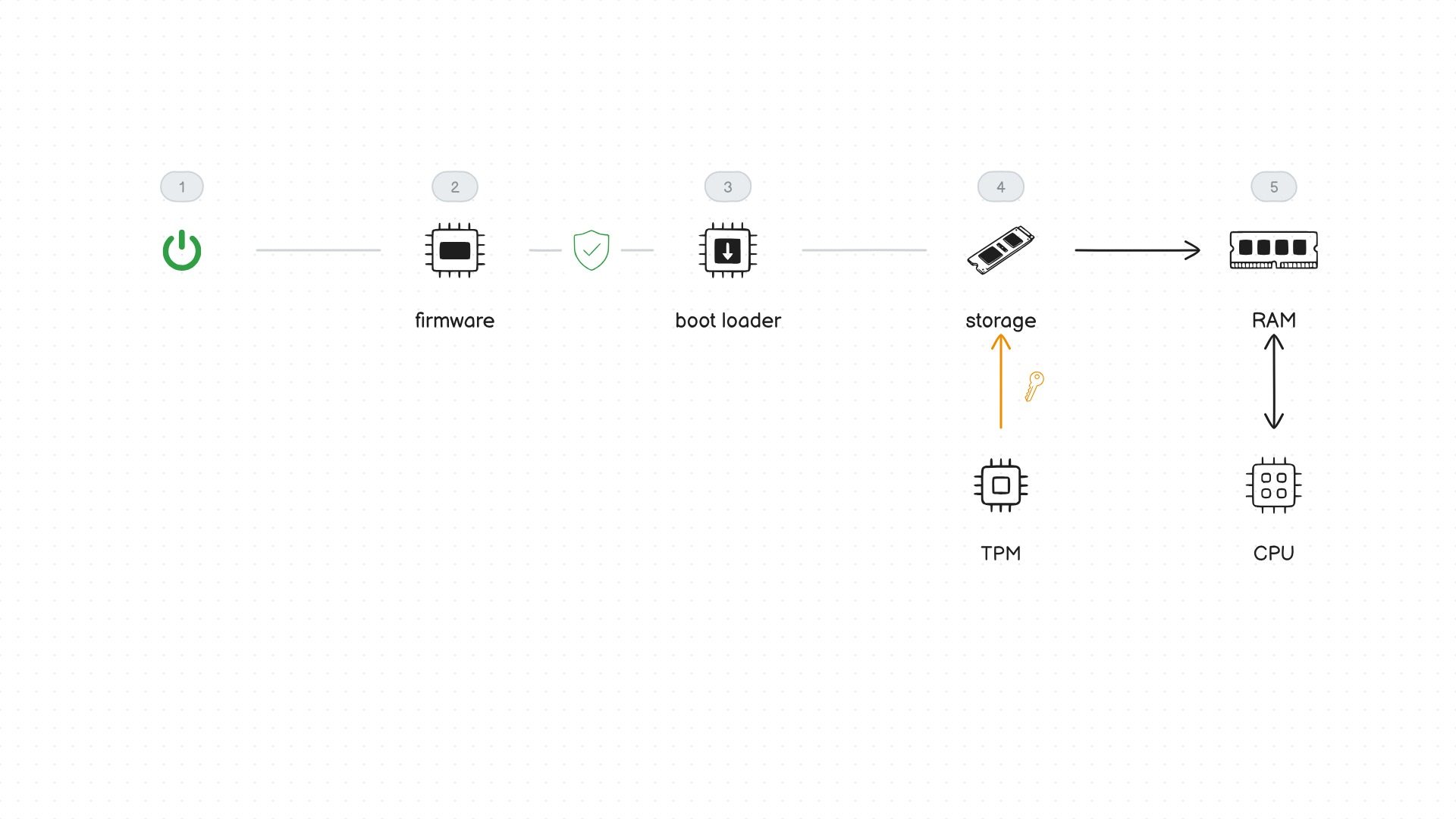
Startup happens in steps. The firmware (UEFI) runs first and checks the hardware. Secure Boot then checks the boot loader's signature, so a boot loader changed by malware won't start. The operating system lives on storage, and on an encrypted disk the TPM, a security chip that protects keys, only unlocks it if the startup checks pass. The system is then copied into RAM, where the CPU runs it.
Each part has a security side. RAM holds passwords and keys while the computer runs, so investigators copy it before shutting a machine down. GPUs can guess billions of weakly stored passwords a second, which is why long passwords matter. A MAC address can be changed in software, and a USB stick can pretend to be a keyboard, so never plug in a drive you found.