OpenClaw vs. Claude Code: Which AI agent fits your workflow?
 William Imoh
Choosing between OpenClaw and Claude Code isn't simply a matter of picking the more capable AI agent. The two tools are built for fundamentally different kinds of work, and choosing the wrong one for your workflow could mean spending hours configuring, maintaining, and paying for a tool that doesn't actually fit the way you work.
OpenClaw is a general-purpose platform designed to run 24/7 across messaging channels, local files, and external services, handling tasks such as scheduling, monitoring, and cross-system automation. Claude Code, on the other hand, is a terminal-native coding agent built to work directly with your codebase, implement features, run tests, and manage git.
That difference becomes important when you use either tool outside its strengths. Seting up OpenClaw expecting it to understand and work through your codebase like Claude Code, and you'll be building automation workflows around a tool that isn't designed for repo-aware coding. Default to Claude Code expecting it to handle 24/7 autonomous monitoring, and you'll find yourself manually invoking sessions for tasks that OpenClaw can run continuously.
This guide breaks down the key differences between the two, helping you decide which AI agent best fits your workflow, or whether using both makes more sense.
TL;DR: OpenClaw vs. Claude Code
Choose OpenClaw if...
You want a platform that works on your behalf around the clock, without you having to initiate each task.
You need cross-system automation and can perform activities like monitoring a service and getting pings on WhatsApp when CPU spikes, compiling daily blockers from Slack, and posting them on Telegram.
Data residency is a hard requirement. OpenClaw runs locally and only sends the tokens needed for reasoning to your chosen LLM, so your files and memory stay on your hardware.
You want provider flexibility. OpenClaw supports Claude, GPT, Gemini, and local LLMs like Llama 3 and Mistral, so you’re not locked to one vendor.
You want zero subscription cost. It is MIT-licensed and free to run; you only pay for the API tokens you consume.
You want to automate repetitive jobs that span multiple apps, not just your codebase.
Choose Claude Code if...
Your primary job is software development, and you want an AI that works alongside you in the terminal.
You need an agent that can read across many files, track dependencies, and make coordinated changes across a repository.
Your workflow is git-centered, and you want Claude to run tests and fix failures before handing off a clean diff.
You want a fast, managed setup. You can install Claude via npm, with no server provisioning or infrastructure management.
You’re on a team that needs enterprise-grade security and compliance out of the box.
How both compare
Here’s a table that will help you compare the two agents side by side across the categories that actually matter:
Category | OpenClaw | Claude Code |
Primary purpose | General-purpose automation platform | Coding specialist |
License | MIT / open source | Proprietary (Anthropic) |
Cost | Free; pay only for API tokens | $20 to $200+/month subscription |
Setup time | 15 to 60 minutes (VPS, Docker, hardening) | About 30 seconds (npm install) |
Where it runs | Self-hosted (local machine or VPS) | Anthropic's managed cloud |
Interface | Messaging apps (Slack, WhatsApp, Telegram, Discord, iMessage) | Terminal, IDE, Claude app |
Provider support | Claude, GPT, Gemini, local LLMs etc. | Claude only |
Codebase awareness | Shallow, can run shell commands, no repo-aware reasoning | Deep, repo-wide, 200K-token context |
24/7 proactive operation | Yes, scheduled via cron jobs and periodic heartbeat | No, requires user invocation (or CI/CD) |
Scheduled tasks | Native, built-in | Manual / CI/CD pipelines only |
Skills / extensions | ClawHub community skills registry (13,700+) | MCP connectors |
Data residency | Stays on your own hardware | Processed on Anthropic's infrastructure |
Security posture | User-managed access with broad system permissions by design | Managed, enterprise-grade, scoped access |
Why choose OpenClaw?
OpenClaw is a free, MIT-licensed, open-source autonomous agent that runs on infrastructure you control. Austrian engineer Peter Steinberger built it, originally released in November 2025 as Warelay, and it went viral in January 2026 under the OpenClaw name, reaching 60,000 GitHub stars within 72 hours. It is not a coding tool in the same sense as Claude Code. Instead, it functions as a programmable digital worker that executes tasks across messaging platforms, local files, browsers, and external APIs around the clock without you initiating each session.
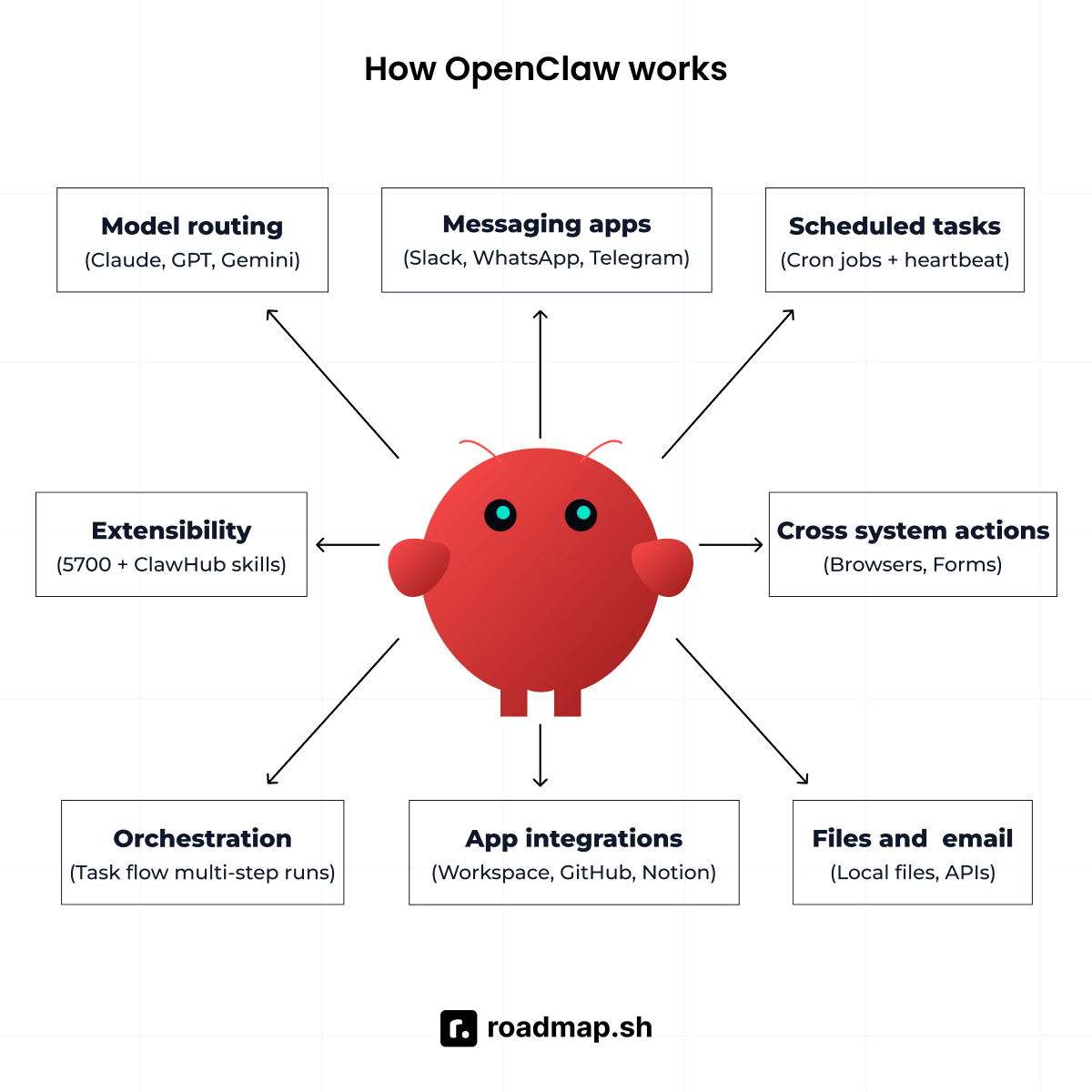
Here are some of the key features that make OpenClaw a powerful autonomous AI agent:
Proactive, 24/7 autonomous operation
OpenClaw’s heartbeat function allows it to wake up, check background tasks, and notify you only if something requires urgent attention. By default, it runs every 30 minutes and replies with a HEARTBEAT_OK status if everything is fine.
A typical OpenClaw workflow starts with the agent waking up at a scheduled time. At 07:30, for example, a HEARTBEAT.md cron job can trigger it to parse Git logs, compile the day’s activity, and post a morning briefing to Slack. Later, it can listen to stand-up updates in Discord, pick out blockers as they’re mentioned, and send a summary to the team via Telegram. Meanwhile, an on-call monitor can keep watching system metrics in the background, detect a CPU spike when one occurs, and message the on-call engineer through WhatsApp.
What I found most useful when working with OpenClaw was how much more context it could apply to these automated tasks. It attaches reasoning to its autonomous processes, figuring out what it finds and what’s actually worth bringing to your attention, even while you sleep.
Cross-system automation across messaging apps
OpenClaw’s primary interface is messaging, letting you interact with the agent and receive results through Telegram, Slack, WhatsApp, iMessage, and other channels. But messaging is only the entry point; OpenClaw can act across the systems where your work actually happens. It can control browsers, fill forms, scrape data, manage files, send emails, call APIs, and connect with tools such as Google Workspace, GitHub, Notion, Obsidian, Trello, and Apple’s native apps.
This means you can give OpenClaw a single instruction from your messaging app, and it can carry out the resulting workflow across multiple services instead of requiring you to move between them manually. The addition of a structured orchestration layer called TaskFlow further extended this capability by supporting multi-step workflows. Together, these capabilities make OpenClaw more than a conversational assistant; they make it an agent that can coordinate tasks across an entire system.
Data residency and local privacy
OpenClaw runs on hardware you own or on a VPS you control, giving you greater control over where your agent’s data is stored and processed. Instead of keeping your files, memory, and conversation history in a third-party AI platform, OpenClaw can keep that data within your own environment. When the agent needs an LLM for reasoning, only the data required for that interaction is sent to the provider you have configured.
OpenClaw’s long-term context is stored in local Markdown files, giving you direct access to the information OpenClaw remembers about your work. You can inspect, modify, or delete these files yourself rather than relying on a provider’s data-management controls. For developers working with sensitive files, or those who want tighter control over their agent’s data, this local-first architecture can be a significant advantage.
Provider flexibility and zero subscription cost
OpenClaw gives you the flexibility to choose which LLM powers your workflows instead of locking you into a single provider. It supports models from providers such as Claude, GPT, and Gemini, as well as local models like Llama 3 and Mistral. You can even route different tasks to different models based on their capabilities, cost, or privacy requirements.
OpenClaw comes with no subscription fee; you only pay for the LLM API tokens your workflows consume. If you use local models, you can run the agent without sending inference requests to a cloud provider at all. For cost-conscious developers, that flexibility can make OpenClaw significantly cheaper than committing to a fixed subscription, particularly when local models are practical for the workload.
Why choose Claude Code?
Claude Code is Anthropic’s purpose-built coding agent. It lives in the terminal, reads codebases, and understands project architectures. It can take a development task from start to finish: writing the initial code and refactoring it, running tests, fixing failures, managing Git, and opening a pull request.
Claude Code is widely regarded as a specialist coding agent rather than a general-purpose agent. A striking sign of just how far its coding capabilities have come is that roughly 90 percent of the tool itself is now written by Claude Code.
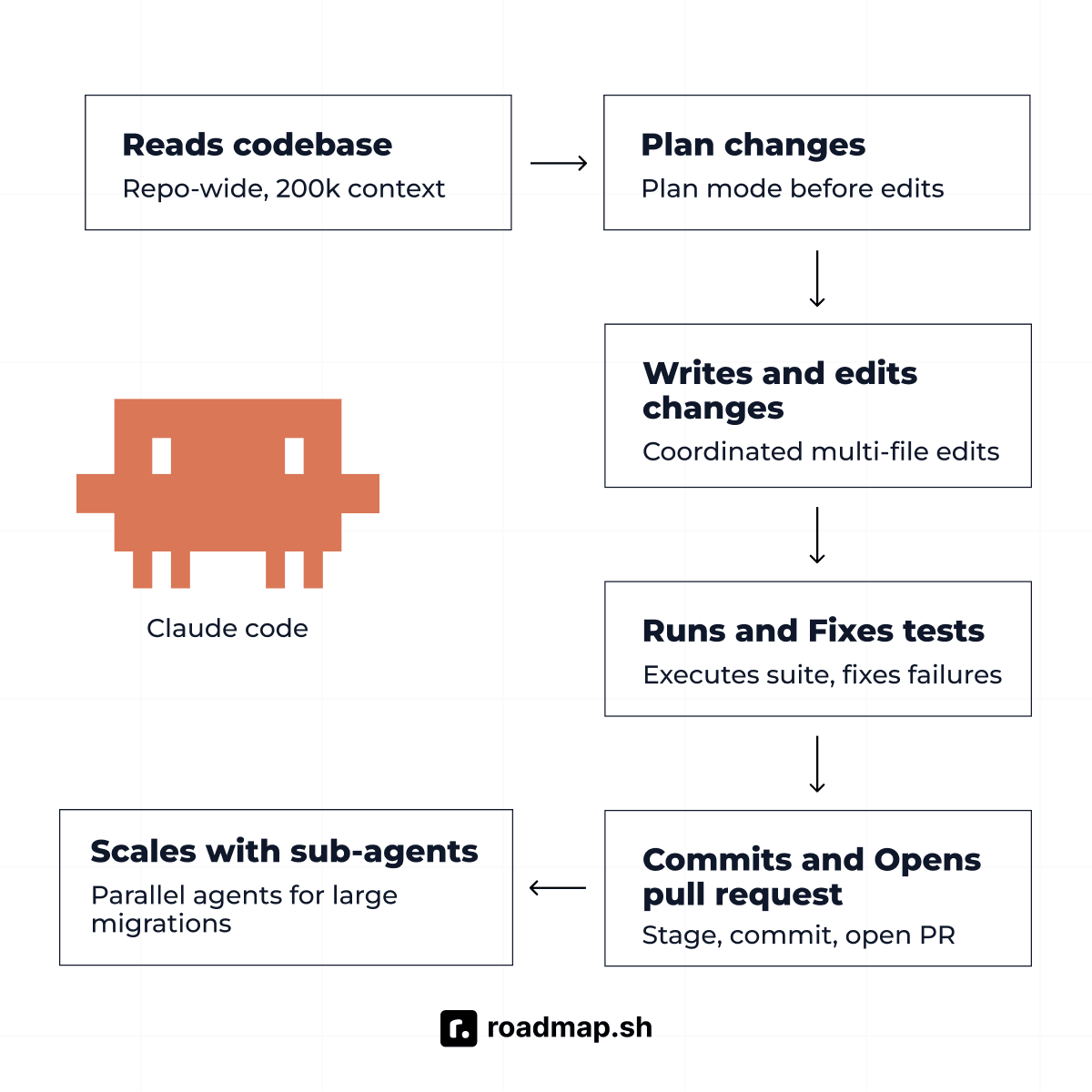
Here are some of the key features that make Claude Code such a powerful AI agent.
Deep codebase understanding
Claude Code reads across your entire repository rather than just the files you have open, giving it a much broader view of how your application fits together. It understands file relationships, import graphs, test coverage, and git history, allowing it to build context around not just what a piece of code does, but how it connects to the rest of the codebase.
That repository-wide context is what lets it make coordinated changes across many files at once without breaking interfaces or overlooking dependencies elsewhere in the project. Its default context window (200,000 tokens) also keeps a large amount of repository context in working memory throughout an entire session, reducing the need to explain how different parts of the codebase fit together repeatedly.
End-to-end coding workflows
Claude Code is built to participate in the entire software development workflow, not just generate code. A typical session looks like this: Claude reads the repository, plans the approach in Plan Mode, implements the change across files, runs the test suite, fixes failures, stages and commits, and opens a pull request. Rather than stopping after generating code, Claude Code can stay involved throughout the development cycle, moving from planning and implementation to testing and delivery.
That's the Claude Code coding experience in a nutshell: fast setup, deep repo context, and a clean handoff at the end. Dynamic workflows introduced with Opus 4.8 let it orchestrate hundreds of parallel sub-agents for large-scale migrations, breaking complex work into smaller tasks and handling them concurrently. A CLAUDE.md file in the project root gives it standing context about your project, including coding conventions, architecture decisions, and development instructions, so you don't have to re-explain your conventions each session.
Managed setup and enterprise security
Claude Code takes a managed approach, so developers can get started without having to build or maintain the environment it runs in. Installation takes about 30 seconds via npm, with no Docker configuration, server provisioning, or manual hardening required. Anthropic processes code on its infrastructure, which provides enterprise-grade security and compliance features that can meet requirements for teams with SOC 2 or similar. Anthropic also maintains the underlying product, so patches, upgrades, and infrastructure changes are handled for you rather than becoming another operational responsibility.
Claude Code vs. OpenClaw: Key differences
Both tools offer powerful capabilities, but they differ in how they work, how they’re set up, and how they’re used.
General-purpose agent vs. coding specialist
OpenClaw is a generalist platform built to automate tasks across different systems and services. Claude Code is a specialist built for the software domain, and excels because its capabilities are deeply optimized for coding, repositories, and development workflows.
Proactive vs. reactive
OpenClaw is proactive, meaning that once configured, it runs on a schedule, watches conditions, and acts on your behalf. Claude Code is reactive; you open a session, describe a task, and it executes. For example, OpenClaw can autonomously label issues by severity, assign them to team members, and post a Slack summary as part of a GitHub issue triage workflow that runs every night. Claude Code requires you to manually invoke the process each time.
Setup and infrastructure
OpenClaw requires provisioning a VPS or local server, installing Docker, configuring sandboxing and hardening, and managing ongoing updates and security patches. As we explain in a previous guide, setting up OpenClaw takes at least 14 minutes for a basic secure installation, and you maintain the infrastructure. Claude Code, on the other hand, installs in about 30 seconds via npm and runs on Anthropic infrastructure.
Model agnosticism vs. model lock-in
OpenClaw supports any model with an API. You can route different tasks to different models, like Claude for complex reasoning, a cheaper model for monitoring, a local model for fully offline or air-gapped operation. This flexibility is valuable for cost management and for organizations with data restrictions on cloud model providers.
Claude Code uses Claude models exclusively. You get the best available Anthropic model, optimized for coding, with no configuration required. If Anthropic changes pricing or deprecates a model, you have no alternative within Claude Code.
Security posture
OpenClaw has broader system access by design, enabling cross-system automation but also requiring the user to define and enforce security boundaries carefully. Claude Code operates within a defined scope (your codebase, terminal, MCP connectors you authorize) and is managed by Anthropic with enterprise-grade compliance controls.
Cost structure
OpenClaw has no subscription fee; you pay only for LLM API tokens consumed. For a developer who uses a mix of Claude and cheaper models for monitoring tasks, real monthly cost can be significantly lower than Claude Code subscription pricing. The trade-off is the 15 to 60 minutes of setup and ongoing infrastructure management.
Claude Code is available with Claude Pro at $20 per month, while the higher Max plans cost $100 and $200 per month. Heavy users can also purchase additional usage credits after reaching their included limits, so actual monthly spending can exceed the subscription price.
Which should you use? Decision framework
The question is not which tool is better. The tools serve different purposes, and most developers who use one will eventually adopt the other. The question is which to start with, and what problem you are actually trying to solve.
Use the table below to see which AI agent is a better fit for your workflow:
Your situation | Recommended tool |
You write software professionally and want the best coding agent. | Claude Code |
You want a platform that runs scheduled tasks without your initiation. | OpenClaw |
You need deep codebase reasoning across many files. | Claude Code |
You need cross-system automation spanning messaging apps, files, and APIs. | OpenClaw |
You want zero infrastructure to manage. | Claude Code |
You have strict data residency requirements. | OpenClaw (self-hosted) |
You want provider flexibility or local LLM support. | OpenClaw |
You want the fastest setup (15 to 60 minutes). | Claude Code |
You want a free tier or zero subscription cost. | OpenClaw |
You need enterprise-grade compliance out of the box. | Claude Code |
You want to automate dev-ops tasks like triage, monitoring, stand-up summaries. | OpenClaw |
You want both coding depth and general automation. | Both, for their respective domains |
When should you consider both?
You do not have to choose between OpenClaw and Claude Code. They work well together when you use each for what it does best: Claude Code handles development work such as building features, fixing bugs, reviewing code, and managing pull requests, while OpenClaw handles operations and automation across messaging, monitoring, scheduling, and other services. Because their strengths overlap very little, you can run both as complementary agents rather than forcing one tool to handle every task.
Wrapping up
OpenClaw and Claude Code were never competing for the same job. Claude Code is a coding specialist: terminal-native, repository-aware, and deeply integrated into the software development workflow. OpenClaw is an autonomous generalist: self-hosted, provider-agnostic, and built for proactive cross-system automation. For coding depth and managed setup, Claude Code is the stronger choice. For autonomous operations, provider flexibility, and data residency, OpenClaw has the edge. For many developers, the best setup may be both, with Claude Code handling development and OpenClaw handling automation beyond the codebase.
If you’re ready to jump straight in, start with our OpenClaw and Claude Code guides. From there, you can create a roadmap.sh account to track your progress, save your learning paths, and access personalized roadmaps as you advance through your tech journey. The AI Tutor is also available if you want to explore a concept further or ask follow-up questions.
