Claude Code vs Cursor: Which AI Coding Tool To Choose
 Ekene Eze
AI coding assistants are now part of everyday development. What has changed is not just their popularity, but how they fit into your workflow. The space has split into two clear approaches: terminal-based agents and editor-native tools. On one side, Claude Code runs in the terminal, executing tasks across your codebase and returning completed results. On the other side, Cursor lives inside your IDE and helps you write, edit, and refine code in real time.
Claude Code is the one you hand work to. Give it a task, and it handles the flow. It determines what needs to be done, writes the code, runs tests, and returns the results. You define the objective; it owns the execution.
Cursor is the one you stay with. Moving through files, reviewing diffs, and writing logic, it follows along, suggesting and completing as you go. It does not take over. Every code change goes through you first.
Both are powerful, but Cursor and Claude Code represent different philosophies about how AI-assisted development fits into a modern engineering workflow.
That execution philosophy is where the decision begins. This guide walks you through both, shows where each fits, and how to decide the best vibe coding tool based on how you actually work.
TL;DR: Claude Code vs Cursor
Go for Claude Code if…
The terminal is where you live.
You want to hand off multi-step tasks and come back to results.
You are building automation pipelines or wiring AI into CI/CD.
You work in headless, remote, or server environments where a GUI is not an option.
You want first-party Claude integration without the middleware.
Go for Cursor if…
You want a full IDE with AI that feels native, not bolted-on.
You are already on VS Code and want to keep everything that comes with it.
You need to switch between models depending on the task.
Tab autocomplete, inline edits, and a chat sidebar are part of your workflow.
You want to review every suggestion before it lands.
Cursor vs Claude Code: Comparison Table
Dimensions | Cursor | Claude Code |
|---|---|---|
Interface type | Comprehensive IDE-based (VS Code fork with built-in AI) | CLI-based (Terminal-native agent) |
Execution model | Accelerator (Assists code writing and editing in real time) | Delegator (Executes full tasks across the codebase from start to finish) |
Underlying model | Multi-model support (Claude, GPT, Gemini) with switching inside IDE. | Supports Claude models only (Sonnet, Opus, etc.) |
Autonomy level | Assisted e.g., “Help me write this." | Independent, e.g., “Go do this for me." |
IDE/Editor integration | Complete IDE experience (VS code extensions, themes etc.) | No IDE, Terminal only |
Learning Curve | Low for VS Code users. | Moderate, requires being comfortable with terminal workflows |
Pricing Model | Subscription with usage limits and credit-based consumption | Tier-based (Pro / Max plans with usage limits) |
Best-fit Use case | Feature development, debugging, interactive workflow | Autonomous execution, large refactor, pipeline runs. |
OS Support | Cross-platform: YES (needs graphical environment) | Cross-platform: YES (Available for headless-native) |
Context/Codebase awareness | Pre-indexes the entire codebase for fast suggestions. | Dynamically explores the codebase during task execution. |
Risk-level | Lower operational risk. You review before anything changes. | Higher operational risk. Autonomous execution requires monitoring. |
Execution scope | File-level and editor-based | Full codebase and workflow-level |
Workflow control | User-driven (Review and approve each change) | Agent-driven (Executes tasks and returns results) |
Version control | Works within editor-based Git workflows | Directly executes Git commands as part of task execution |
Why Choose Claude Code?
Claude Code is Anthropic's terminal-based coding agent built to handle complex, multi-step tasks autonomously. If you need to automate a workflow, generate tests, or fix failures, Claude Code takes ownership of the task instead of just suggesting completions. It breaks the work into steps, decides what needs to happen next as it goes, and carries the implementation through to completion with minimal back-and-forth.
For longer workflows, Claude Code can run multiple agents in parallel, sometimes referred to as multi-agent parallelism, breaking tasks into smaller parts and working through them at the same time instead of handling everything step by step.
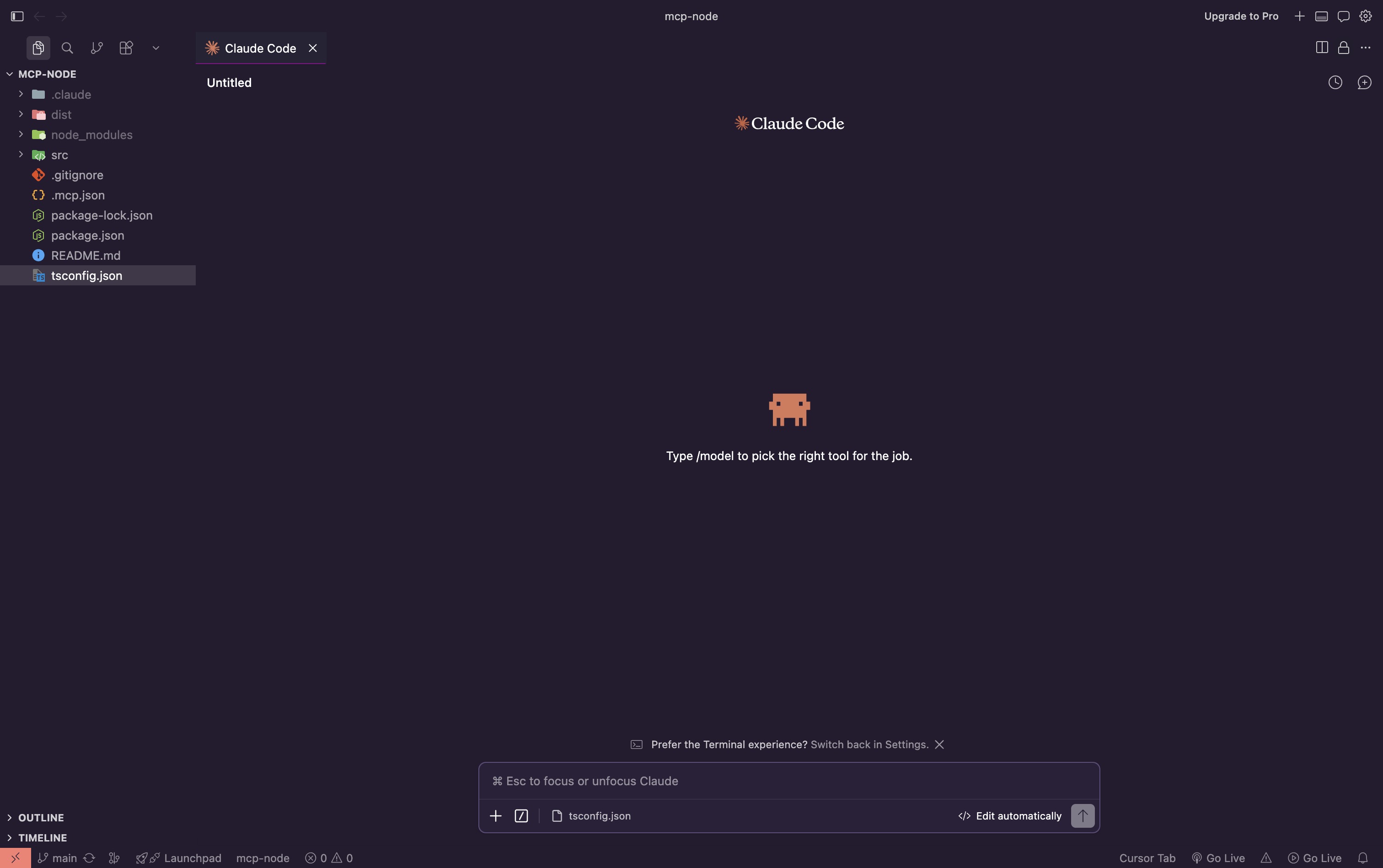
Claude models have performed strongly on benchmarks like SWE-bench Verified, which evaluate how well systems can resolve real-world coding issues. Claude models also support very large context windows, allowing them to reason across large portions of a codebase in a single pass. This enables Claude to handle tasks like refactoring, updating dependencies, and validating changes through test execution.
If you want to get a better sense of Claude Code usage and where it fits in real projects, check our Claude Code tutorial to build your first app.
Here are four things that make Claude Code worth choosing:
Terminal-native and agentic by design
Claude Code is built for the terminal. It lives in the command line, which means it can read your entire codebase, edit files, and execute terminal commands in the same environment you already work in.
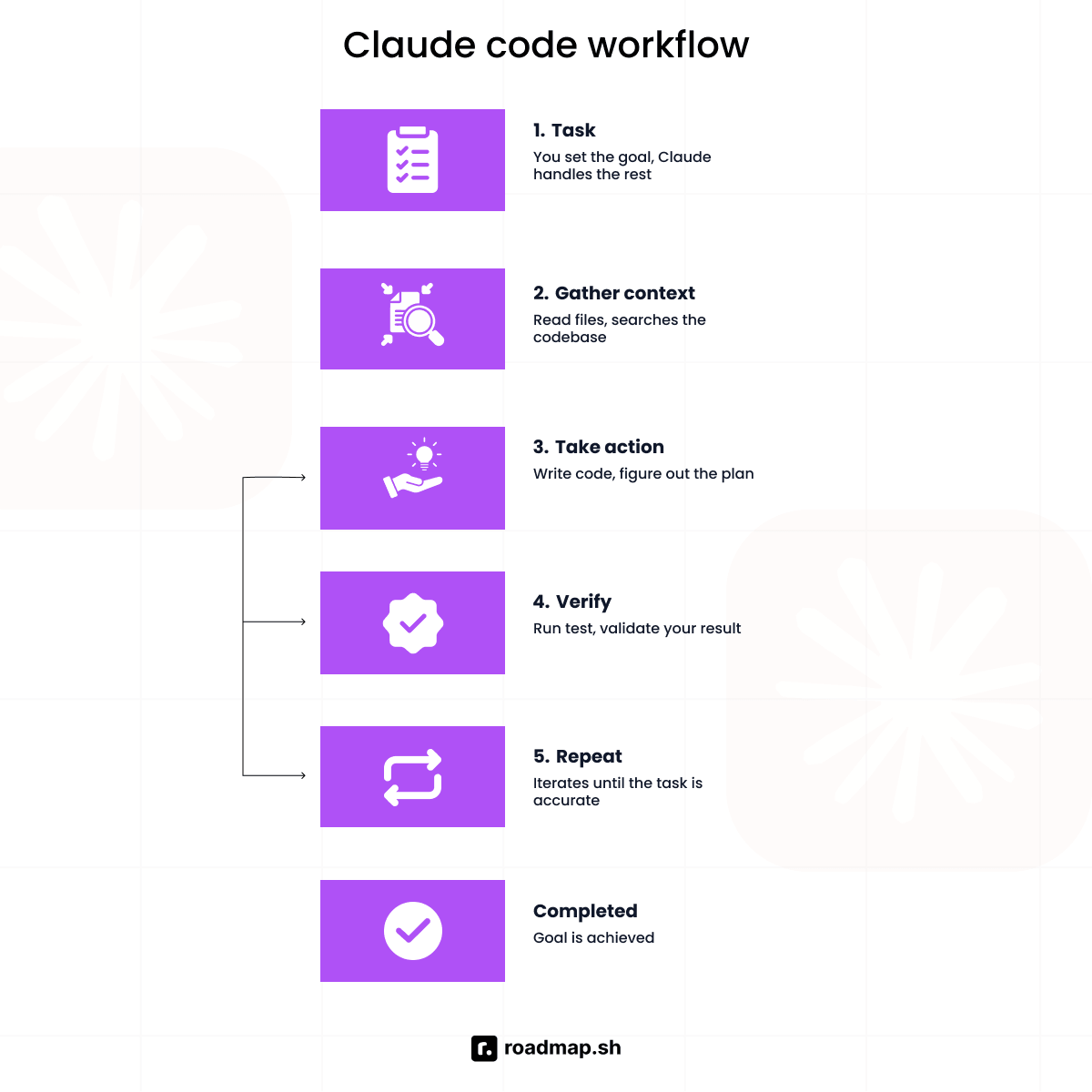
It works by gathering context, applying changes, and iterating until the task is complete. That is why it does not need a graphical interface. The terminal already gives it full access to your tools, your Git workflow, and your version control.
Deep integration with Claude models
Claude Code runs directly on Claude models like Sonnet and Opus because complex engineering requires reasoning at every step. It needs to understand your entire codebase, decide what to change, track what has been done, and adjust when something breaks. That level of coordination depends on strong reasoning, not just code generation.
This is what separates Claude Code from tools that bolt AI onto an existing editor. The Claude models powering it are built for complex coding tasks, not just completions. As those models improve, Claude Code usage gets more reliable, especially on tasks that span multiple files and services.
Autonomous task execution
Claude Code is built to take ownership of tasks, handling every step required to meet your objective. No prompting for each action. It runs test suites, executes Git commands as part of the workflow, navigates your entire codebase, and keeps going until the work is done.
This is where Claude Code shines. For example, you need to rename an API response format across different files, update dependent logic, and rerun the test suite. Instead of touching each file manually, Claude Code can take that as a single instruction, apply the changes across the codebase, run tests, and validate the result before returning it.
Ideal for scripting, automation, and headless environments
Claude Code handles work that does not fit inside an editor session. CI pipelines run builds, execute tests, and surface failures without a developer stepping in. Batch refactoring applies consistent changes across multiple files and validates the results before moving on. Server-side automation runs on remote machines with no GUI, just a shell and a task.
In a CI pipeline scenario, you can delegate something like fixing failing tests in a broken build and pushing a patch. Claude Code can inspect logs, trace the failing modules, apply the required fixes, rerun the test suite, and open a pull request.
In these environments, Claude Code executes terminal commands directly, runs Git commands as part of the workflow, and works through tasks in a continuous loop until the objective is met.
There is no visual editor here. Claude Code runs directly in the terminal, and its terminal-first design avoids the extra abstraction layer that comes with IDE-based integrations.
Why Choose Cursor?
Cursor is an AI-first IDE built to take some of the mental strain out of AI-assisted development. As a VS Code fork, it integrates an LLM directly into the editing experience, so it feels like part of how you write and code. Where Cursor and Claude code differ most is in how they surface code changes.
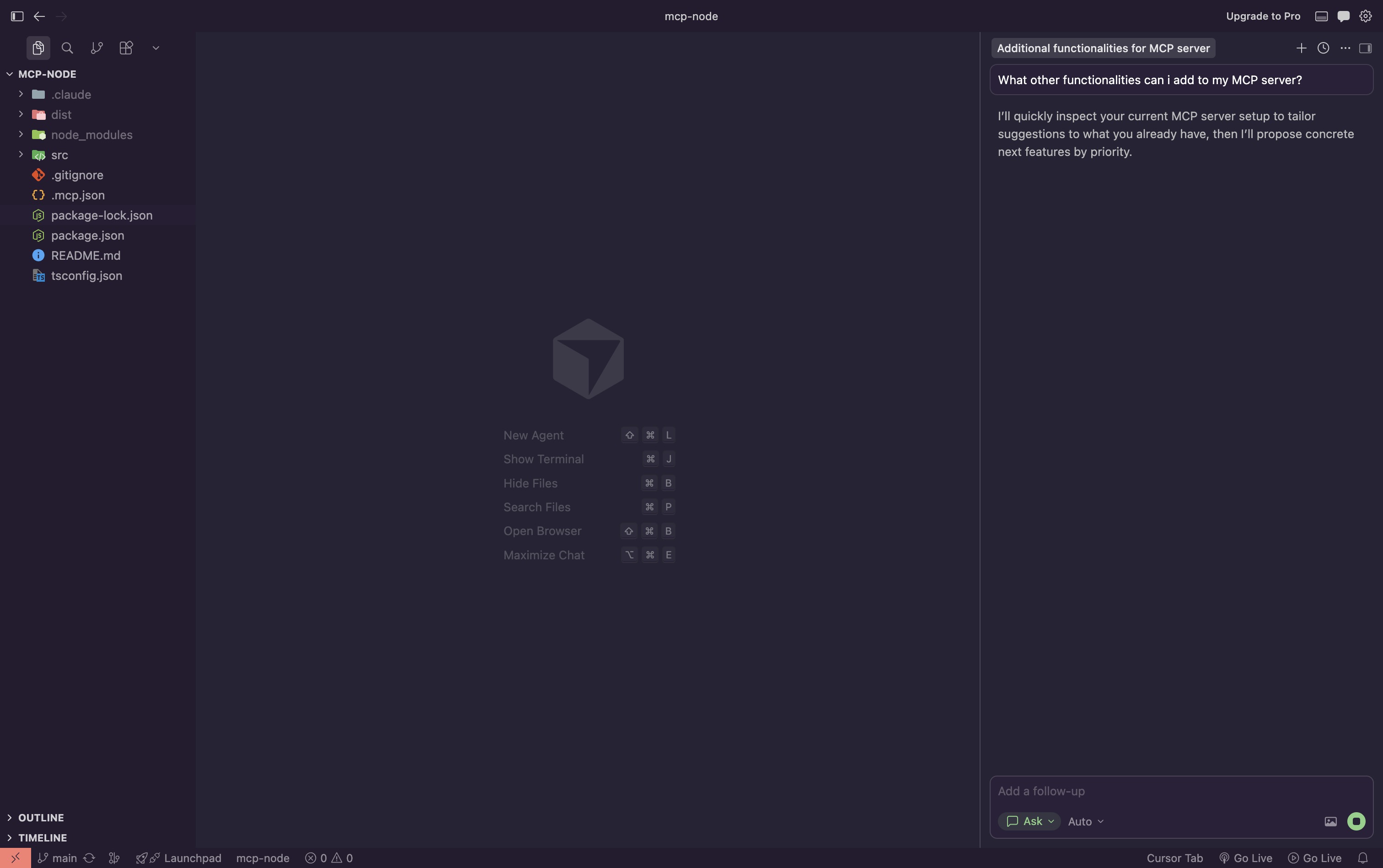
Cursor keeps every change visible and interactive. Here is what drives that experience:
IDE experience with VS Code compatibility
If you have ever worried about losing your setup, Cursor is compatible with VS Code. Because it is a native VS Code fork, you do not have to choose between advanced AI coding capabilities and the tools you already use. Every VS Code extension you rely on, Docker, Prettier, or language-specific debuggers, works across any stack you are on.
Your team can get started with zero specialized expertise. The UI is identical to what you already know, and your themes, snippets, and keybindings stay intact. That means feature implementation starts on day one, not after a migration period.
Multi-model flexibility
Cursor operates as a model-agnostic platform, so you are not tied to a single backend. You can switch between models like GPT-4, Claude, and Gemini directly inside the IDE, depending on the task you are working on.
If you need faster responses, you go with a lighter model for quick changes like fixing errors, tweaking functions, or adjusting small parts of your code. If the task involves multiple files or requires deeper reasoning, you switch to a stronger one like Claude Sonnet or Claude Opus. Cost becomes part of the tradeoff. You gain the flexibility to switch models based on the task, while usage and access still depend on your subscription tier.
Cursor can also use Claude models inside the editor, so you still benefit from Claude’s reasoning without leaving your workflow. The difference is that everything stays within the IDE experience rather than the terminal-based execution style Claude Code is built around.
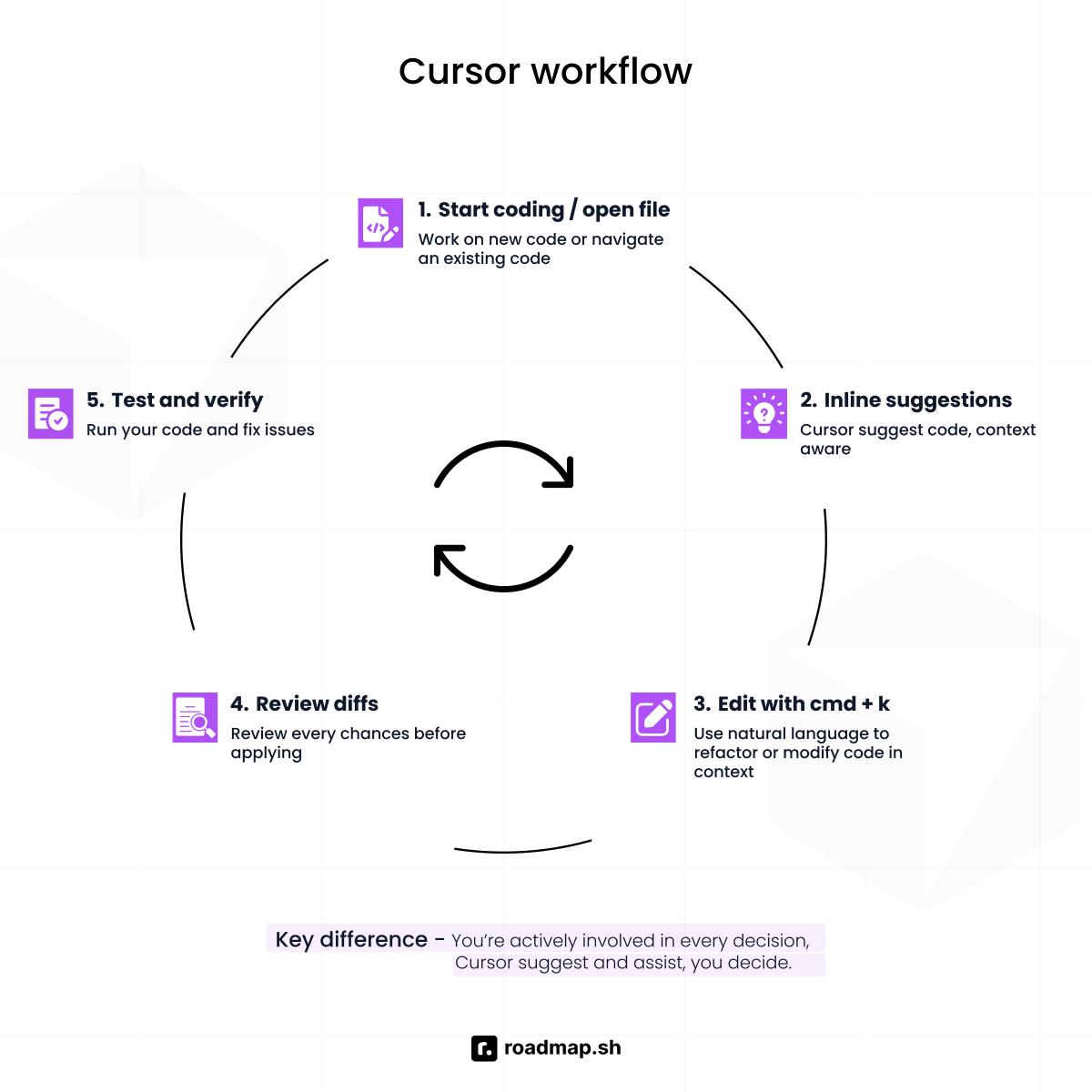
Inline editing, tab autocomplete, and chat
Cursor improves the way you interact with AI through three core interaction modes: Cmd+K inline edits, tab autocomplete, and the chat sidebar.
With Cmd+K, you highlight code, describe the change you want in natural language, and it refactors the logic directly in your file. This makes it easy to review and apply changes without breaking your flow. Tab autocomplete works similarly to Copilot but is more context-aware, predicting entire blocks of code and multi-line changes based on your project's flow.
The chat sidebar lets you have long-form conversations about your entire codebase. For example, if you are building a new React component, you can scaffold the structure, refine props, and adjust state logic while Cursor suggests updates across relevant files. Plan Mode lets the agent map out a step-by-step approach before touching your code. You review the plan and approve it, and then it gets to work without losing context.
Codebase indexing and context awareness
One of the core strengths of Cursor is its ability to understand your entire project through codebase indexing. It does not just look at the file you have open. It indexes your entire codebase, including version control history and project structure, to understand how everything connects from the ground up.
This means you can ask complex questions about large projects and get accurate answers across coding tasks that span multiple files. The indexing maps out how files and functions connect, so Cursor knows exactly how your code is structured and where code changes will have the most impact. For teams concerned about data privacy, Cursor offers a Privacy Mode that prevents your codebase from being used for model training.
Claude Code vs Cursor: Key Differences
When deciding between Claude Code and Cursor, these are the points that actually matter. Start with the most fundamental one: how each tool handles tasks in practice.
Interface and interaction model
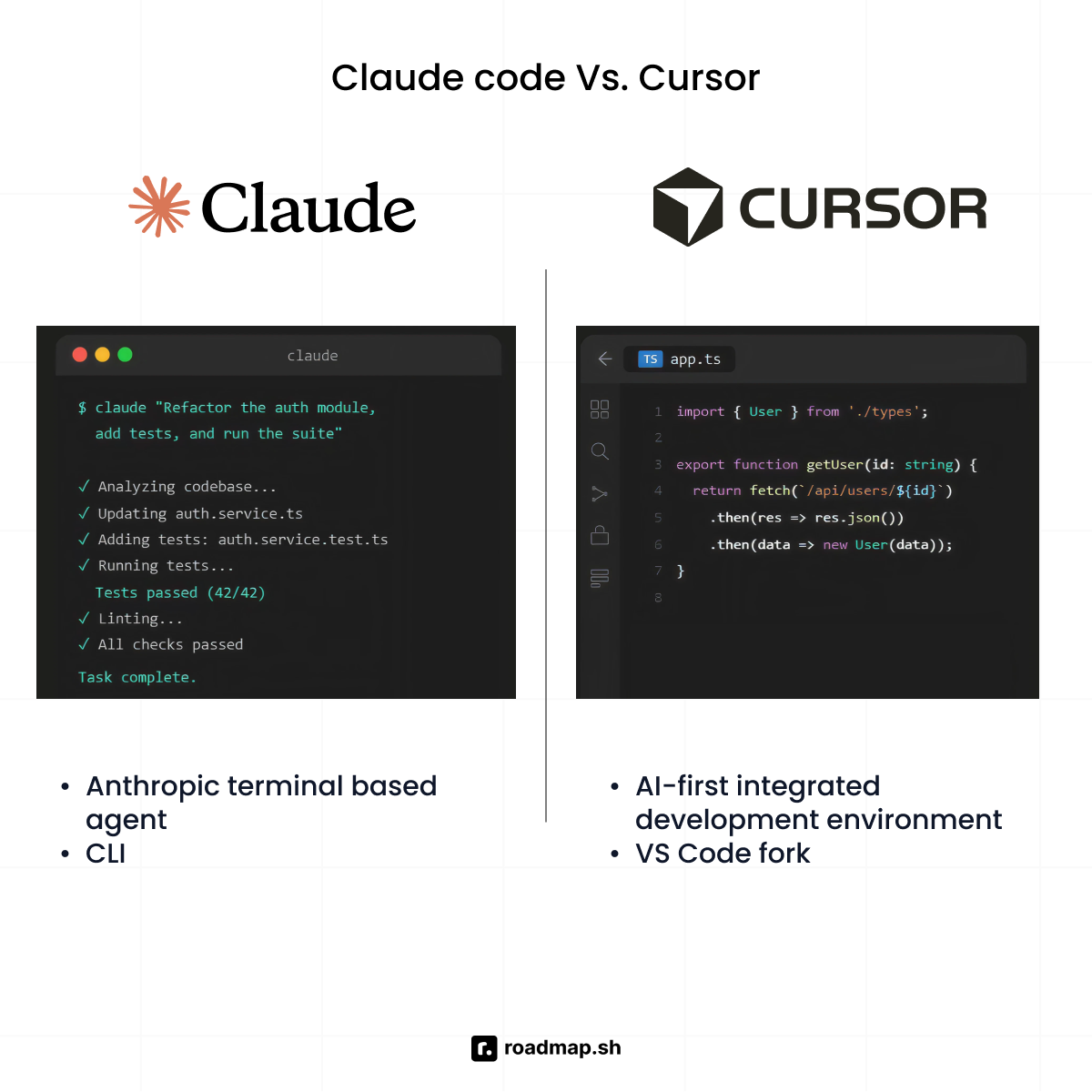
Claude Code runs in the terminal, designed to execute tasks without constant input. As a coding agent, it runs terminal commands, handles version control operations through Git, and works through the full task until the job is done. You do not step in at every stage. You review the result when it is ready.
In a work environment, this reduces the number of actions you handle manually, but it requires you to be comfortable trusting the output. This can slow team adoption, particularly among developers accustomed to reviewing every change.
Cursor works like an editor. Changes appear as suggestions, diffs, and inline edits before anything is applied. The model interacts with you before making changes, keeping AI-assisted development visible and controlled at every step.
Cursor fits naturally into existing workflows. There is little onboarding friction because it feels familiar, and teams can adopt it without changing how they already work.
Autonomy vs. collaboration
When deciding between Claude Code and Cursor, the real question is how much control you want over the process. Whether you want to delegate a task or collaborate on it.
If you are comfortable with a coding agent autonomously refactoring a module while you focus on something else, Claude Code is your tool. Claude Code usage works best when you have a high risk tolerance and want an agent that executes tasks across your codebase, keeping track of changes as it works.
The trade-off is visibility. When Claude Code gets something wrong, the impact can extend beyond a single suggestion. Because execution continues until the task is complete, reviewing the final output becomes critical, not optional.
If you prefer to guide the process and approve a workflow where you can catch every detail, Cursor is the better tool. The Cursor agent works inside your editor, handling edits across files while keeping every code change visible before it is applied.
Cursor has the opposite trade-off. You stay in control, but that also means more decisions. On larger changes, reviewing multiple suggestions can slow you down compared to handing the task off.
Performance and execution speed
The difference between Cursor and Claude Code shows up in how they handle speed and scale.
Cursor is optimized for real-time interaction. Tab autocomplete and inline suggestions appear almost instantly as you write, making it efficient for drafting, debugging, and refining code line by line inside your IDE.
Claude Code is built for depth. It can handle very large context windows (up to 1 million tokens for some Claude models), allowing it to analyze entire codebases in a single run. On benchmarks like SWE-bench Verified, models like Claude Opus score in the 80.8% range, showing strong performance on real-world coding tasks.
This difference plays out in execution. Cursor is faster for interactive editing and quick feedback loops. Claude Code is more efficient for large refactors, test generation, and tasks that span multiple files, where full codebase understanding matters more than instant feedback.
Model support and vendor lock-in
Claude Code is built exclusively on Claude models, which means you are locked into Anthropic's ecosystem. If you are already committed to Claude and have no plans to switch, that is not a problem. It is a specialized tool built to get the most out of a single underlying model, and as that model improves, so does Claude Code.
Cursor takes a different approach. Multi-model flexibility is one of its core advantages over Claude Code. It supports GPT, Claude, and Gemini, so your team can switch the underlying model based on the coding tasks at hand, your budget, or existing API agreements. When comparing Cursor and Claude Code on this dimension, Cursor wins for teams that want options.
Context and codebase handling
One of the core strengths of Cursor is its ability to understand your entire codebase through indexing. This process maps out how different files and functions connect, so the AI knows exactly how your code is structured and where code changes will have the most impact.
Claude Code handles context differently. Instead of relying on a pre-built index, it explores your codebase by searching through files, following patterns like imports and documentation, and running terminal commands to gather the context it needs for a specific coding task.
Cursor is built for immediate, high-speed code writing. It indexes your entire codebase upfront, including version control history, so you can start building without the AI having to navigate your repo from scratch every time you ask a question.
Pricing and cost structure
Both tools start at around $20 per month for individual developers. From there, the difference is not just pricing, but how usage scales.
Cursor follows a credit-based model, but not everything is metered. Core features like tab autocomplete and auto mode are unlimited on paid plans, so you can write and edit without thinking about usage. More advanced features, like premium model access or agent-style tasks, draw from a monthly credit pool, so costs scale with heavier usage rather than everyday coding.
Claude Code is available through Anthropic’s pro and max plans, each with different usage limits depending on the tier. You are not billed per request, but constrained by how much work runs over time.
At the team level, Cursor typically starts around $40 per user per month, while Claude Code is available through Anthropic’s Pro and Max plans, with pricing tied to usage limits. For heavier workloads, costs scale differently depending on how each tool is used, with Cursor increasing credit capacity and Claude Code extending execution limits for longer-running tasks.
There is also a structural difference. Claude Code runs inside a subscription model, while Anthropic’s API is billed per token. That separation matters. Subscription usage favours interactive workflows, while API pricing applies when you embed models into production systems.
Claude Code can be more token-efficient on larger tasks, but overall cost depends on task size, model choice, and how much work you delegate per session.
Which Tool Should You Use? Decision Framework
Claude Code and Cursor are two powerful tools that excel at writing clean code and solving complex tasks. But if you are still indecisive about which tool to choose, think through these points to decide which one fits you better:
Workflow type
Claude Code fits workflows where execution happens in the terminal. DevOps and platform engineers editing deployment configs, running infrastructure commands, and validating outputs do not need an IDE for that work. For these developers, Claude Code is the one tool that slots into how they already operate, without switching tools or adding friction to an existing setup.
Cursor is useful for projects built inside the editor. Frontend developers are iterating on components, or engineers reviewing diffs and refining logic before shipping. Teams that rely on multiple tools inside VS Code will find Cursor works naturally in that environment without disrupting anything.
Task type
For tasks like large refactors, automation, running test suites, or anything that involves multiple steps, Claude Code reduces the need for constant input. Developers use it for this kind of work because it can operate across multiple files, maintaining context over relevant parts of the codebase as it works through the task.
For feature development, debugging, and quick bug fixes, Cursor fits better. Think of iterating on a login flow, adjusting validation logic, or fixing a UI bug inside your editor.
You get real-time suggestions as you write code, with tab autocomplete predicting full blocks and Cmd+K handling targeted refactors. Every code change is visible, so you can review, accept, or refine it immediately without breaking your workflow.
This tight feedback loop is where Cursor stands out. Instead of switching tools or running commands separately, you stay inside your IDE, move across files, and ship features faster with full control over your code quality.
Team context
Claude Code is best for speed and high-autonomy environments, especially for solo developers or power users on small teams with no approval layers to navigate. You define the workflow, set the parameters, and delegate entire tasks without waiting on sign-off.
Claude Code also fits naturally into Git-based team workflows. From a natural language instruction, it can create branches, write commit messages, and open pull requests without switching context. For teams running CI pipelines, that means less manual coordination between writing code and shipping it.
Cursor fits larger teams that share ai coding tools, run code review cycles together, and need consistency across environments. It is built on VS Code, so most developers are already familiar with the interface. No retraining. Just an AI layer added to a setup you already know.
Risk tolerance
Claude Code suits you if you are comfortable stepping back from the step-by-step execution. Instead of tracing files, updating logic, and rerunning tests, you hand off the task and let it work through it. The focus shifts from managing each step to reviewing the outcome once the task is complete.
Cursor is more collaborative. You stay involved, guiding the process and approving changes as they come. That visibility helps you understand what is changing and makes code review easier, since you see and confirm updates before they are applied.
Conclusion
The truth is, there is no universal winner. The right choice depends on how you work, what you are building, and which interface fits your workflow.
Claude Code is better suited for execution-heavy tasks where delegation and automation matter more. Cursor fits interactive development workflows where fast feedback and visibility into changes are more important. Workflow fit, model quality, and the level of control you want during implementation are what drive that decision.
The vibe coding roadmap and Claude Code roadmap take it further, showing how to apply these tools in real projects as their capabilities continue to evolve.
If you're not sure yet about the tool you should choose, have a proper conversation with our AI Tutor to make up your mind.
