WebSocket vs HTTP: Which Protocol Should You Use?
 William Imoh
If your first instinct as a network engineer is to use WebSocket whenever a feature needs continuous updates, without understanding what communication pattern your application needs, you may be doing the wrong thing.
HTTP and WebSocket are both built on TCP, but they solve different problems. HTTP's request-response model powers most of the web reliably and is still the default for traditional web development. At the same time, WebSocket adds a persistent, bidirectional channel for cases where the server needs to push data without waiting to be asked.
This guide explains how HTTP and WebSocket work, what each protocol is suited for, and why Server-Sent Events deserve closer attention.
TL;DR: WebSocket vs. HTTP
Go for WebSocket if...
You need bidirectional communication: the client and the server both send data without waiting for the other to ask.
You are building live chat (Slack, Discord, and WhatsApp Web all use WebSockets for message delivery and typing indicators), multiplayer games requiring sub-10ms latency, collaborative editing tools (Google Docs and Figma use WebSockets with operational transformation or CRDTs for concurrent edits), or live trading/auction platforms where both parties are sending and receiving events at the same time.
Your use case involves binary data (audio, video frames, images): WebSocket supports binary frames natively; server-sent events are text-only.
You need the absolute lowest per-message latency: WebSocket frames carry just 2 bytes of overhead after the initial connection, compared to hundreds of bytes for HTTP headers on each request.
If any of these align with what you are building, the Network Engineer Roadmap shows where WebSocket fits within your technical progression.
Go for HTTP if...
Your feature follows a request-response pattern: the client asks, the server answers, and the interaction is complete (REST APIs, page loads, form submissions, file uploads).
You need caching, CDN distribution, or standard HTTP infrastructure: WebSocket connections bypass most HTTP caching layers.
Your real-time requirement is actually one-directional (server pushes updates to client only): use Server-Sent Events over HTTP instead of WebSocket; SSE is simpler to implement, uses standard HTTP, passes through most firewalls and proxies without issues, and supports automatic reconnection natively.
You are building: live notifications, activity feeds, deployment status updates (GitHub uses SSE for build status), news feeds, stock tickers, or LLM streaming responses (SSE is the protocol powering ChatGPT and most LLM streaming APIs).
When the complexity WebSocket introduces is not justified by the feature, SSE is the stronger choice.
Most of these use cases do not need a persistent connection. HTTP handles them well. The API Design Roadmap covers how it intersects with your protocol design decisions.
WebSocket vs HTTP: Comparison Table
Next, take a look at how these protocols are similar and different.
HTTP | WebSocket | |
|---|---|---|
Connection model | Request-response (stateless) | Persistent, full-duplex |
Direction | Client initiates requests to the server | Bidirectional |
Protocol | HTTP/1.1, HTTP/2, HTTP/3 | Starts as an HTTP connection and upgrades to WebSocket (ws:// or wss://) |
Latency | Higher for repeated requests because of request and header overhead | Lowest for ongoing bidirectional communication |
Caching | Full HTTP caching support | Not cacheable |
Firewall/proxy compatibility | Universal | Generally supported, though some legacy proxies may block upgrades |
Auto-reconnect | N/A | Must be implemented manually |
Binary support | Yes | Yes |
Best for | REST APIs, page loads, file transfers | Chat, games, collaborative editing, live bidirectional communication |
The table above makes WebSocket look good on paper. In production, choosing it means you are giving up HTTP caching and native reconnection in exchange for managing those complications yourself. To understand why you must make those compromises, you need to know how the web was built to communicate in the first place.
Before WebSocket entered the conversation, there was HTTP.
What Is HTTP?
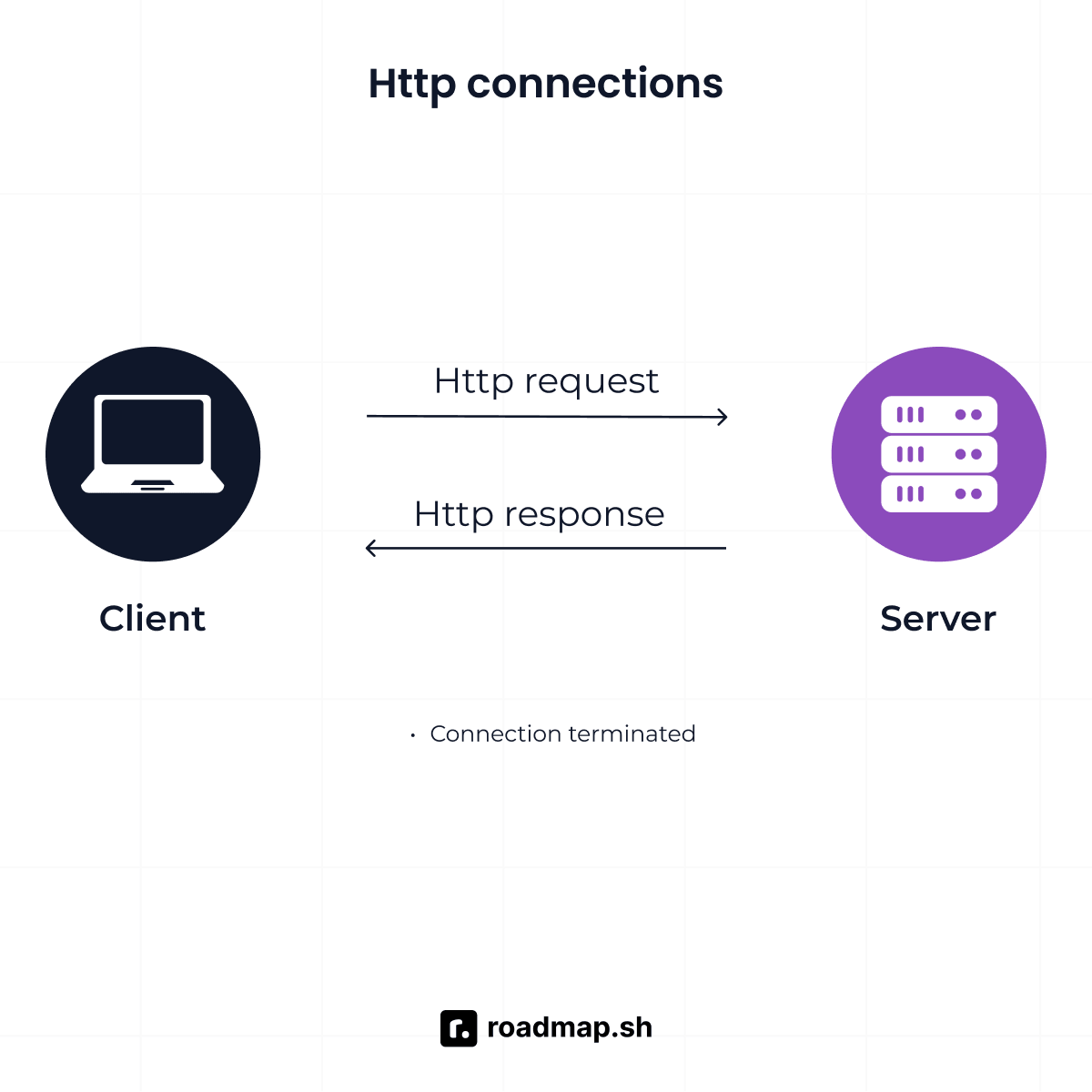
HTTP (HyperText Transfer Protocol) is the foundation of data exchange on the web, operating on a request-response model since 1991. Every time a browser loads a page, submits a form, downloads a file, or calls a REST API, it uses HTTP. The client sends a request, the server returns a response, and even when modern setups recycle connections to save time, every single request starts and ends as an isolated conversation.
That model is a big part of why HTTP has remained the default for web applications. It is predictable, widely supported, and handles almost all standard web traffic without complaint.
How HTTP works
HTTP works like a conversation where the client always speaks first. It sends a request over a TCP connection, the server processes it and sends a response back, and the connection typically closes unless configured to stay open. Each request carries a method (GET, POST, PUT, DELETE) and headers that tell the server what the client wants and how to handle it.
HTTP is stateless. Every request is isolated from the one before it. The server has no memory of previous requests by default, so each interaction starts fresh.
HTTP/2 improved on this by allowing multiple request and response streams to share a single connection while compressing headers to cut down on repeated overhead. HTTP/3 went further, swapping TCP for QUIC to reduce the time it takes to establish a connection in the first place.
Advantages of HTTP
HTTP has been the default for web communication for decades, and there is a reason for that. Its design handles a lot of common problems without asking much from the developer.
Universal compatibility: It works everywhere: browsers, mobile apps, APIs, CDNs, proxies, firewalls, and load balancers all use it. You don't have to think about whether a request will make it through the network or whether the infrastructure can handle it.
Built-in caching: HTTP was designed with caching in mind. Responses can be cached at the browser, CDN, and proxy level. Cache-Control headers determine how long those responses are stored and whether they can be reused. That cuts server load, reduces infrastructure costs, and speeds up response times.
Simplicity: The request-response model is easy to reason about. Building a REST API, integrating a third-party service, or debugging an endpoint all follow the same predictable pattern. You already know it before you start.
Easy to scale: HTTP is stateless, so servers do not need to track an active relationship with every client between requests. Any available server can pick up an incoming request. That makes distributing traffic across multiple servers a straightforward problem as traffic grows.
Mature security model: Web security is built around HTTP. Which means
HTTPScombinesHTTPwith TLS encryption and has become the standard for production applications. Every browser enforces it, and each hosting provider supports it.The request-response model solves most communication problems well. Where it starts to show cracks is when an application needs to react to new data the moment it arrives.
Limitations of HTTP for real-time features
HTTP was never built for continuous, event-driven communication. The server cannot push data to the client without the client asking first. That is a hard constraint of the request-response model.
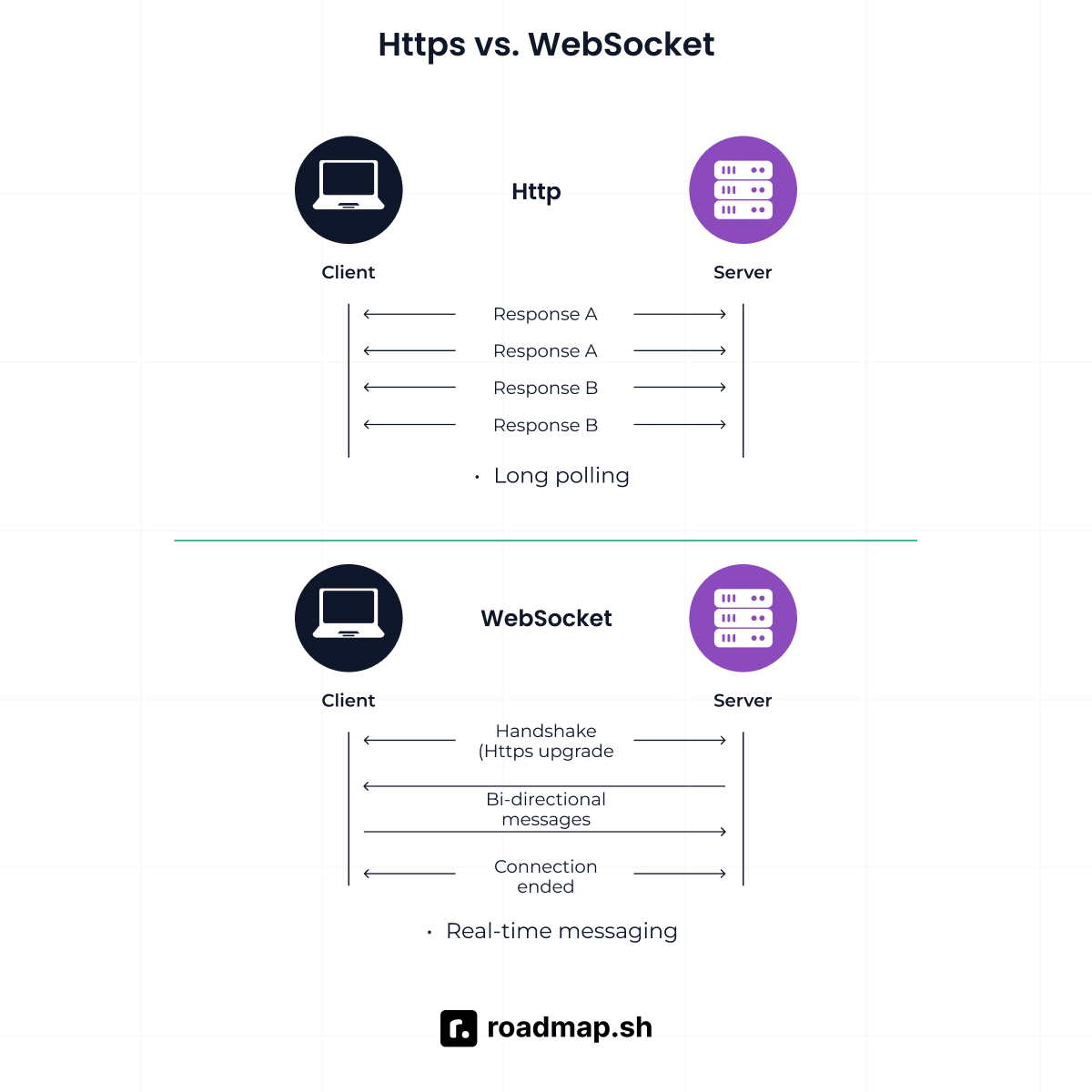
There are ways to work around it. HTTP long polling holds a request open until the server has data to send back. HTTP streaming works similarly. These approaches reduce the gap, but none of them give you true bidirectional communication where the client and server send data to each other without waiting.
For features that need both sides active at the same time, HTTP requires you to engineer around its own design. WebSocket was built to remove that constraint.
After all, how far those limitations reach depends on what sits between your client and server. If you want to understand how HTTP behaves across different network infrastructures, the Network Engineer Roadmap covers it all.
What Is WebSocket?
WebSocket is a communication protocol that provides a persistent, full-duplex channel over a single TCP connection. It was standardized as RFC 6455 in 2011. Unlike HTTP, where the client always initiates and the server always responds, WebSocket allows either party to send messages at any time after the connection is established.
How the WebSocket handshake works
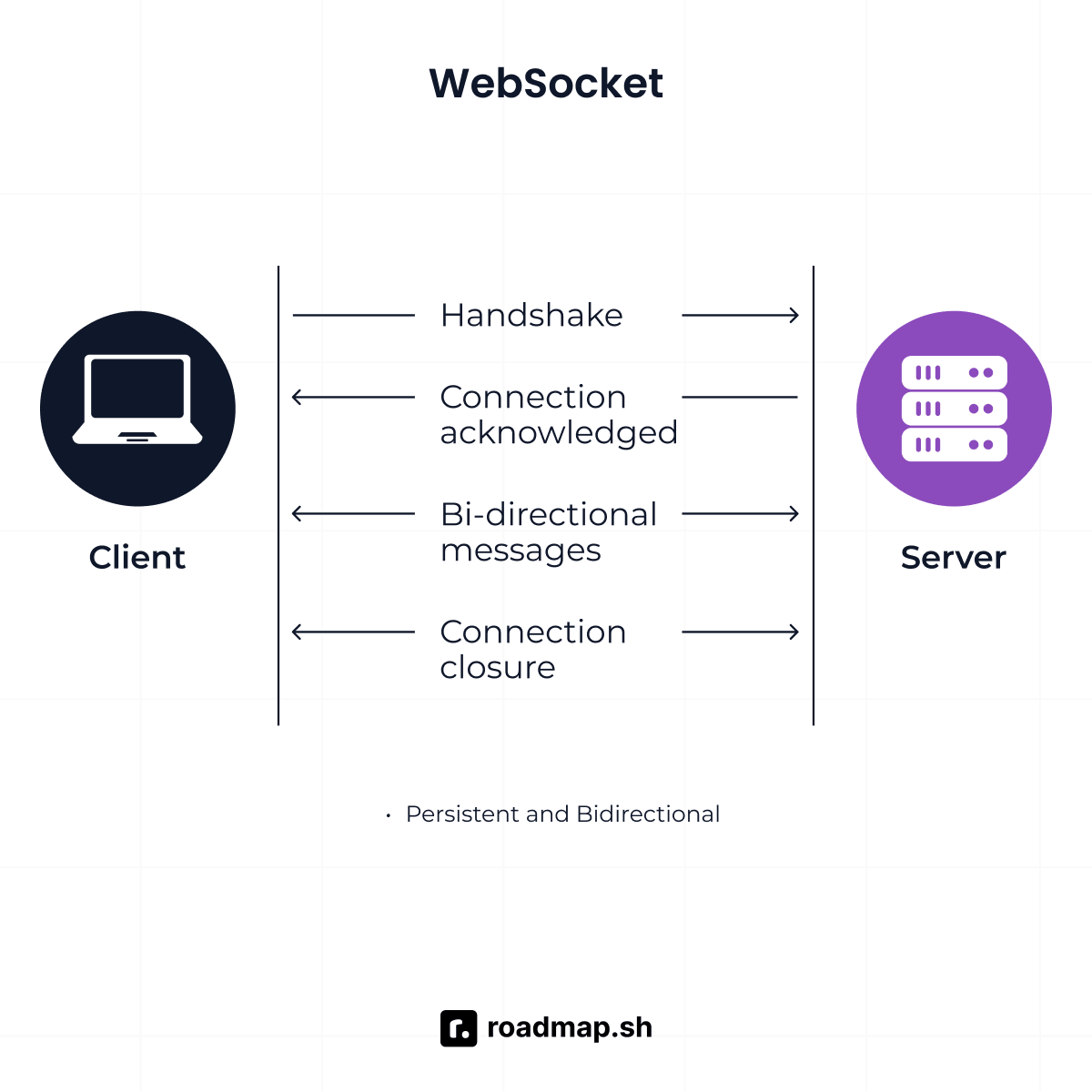
A WebSocket connection does not start as something new. It begins with an HTTP request. The client sends an HTTP/1.1 request containing an Upgrade: websocket header, signaling that it wants to switch protocols.
If the server supports WebSocket, it responds with HTTP 101 Switching Protocols. At that point, the connection stops being HTTP and becomes a WebSocket connection.
From there, the connection is persistent and bidirectional. Both the client and server can send data frames at any time without waiting for the other side to ask. The connection stays open until one side closes it.
Here is a simplified example that shows the HTTP Upgrade request that initiates a WebSocket connection:
If the server supports WebSocket, it responds with:
Once the server returns a 101 Switching Protocols response, the connection transitions from HTTP to WebSocket. From there, either side can send messages without waiting for the other. The following example shows how to establish a WebSocket connection using the browser's WebSocket API:
When the open event executes, it means the handshake is completed and the connection is active. Every message after that travels through the same connection until one side closes it.
Browsers expose very little information through the error event. It tells you something went wrong, but not why. To find the actual cause, check the close event, your browser's developer tools, or your server logs.
Advantages of WebSocket
WebSocket was built to solve the problems HTTP cannot. Everything that follows comes from that single design decision:
Full-duplex communication: Communication is no longer tied to the request-response cycle. Either party can transmit the moment it has data to send.
Lower overhead: After the initial handshake, WebSocket drops the heavy header structure that HTTP carries on every request. What remains is a minimal frame, as small as 2 bytes for short messages, which is why per-message overhead stays low even at high message frequency.
Low latency: Since communication happens over an already established connection, messages can be exchanged without having to create new HTTP requests. For trading platforms, multiplayer games, and collaborative tools, that difference is not theoretical. It shows up in the product.
Real-time push: The server does not wait for the client to ask for updates. It pushes data the moment it is available. That eliminates polling and the lag that comes with it.
No connection churn: HTTP opens and closes TCP connections with every exchange. WebSocket keeps one alive for the duration of the session. That removes the CPU and bandwidth cost of establishing a new connection every time data needs to move.
Controlled connection lifecycle: With HTTP, the connection lifecycle ends the moment the response is sent. There is no signal, just a closed exchange. WebSocket handles this differently. When either side is ready to disconnect, it sends a Close Frame. Both parties acknowledge it, any data still in flight finishes processing, and the connection closes without dropping anything mid-session.
Limitations of WebSocket
WebSocket solves real problems HTTP cannot match. It also introduces new ones; what it asks for in return is worth knowing before you commit to it.
No built-in reconnection: When a WebSocket connection drops, nothing catches it for you. The client has to detect the failure and reconnect on its own. Server-Sent Events (SSE) solves that for you, whereas WebSocket does not.
Not cacheable: WebSocket connections cannot be cached by CDNs or proxies. Every message travels end to end, every time. For content that does not change often, that is overhead HTTP would not carry.
Stateful by design: HTTP does not care which server handles a request. WebSocket does. The server has to maintain connection state for every active client, which means a client connected to server A has to stay on server A. That requires either sticky sessions on the load balancer or a shared message broker like Redis Pub/Sub to distribute messages across servers.
Higher implementation complexity: WebSocket leaves you to solve production problems on your own. A connection can go silent without either side knowing, so you implement ping-pong frames to detect stale connections and close them before they waste resources. When a connection drops, it will not recover on its own, so you write the reconnection logic and exponential backoff yourself. WebSocket also has no built-in message tracking, so any messages sent while a client is disconnected are lost unless you build a queuing layer to catch and replay them. None of it comes for free.
Firewall and proxy compatibility is a solved problem today. Most modern infrastructure support WebSocket connections without issues. Legacy enterprise environments in different organizations are the exception. Proxies in environments like these are optimized for request-response traffic and will strip the
Upgradeheader or terminate persistent connections when they see something that does not match.Using
wss://improves compatibility because WebSocket traffic runs over TLS and passes through most networks as standard HTTPS. If you are building for enterprise clients, test behind their actual network infrastructure before deployment.
WebSocket vs HTTP: Key Differences
HTTP and WebSocket both run over TCP. After that, the similarities stop. What separates them is everything that happens after the connection is made. Here is where it shows:
Connection model: persistent vs request-response
HTTP is discrete (treats every interaction as a separate conversation). The client asks, the server answers, and the communication exchange is over. The server has no way to send data out on its own unless the client asks.
WebSocket establishes a long-lived connection that both sides can use throughout the session. From that point, data exchange becomes more event-driven rather than request-driven.
That distinction matters more for some features than others. Checking an inbox every 30 seconds works fine over HTTP. The moment you add typing indicators, read receipts, and live messages to the same screen, the request-response model starts showing a lag.
Overhead and performance
HTTP carries metadata headers on every request, which is like hundreds of bytes. For low-frequency interactions, that is not a problem. But for high-frequency exchanges like trading platforms or multiplayer games, that overhead compounds fast.
WebSocket removes most of that overhead after the handshake. What remains is a minimal frame structure, which is why per-message cost stays low even at high message volume.
The catch is that WebSocket holds a connection open for every active client. Server memory stays allocated even when no messages are being sent. For workloads with thousands of concurrent but idle connections, that adds up. HTTP releases connection resources the moment a response is sent, which makes it scale more cleanly for those patterns.
Be aware that performance depends on your workload. WebSocket is good for high-frequency bidirectional exchanges. HTTP/2 and SSE can reach comparable throughput without the memory cost of managing persistent connections.
Scalability trade-offs
Requests are independent of one another, so any server can handle any request without coordination. When the interaction ends, the connection is released, and no request state is retained.
WebSocket changes that because its connection is stateful. A client connected to server A has to stay on server A. A message arriving on server B never reaches that client. That is why WebSocket systems need sticky sessions on the load balancer or a shared message broker like Redis Pub/Sub to route messages across servers.
In a single-server setup, managing stateful connections is straightforward. At millions of concurrent connections, it requires deliberate architecture: session state management, distributed message broadcasting, and connection lifecycle monitoring.
Security
Both protocols support transport-layer encryption. Use HTTPS for HTTP, WSS for WebSocket, and never ship a production application over an unencrypted connection ws://. Fix that before anything else.
WebSocket starts as HTTP but does not stay there. After the upgrade, many HTTP security controls no longer apply to the ongoing communication. Content Security Policy rules and CORS preflight checks do not operate in the same way they do for normal HTTP requests. Authentication has to be handled at the application layer, often through a token in the connection URL or in the first message sent after the connection opens.
This doesn't mean WebSocket is less secure. It just handles security in a different way, and that difference needs to be accounted for during the design stage.
Which Should You Learn? Decision Framework
The right protocol depends on your feature's communication pattern, your team's operational comfort, and your infrastructure. Here is how to think through the decision.
Feature or use case | Recommended protocol |
|---|---|
REST API or standard web page | HTTP |
File upload or download | HTTP |
Dashboard with periodic data updates | HTTP |
Live chat, typing indicators, presence status | WebSocket |
Multiplayer game with real-time player actions | WebSocket |
Collaborative document editing | WebSocket |
Live trading or auction platform | WebSocket |
When WebSocket is the right call
The clearest signal is when both the client and the server need to send data during the same session without waiting for the other side to ask. That is the core use case WebSocket was built for.
Secondary signals often appear alongside it: latency is a hard requirement, binary data such as audio or video frames needs to move in both directions, or the session itself carries state that matters between messages, as it does in multiplayer games and collaborative editing tools.
When all of those requirements show up together, WebSocket is the right protocol you will want to use.
When HTTP is enough
If the client initiates every exchange and the server responds, standard HTTP is what you should consider. You do not need a persistent connection, and you do not need to manage connection state or build out additional infrastructure for it.
Career and learning context
HTTP is foundational. Every web developer needs to understand request-response communication, status codes, headers, methods, and caching. These concepts run through almost every application you build and are covered in depth in the API Design Roadmap.
WebSocket becomes important as you move into backend and distributed systems work. Once you start building features that depend on persistent connections, event streams, and low-latency communication, understanding WebSocket is no longer something you can defer. That is covered in the Backend Roadmap alongside the broader real-time systems patterns you will encounter at that level.
Conclusion
Choosing between HTTP and WebSocket starts with understanding what your feature actually needs to do with data, not with picking a technology first.
HTTP handles most web communication well because most web communication follows a request-response pattern. WebSocket earns its place when both the client and server need to send data through the same connection without waiting on each other. The choice comes down to the communication pattern your application actually needs, not which protocol looks more capable on paper.
The landscape is still shifting. HTTP/3 and QUIC are closing the latency gap between HTTP and WebSocket for a growing number of workloads. WebTransport, built on HTTP/3, is being explored as a potential successor to WebSocket for high-performance bidirectional communication, though it is still early-stage as of 2026. For now, HTTP and WebSocket remain the practical choices for most web applications, each with a different set of trade-offs.
If you are a network engineer working through a specific feature decision, the AI Tutor can walk you through the protocol choice based on what you are building.
