WebSocket vs SSE: Differences, Use Cases & When to Pick
 Ekene Eze
You already know your application needs real-time updates. Now you have to put on your network engineering lens and decide how those updates should reach the browser.
SSE (Server-Sent Events) and WebSocket are both browser-native ways to push real-time data. SSE sends data one way, from the server to the client. WebSocket sends data both ways.
The right protocol depends on how your data needs to move, how often it moves, and what your infrastructure can handle. HTTP/2 makes SSE more scalable. LLM token streaming has also made SSE a common choice for AI applications.
This guide compares WebSocket and SSE so you can choose the right one for the feature you are building.
TL;DR: WebSocket vs. SSE
SSE is the simpler default for one-way, server-to-client streaming; WebSocket is built for high-frequency, bidirectional communication. HTTP/2 removed SSE's old scaling limit, so here's how to pick.
Go for WebSocket if...
Both the client and server need to send data frequently (e.g., chat with typing indicators, multiplayer, collaborative editing, live trading).
You need low per-message overhead: WebSocket keeps the connection open, so each message skips the usual HTTP overhead.
You need to send binary data efficiently: WebSocket supports both text and binary messages.
You need a very high message frequency in both directions: WebSocket handles both sides sending constantly on the same connection.
If you want to see how WebSocket compares to HTTP, check out our WebSocket vs HTTP guide.
Go for SSE if...
Data only needs to move from the server to the client: Notifications, live feeds, dashboards, progress updates, and LLM token streaming all fit here.
You want automatic reconnection: The
EventSourceAPI reconnects on its own, andLast-Event-IDlets the server resume the stream where it left off, with no custom logic to write.You need it to work through standard HTTP infrastructure: SSE runs over plain HTTP, so CDNs, proxies, and load balancers handle it without needing special support for a WebSocket upgrade.
You want the simpler implementation: SSE is plain HTTP end-to-end, with no separate protocol or handshake to account for.
Master the networking concepts behind both, step by step, with the Network Engineer roadmap.
SSE vs. WebSocket: Comparison table
Features | WebSocket | SSE |
|---|---|---|
Direction | Bidirectional | One-way (server-client) |
Protocol | WebSocket protocol (ws:// and wss://) established through an HTTP/1.1 Upgrade handshake | HTTP with a text/event-stream response |
Browser API | WebSocket | EventSource |
Data types | Text and binary | Text only, encoded as UTF-8 |
Auto-reconnect | Manual; the application handles it | Built in; resumes via Last-Event-ID |
HTTP/2 behavior | Can run over HTTP/2, but support must be negotiated by client, server, and proxy | Multiplexes over a single connection, avoiding the HTTP/1.1 per-origin connection limit |
Infrastructure compatibility | Needs upgrade-aware proxies/CDNs | Works over standard HTTP; common gotcha is proxy buffering |
Typical latency/overhead | Lower per-message overhead once WS connected | Slight per-message overhead from HTTP framing |
Best-fit use cases | Chat, multiplayer games, collaborative editing, live trading | Notifications, live feeds, dashboards, progress updates, LLM token streaming |
Here's the comparison in more detail, starting with WebSocket.
Why choose WebSocket?
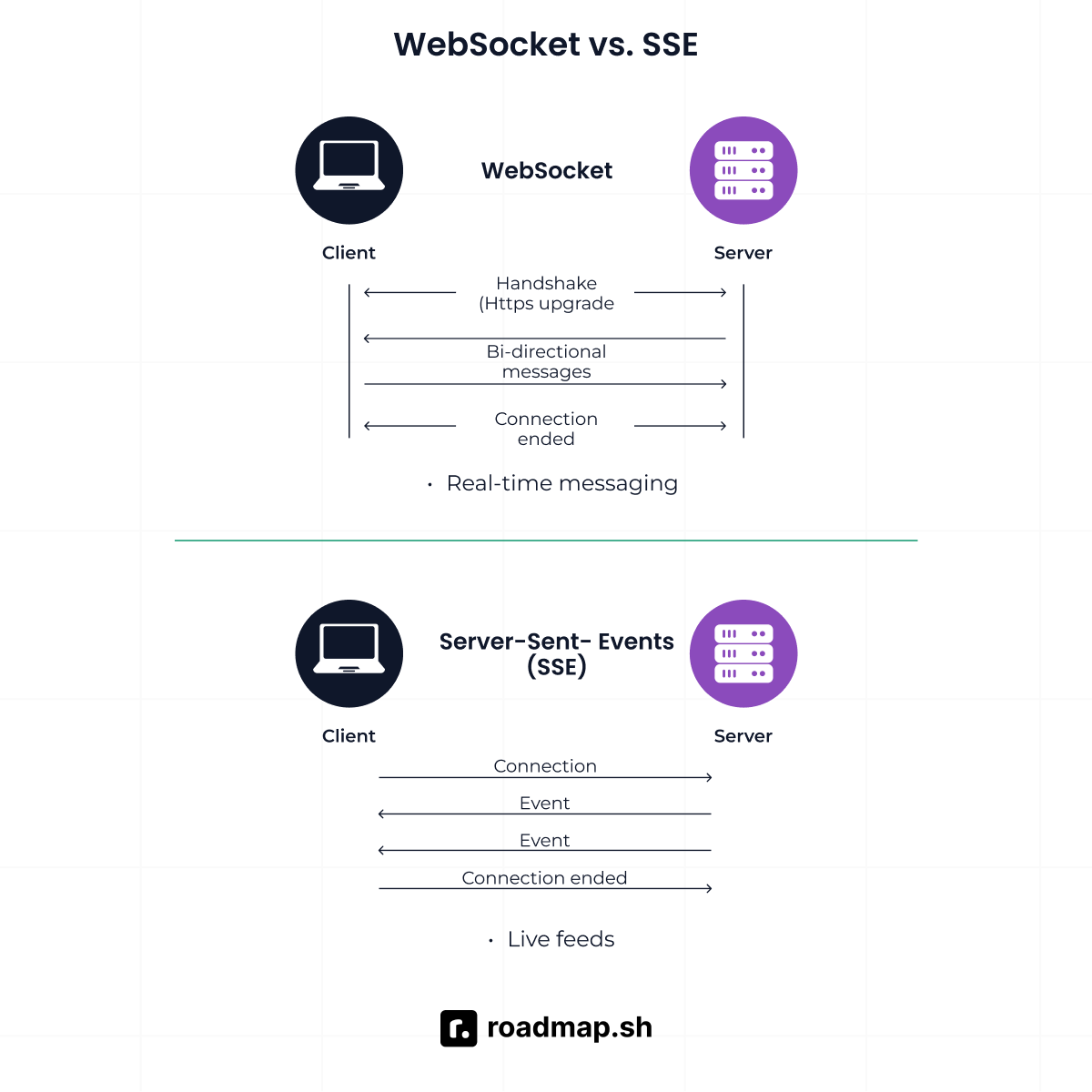
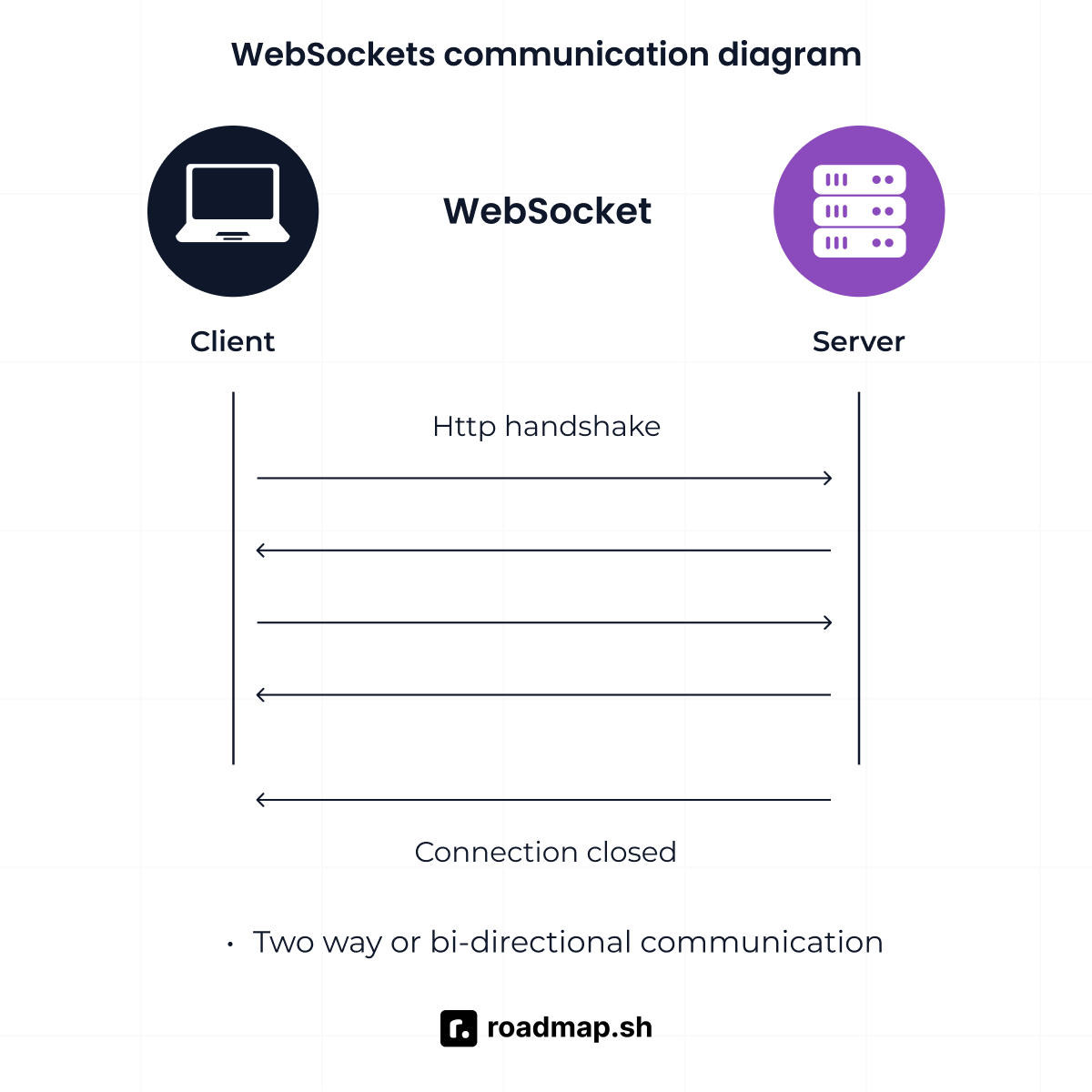
WebSocket is a full-duplex protocol that starts with an HTTP upgrade handshake, then keeps a persistent connection open for communication in both directions. Once connected, the client and server can send messages independently without opening a new connection for each message. That's the foundation for everything WebSocket is actually good at.
True bidirectional communication
WebSocket gives both the client and server a full-duplex connection. Either side can send data at any time without waiting for the other side to respond. SSE can't do this. The server can push data to the client, but the client has no way to send data back on the same SSE connection. That's the gap SSE can't close; WebSocket lets the client respond just as freely as the server pushes.
Low overhead and binary support
WebSocket sends messages through its own framing protocol once connected, so it doesn't require a new HTTP request per message. That is low overhead even at high frequency. It also supports binary data natively, without converting the data to text first.
Best-fit real-time use cases
WebSocket works well for any feature where the client also needs to send frequent updates, not just receive them from the server. For example, live trading, multiplayer games, and collaborative editors all fall here; the server pushes constantly, but so does the client.
Why choose SSE?
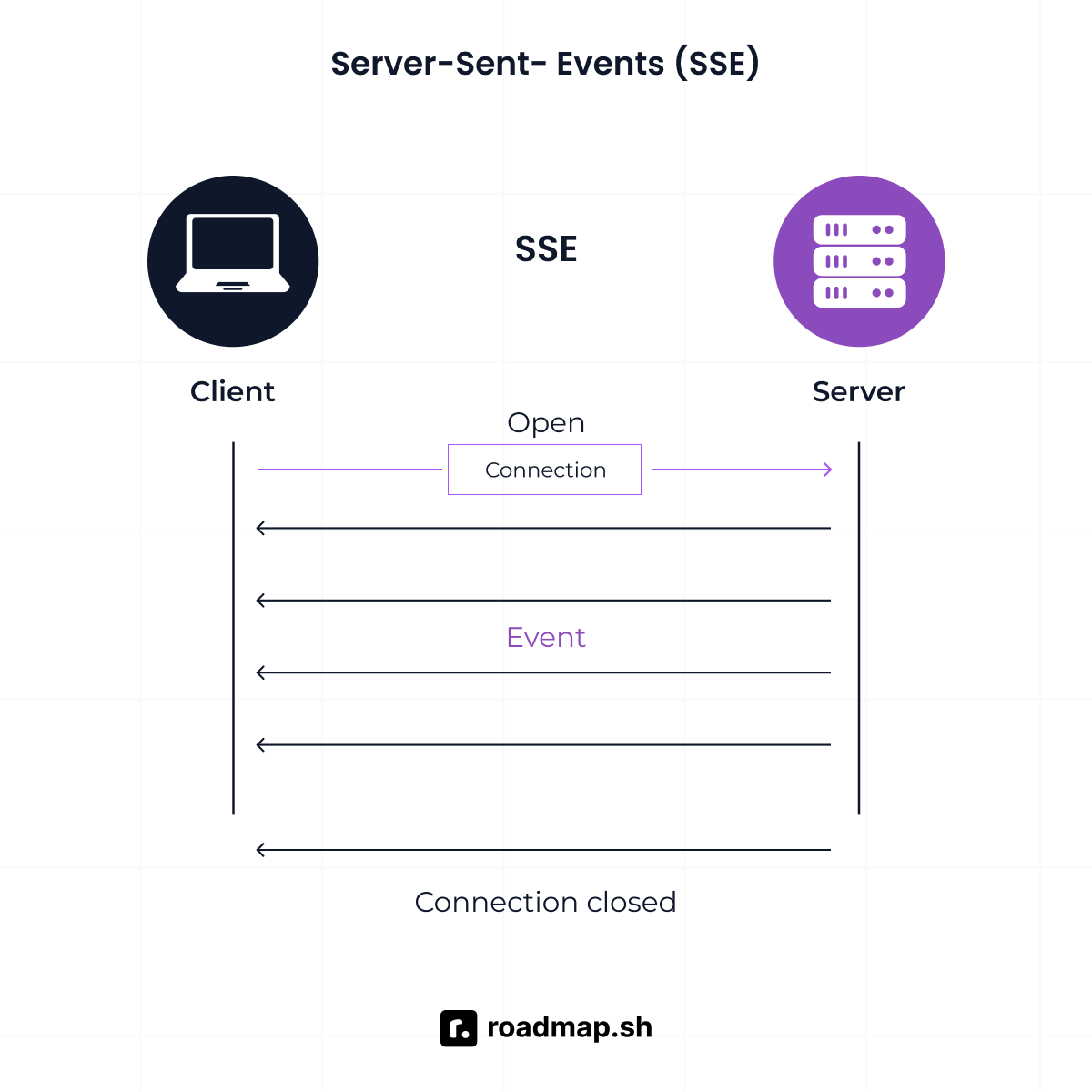
Server-Sent Events (SSE) is a browser-native way to stream data from a server to a client over a single, long-lived HTTP request. It uses the EventSource API, part of HTML5 and supported in every major browser, so the client listens while the server sends updates as they happen.
Simplicity over plain HTTP
Is SSE just HTTP? Yes, and that is the advantage. You're not learning a second protocol or negotiating an upgrade. You use the same HTTP model you already know, except the response stays open while the server keeps sending data.
Built-in reconnection
SSE handles reconnection automatically without you writing the logic. If the server sends event IDs, the browser can send Last-Event-ID on reconnect, so the server can pick up where it left off. WebSocket doesn't give you that for free. You have to build it yourself.
There's a catch. This applies to EventSource's built-in GET-based connection. If you need POST bodies or custom headers, you must use fetch() instead, which means giving up that built-in reconnect and resume. You can still reimplement reconnection and Last-Event-ID resumption manually.
Infrastructure-friendly and HTTP/2 scaling
SSE runs over standard HTTP, so it works through the CDNs, proxies, and load balancers you already have; no upgrade handshake for them to support or block. Under HTTP/2, multiple SSE streams multiplex over one connection, so the old HTTP/1.1 limit of six connections per origin no longer applies.
Some proxies buffer responses by default, so an SSE stream can sit there batching instead of arriving as it's sent, and in production that looks like stalled or delayed updates for no obvious reason. The fix is usually to disable buffering on that route, not to abandon SSE over it.
The default for LLM token streaming
LLM token streaming sends generated output to the client as it becomes available, using text/event-stream over HTTP. OpenAI, for example, documents its Responses API streaming as server-sent events.
For a browser client, EventSource won't work here, LLM APIs need POST requests and custom auth headers, while EventSource only supports GET with no custom headers. So the frontend uses fetch() to read the stream through a ReadableStream instead. That also means the application or SDK takes care of parsing the incoming chunks and handling resumption where needed.
If you want a refresher on how request headers and authentication work over HTTP, see the HTTP guide.
WebSocket vs. SSE: Key differences
Server-Sent Events (SSE) vs. WebSockets starts to make sense once the feature has to deal with real traffic, dropped connections, and the infrastructure sitting between the browser and your server.
One-way versus two-way
This is the first question you need to answer: Does the client need to send messages back over the same connection?
SSE keeps the stream moving from server to client. WebSocket lets both sides send messages whenever they need to. A notifications feed or an AI token stream only needs the first model. Chat with typing indicators, presence, or collaborative editing needs the second.
Protocol and infrastructure
WebSocket and SSE take different paths through your network stack. A traditional WebSocket connection starts with an HTTP upgrade and switches to the WebSocket protocol, requiring explicit WebSocket support from reverse proxies, load balancers, and firewalls.
Some corporate networks block or interfere with that upgrade even when regular HTTP works fine. If your users connect from restrictive networks, test WebSocket connections in those environments.
SSE stays on standard HTTP with no protocol upgrade, which makes it easier to run through existing infrastructure. The trade-off is buffering. It's not just proxies. Your own server can hold onto the response before it even reaches one. Check that both your application and your infrastructure pass events through as they're generated, not after.
Reconnection and reliability
SSE natively supports reconnection and resumption via event IDs, in the browser. That native behavior doesn't carry over to LLM streams. The SDK or apps have to track where the stream stopped and resend that on retry.
WebSocket provides the raw TCP connection without built-in reconnection logic. Your application must detect drops, establish a new connection, and reconcile messages missed while the socket was offline.
For LLM streaming, reconnection can also have cost implications. If a retry starts the request from scratch, the model processes the prompt and generates tokens again, so you pay for work you already got. Track where the stream stopped so a retry doesn't redo what's already done.
HTTP/2 and scaling
HTTP/2 changes the connection limits for SSE. Multiple SSE streams can multiplex over a single connection, the same relief from the old HTTP/1.1 per-origin limit explained earlier. Under HTTP/1.1, browsers typically cap you at six connections per origin, so a few open SSE streams could eat through that limit, leaving less room for everything else your page needs to load from the same origin.
WebSocket can also run over HTTP/2 via RFC 8441, but that still depends on support across your client, server, and proxy, the same requirement as before. For pages opening several streams at once, that difference is the practical one: SSE gets it by default, WebSocket needs it verified.
Performance
Questions like "which protocol is faster" don't have a straight answer. It depends on what you're sending and how often.
For WebSocket, per-message overhead is minimal once the connection is established, which matters for high-frequency, two-way messaging. SSE carries a little more HTTP-based framing around each event.
For typical one-way push, that extra overhead is usually not the deciding factor. SSE is more than adequate for server-to-client updates and can scale well for fan-out over HTTP/2.
Which tech should you learn? Decision framework
The best choice depends on the scope of your work or project, but here's what will help you decide.
Choose WebSocket when...
Both sides need to send updates constantly: Chat with live presence (e.g., who's online, typing, active), multiplayer games, collaborative editing, and live trading all need the client and server talking on the same connection, not taking turns.
Choose SSE when...
One-way update: Notifications, feeds, dashboards, and progress updates only move one way. If your infrastructure already runs managed WebSocket connections with fan-out, like AWS API Gateway, WebSocket can handle one-way push too.
LLM token streaming and AI chat UIs: SSE is commonly used to stream the model's output from the API to your backend. OpenAI's docs confirm this, and your backend will typically stream that output to the browser using the same server-to-client pattern. The user sends the prompt, while the generated response streams back incrementally.
Infrastructure constraints
If you don't control the proxies or CDNs in front of your app, check whether they buffer SSE or support WebSocket upgrades before you pick either.
Don't use real-time where long polling works
If "real-time" just means the update arrives soon, not instantly, long polling may be enough. You don't always need a persistent real-time transport.
What should you learn first?
Think of SSE and WebSocket as complementary skills, not competing technologies. Start with SSE if most of what you build involves server-to-client updates. Add WebSocket when you start building applications where the client and server need to communicate continuously in both directions.
Conclusion
SSE vs. WebSocket comes down to direction and infrastructure, not one being better than the other. If data only needs to move from the server to the client, start with SSE. That includes LLM token streaming. If the client has to keep sending too, reach for WebSocket.
As you keep building, you'll also come across WebTransport, HTTP/3, QUIC, and datagram, which introduce other ways to handle real-time communication.
Take the next step with the Network Engineer roadmap, which picks up from here one step at a time. When you're ready for what comes after that, the complete roadmap catalog has your next skill.
