API gateway vs. Load balancer: Do you need one or both?
 William Imoh
An API gateway and a load balancer often appear in the same part of your system architecture. Both sit between clients and backend services, and that overlap often confuses. As a result, developers new to both cloud platforms and distributed systems tend to mix them up. However, both tools manage network traffic at different layers and solve distinct issues.
A load balancer focuses on traffic distribution, fault tolerance, and scalability. It operates at Layer 4 (TCP/UDP) or Layer 7 (HTTP/S) to distribute traffic across multiple backend servers. But it doesn't inspect the actual requests or modify API-level content. The main aim is to keep your servers healthy and make sure no single instance bears too much load.
On the other hand, an API gateway focuses on control, security, and traffic management. It works at Layer 7 (HTTP/S) and inspects every incoming request, from headers and tokens to the request body. Based on that inspection, it decides what reaches your backend services and in what form. The goal is to keep your APIs secure and ensure that requests reach the right destination.
In this guide, I'll teach you how a load balancer and an API gateway work, show you where each fits within a production architecture, and explain when to use both.
TL;DR: API gateway vs. load balancer
Go for a load balancer if...
Your primary concern is high availability and fault tolerance. You need incoming network traffic distributed across multiple server instances. When one goes down, the other steps in, absorbs the load, and keeps your system running.
You are routing traffic at the network or application layer. The load balancer handles this based on IP address, port, or URL, not on request content. At Layer 4, routing decisions come down to IP address and port number. At Layer 7, they come down to URL, headers, or cookies.
You need health checks. The load balancer should detect unhealthy instances and remove them from the pool. It helps incoming traffic reach healthy servers and bypass those that are down.
You need SSL/TLS termination. Encryption and decryption happen at the load balancer, not on each backend server. It reduces computational overhead and keeps your servers focused on their main job.
Your architecture is simple. A monolith or a small number of services behind a single domain does not need the overhead of an API gateway.
You need session persistence. IP hash and sticky sessions let you route each user's requests to the same server on every visit.
Go for an API gateway if...
You run microservices and need a single entry point. The API gateway acts as a centralized entry point for all incoming traffic to your system. It then uses the request path, headers, or content to send the request to the appropriate backend service.
You need centralized authentication and authorization. The gateway runs JWT validation, OAuth 2.0, and API key checks on every client request before it gets through. This keeps auth out of each service and in one central place.
You need rate limiting and throttling. The gateway prevents individual clients or IP addresses from overwhelming your services.
You need a request-and-response transformation. This means the API gateway can modify headers and convert between data formats like JSON and XML. It can also pull responses from multiple services and merge them into a single API response.
You need centralized observability. Logging, metrics, and tracing for all API usage across all services live in one place.
You expose APIs to external developers or partners. The gateway handles API versioning, documentation generation, and developer portals. This provides external developers and partners with a clear way to access your APIs.
Both tools share the same traffic management layer and work in series, not against each other. In most production systems, the question is not which one to pick but where each one fits. A load balancer sits in front of the API gateway and distributes incoming traffic across multiple gateway instances. The API gateway sits in front of the backend services and acts as the control layer for every request. It decides what gets through, where it goes, and in what form it arrives. One keeps your infrastructure up, the other keeps your APIs secure and manageable.
API gateway vs. load balancer: Comparison table
Before going into the details, here is a summary of the key differences between API gateways and load balancers. The table below covers the features that matter most in a production architecture:
Feature | API gateway | Load balancer |
|---|---|---|
Primary purpose | Manages, secures, and routes API requests to your services | Distributes incoming traffic across multiple server instances for high availability |
OSI layer | Layer 7 (operates at the application layer only) | Layer 4 (transport: TCP/UDP) or Layer 7 (application: HTTP) |
Traffic awareness | Full incoming request inspection: path, headers, body, tokens | Layer 4: IP and port only; Layer 7: URL, headers, cookies |
Authentication | Full access control: JWT, OAuth 2.0, API keys | Not handled at Layer 4; some basic auth in application load balancer setups |
Rate limiting | Core feature: rate limiting per client, per endpoint, per plan | Not handled |
Request transformation | Full request transformation, protocol translation, and aggregation | Limited header manipulation at Layer 7 |
Health checks | Not a primary function; relies on a load balancer or service mesh | Core feature: automatic removal of unhealthy instances from the healthy server pool |
SSL/TLS termination | Supported, but SSL termination is typically handled by the load balancer or CDN | Core feature: SSL termination at the balancer level |
Routing logic | Request routing based on path, version, header, and consumer identity | Traffic distribution based on connection counts, round-robin, IP hash |
Observability | API level: per-endpoint metrics, usage logs, consumer analytics | Traffic volume and health metrics |
API versioning | Core feature: versioning across backend services | Not supported |
Latency added | 0.5–2ms depending on active plugins | Layer 4: microseconds; Layer 7: low milliseconds |
Example tools | AWS API Gateway, Kong, Apigee, Azure APIM, Apache APISIX, Tyk | AWS ELB/ALB, NGINX, HAProxy, GCP Cloud Load Balancing, global load balancer, external load balancer |
Best for | Microservices, external API calls, centralized security, and API management | High availability, horizontal scaling, and SSL termination offload |
Now that you understand the key differences, it is time to take a closer look at each tool. The sections below cover how each one works and where it fits in a production architecture.
What is a load balancer?
A load balancer distributes incoming network traffic across multiple backend servers or instances. It takes the full weight of incoming requests off any single server and helps keep a system stable. The load balancer provides high availability and supports horizontal scalability. It keeps your system up during server failures and lets you add more servers as traffic grows.
A system without a load balancer routes all network traffic to a single server. Every user request, no matter how many come in at once, lands on that same server. If the server fails, the load balancer steps in and reroutes traffic to the healthy instances. When the load increases, you can add multiple instances without downtime.
How a load balancer works
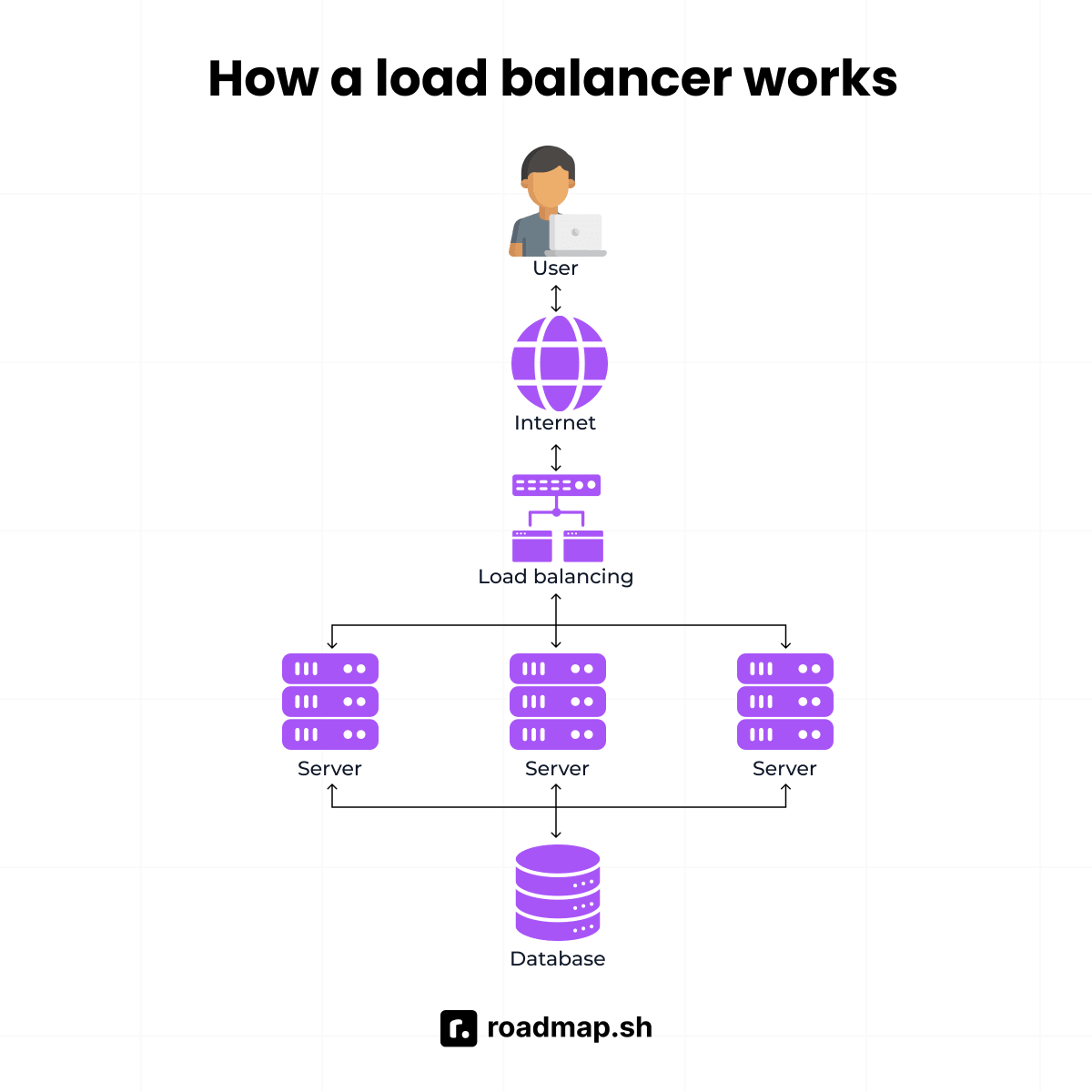
The following shows how a load balancer handles each request, step by step:
Clients send requests to the load balancer's IP address or hostname. The load balancer selects a backend server using a traffic distribution algorithm. It then forwards requests to the selected server so it can process and respond to each one.
Common algorithms for distributing traffic:
Round-robin: The load balancer distributes traffic across server instances in order.
Least connections: Each request reaches the server with the fewest active connection counts.
IP hash: The load balancer maps each client IP address to the same backend instance on every visit. Every user request from that client reaches the same instance, preserving session persistence. This works as long as the backend pool stays the same. This guarantee only holds when the backend pool stays the same size. Any change to the pool can break the mapping and route clients to a different server.
Health checks: The load balancer monitors your web servers and removes unhealthy instances. Traffic flows reach only active instances in the rotation, so no request lands on one that is down or unresponsive.
SSL termination: The load balancer decrypts HTTPS traffic before it reaches your backend instances. It then forwards requests to that instance, ensuring each request reaches the correct server.
The way a load balancer handles requests depends on where it sits in the network stack. This difference divides balancers into two types: Layer 4 and Layer 7. Each type inspects a different level of information within your requests.
Layer 4 vs. Layer 7 load balancers
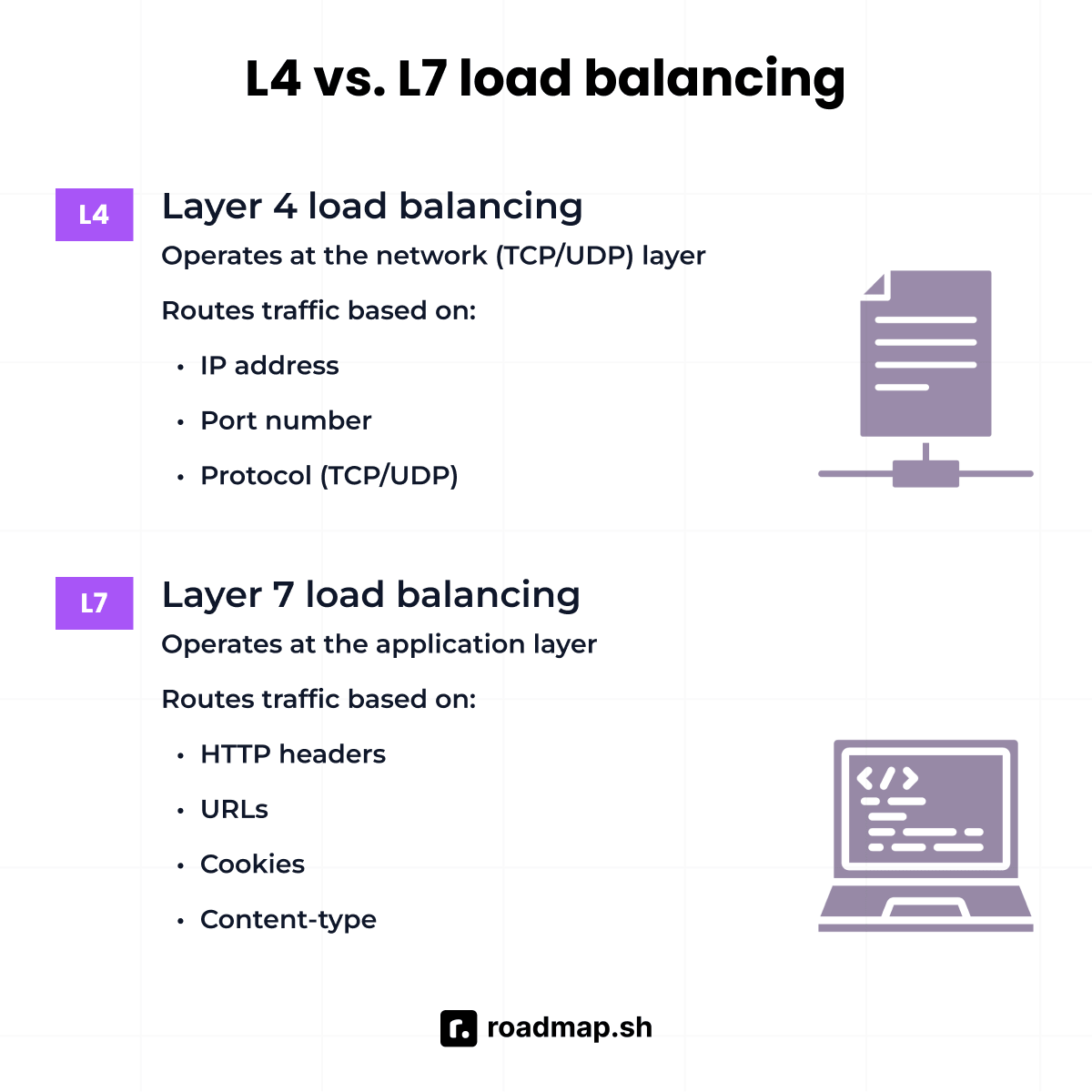
Layer 4 load balancers operate at the transport layer. They route traffic based on the IP address and TCP/UDP port number, and never read the request content. Layer 4 load balancers are fast and protocol-agnostic, adding only microseconds of latency.
Layer 7 load balancers (application load balancers) operate at the application layer. They inspect HTTP headers, URL paths, and cookies to inform request routing decisions. For example, the load balancer can send
/apitraffic to one server group and/staticto another.Most modern cloud load balancers run at Layer 7. Cloud providers design modern balancers to handle tasks far beyond standard traffic distribution. They inspect headers and manage WebSocket connections alongside smart URL-based request routing. AWS ALB, GCP HTTP(S) global load balancer, and Azure external load balancer all fall into this category.
What a load balancer does not do
A load balancer does not inspect or understand API requests. It does not validate authentication tokens or enforce per-consumer throttling. Also, it has no way to transform request content or route requests based on version headers.
A load balancer does not know about your microservices topology. The load balancer sees all backend instances as equal and routes traffic based on availability and load. It distributes traffic based on server health and load, not what the client request contains.
What is an API gateway?
An API gateway serves as a centralized entry point for API traffic between clients and backend services. Unlike a load balancer that focuses on distributing traffic across backend servers, an API gateway manages API requests at a deeper level. The gateway handles advanced API management tasks rather than simple network routing. It can route requests, validate authentication tokens, enforce rate limiting, and identify consumers.
How an API gateway works
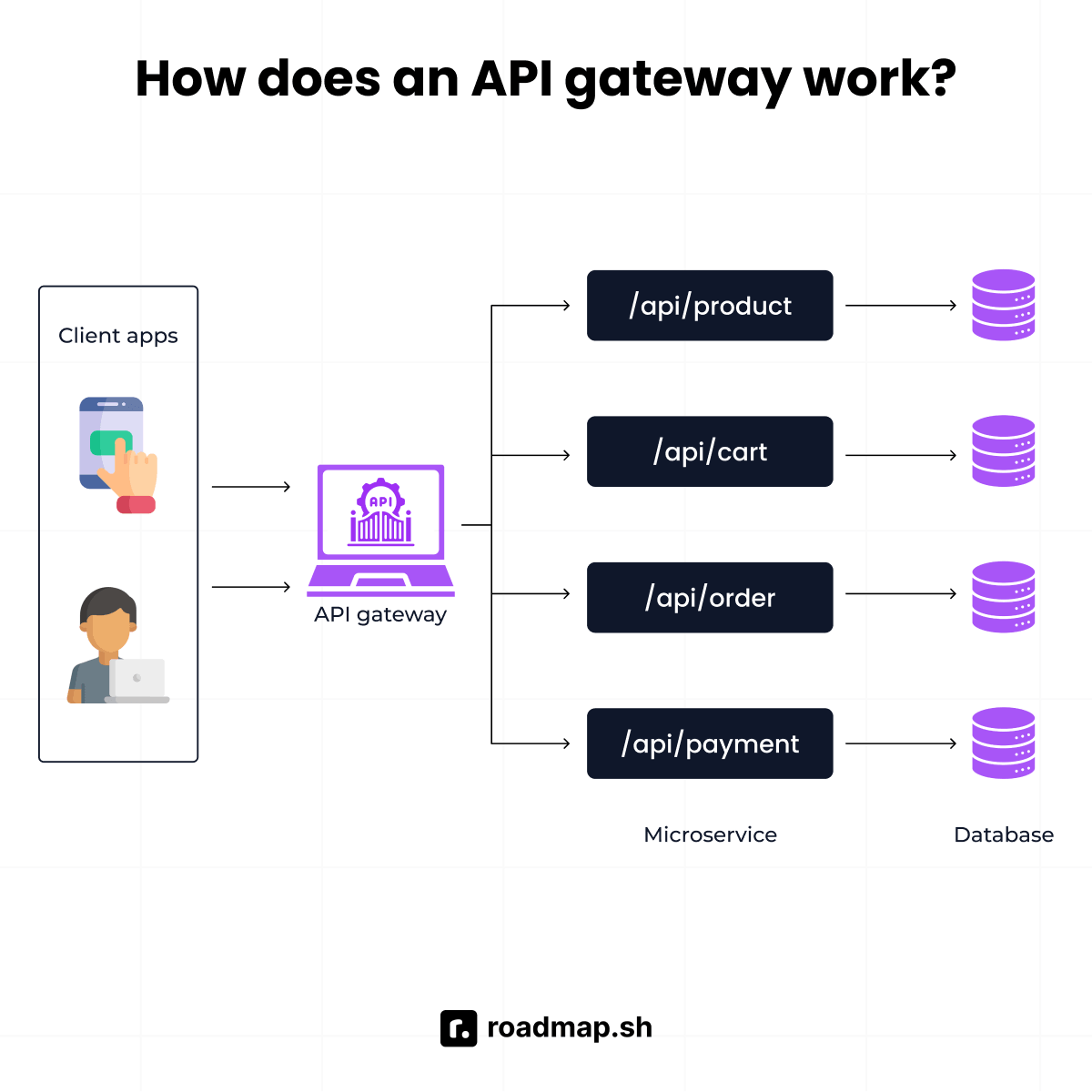
The following is a step-by-step look at how a gateway processes each request:
Clients send all API requests to the gateway's endpoint. The API gateway acts as a single entry point between client requests and your services. It inspects the path, headers, body, and authentication token to determine which service should handle it.
The gateway applies policies before forwarding the request. API gateway authenticates the caller and checks rate limits as the first line of defense against unauthorized access. It then validates the request format and transforms headers or body data as needed.
The API gateway can aggregate API calls. A single client request to
/dashboardcan trigger calls to three separate microservices. The API gateway then merges the responses before returning them to the client.The API gateway logs every API call for observability. Per-endpoint metrics, consumer-level API analytics, and error rates in one central place.
Core API gateway features
The following are the core features an API gateway brings to your architecture:
Access control and authorization. JWT validation, OAuth 2.0 flows, and API keys execute at the gateway before any API call reaches a service. It keeps each service free from having to implement auth on its own.
Rate limiting and throttling. The gateway enforces per-consumer, per-endpoint, or per-plan limits to prevent abuse. It keeps your services protected when demand spikes without warning.
Format and protocol translation. The gateway can modify headers, rewrite URLs, and convert between formats such as XML and JSON. It can also remove sensitive fields from responses before they reach the client.
Request routing and service discovery. The gateway routes requests to the right backend based on the path or version. For example,
GET /usersroutes to the users service, andPOST /ordersroutes to the orders service. It also handles multiple API versions across different services simultaneously.Observability. The gateway collects logs and metrics for all API traffic in one place. Most API gateways provide built-in integrations with monitoring tools like Prometheus and Datadog. They give your team full visibility into how traffic moves across your services.
Developer portal and documentation. API gateways provide a developer portal built for external developers. It gives them access to API schemas (OpenAPI/Swagger) and full documentation in one place.
Understanding these features will help you set up your gateway's security and routing. But you also need to decide how you want to deploy the tool. So, you must choose between using managed or self-hosted gateways.
Managed vs. self-hosted gateways
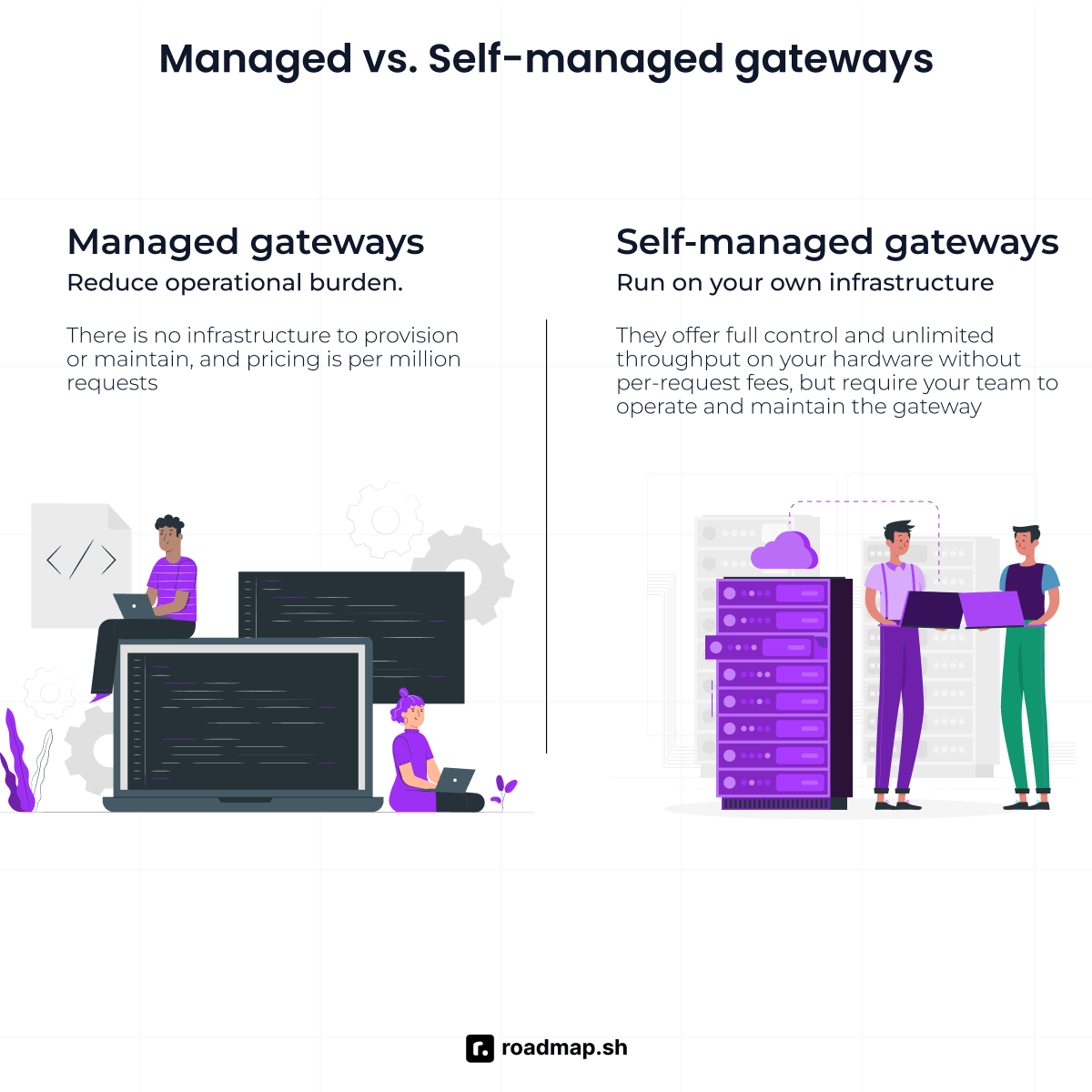
Managed and self-hosted API gateways each come with their own pros and cons. The type of gateway you choose depends on how much operational control your team wants.
Managed gateways from AWS, Google, and Azure reduce your team's operational burden. The vendor handles scaling and maintenance; your team pays per million API requests. Its trade-off is less control over customization and costs that shift with usage. As traffic volume grows, monthly costs can rise at a rate that catches teams off guard.
If your team wants to avoid variable vendor fees, a self-hosted gateway gives more control. Kong, Apache APISIX, Tyk, and KrakenD support custom extensions and flexible request routing. They run on your own infrastructure and come with no per-request fees. Your team gets unlimited throughput and more predictable costs as traffic volume grows. The downside is that your team handles maintenance and updates to the gateway.
API gateway vs. load balancer: Key differences
Now that you know what each tool does and how they work, here are the key differences between them.
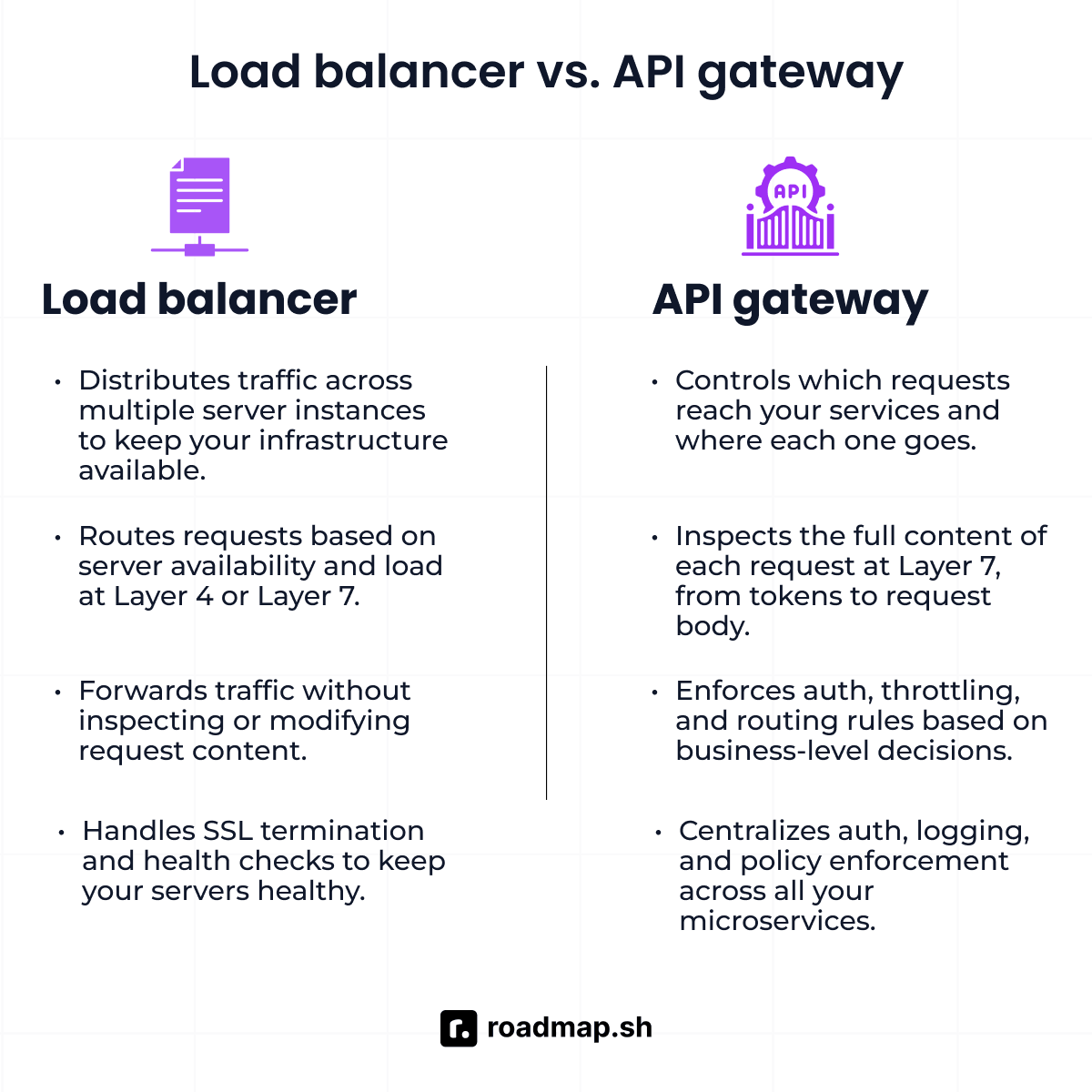
Purpose and layer of operation
A load balancer keeps your infrastructure available through demand spikes and server failures. It handles load balancing and SSL termination so your backend can focus on its core workload. All of this happens at Layer 4 (transport) or Layer 7 (basic HTTP request routing). The content of each request never factors into its routing decisions.
On the other hand, an API gateway exists to keep your API calls under control. Unlike a load balancer, it is the request content that drives every decision it makes. It controls which requests get through, where each one goes, and what form it takes when it arrives. The API gateway operates solely at Layer 7 to perform deep inspection and transformation.
Traffic intelligence
A load balancer makes routing decisions based on infrastructure signals. Layer 4 balancer sees only the IP address and port of every request it receives. It has no visibility into authentication tokens, target versions, or client rate limits. A Layer 7 balancer reads HTTP headers and URLs, but never goes past the infrastructure level.
An API gateway, in contrast, inspects every request at Layer 7, from headers and tokens to the request body. Every decision it makes follows business-level rules rather than infrastructure signals.
Latency trade-off
A load balancer keeps latency low across both Layer 4 and Layer 7. At Layer 4, it adds mere microseconds of latency. It functions as a high-performance packet forwarder with near-zero overhead. At Layer 7, it adds a few milliseconds of delay to parse HTTP headers and URLs. It is more than Layer 4 but still low enough to have no meaningful impact on response times.
On the flip side, an API gateway adds 0.5–2ms depending on the number of active plugins. This delay comes from tasks like credential validation that run on every request. For most systems, backend response times range from 10 to 500ms. At 0.5–2ms, the gateway overhead is a fraction of that range. Centralized authentication, rate limiting, and observability are what you get in return.
Relationship to microservices
A load balancer is the right tool when you're working with a monolith or a simple architecture. It distributes traffic across multiple web servers to maintain a balanced load. The application handles request routing until the system grows into a microservices architecture.
An API gateway, on the other hand, is best suited to architectures that scale to a distributed system. At that point, each service has its own authentication and rate-limiting policies. Keeping those rules in every service takes more time and creates inconsistencies. The API gateway owns those concerns, so each microservice can focus on its domain.
The reverse proxy relationship
A load balancer is a specialized reverse proxy for traffic distribution. It handles the scale problem by distributing requests across your server instances. No single instance ends up with more requests than it can handle.
An API gateway is also a specialized reverse proxy, but its focus is API management. In production, the two work in series with a clear order of operations. The load balancer sits at the front, followed by the API gateway, and then your services. Each component has its own job, and they all work together in a specific order.
Which should you learn? Decision framework
Choosing between an API gateway and a load balancer depends on which part of your architecture each one handles. Once you know that, the decision of when to use one, the other, or both becomes clear.
Situation | Recommended |
Distributing traffic across multiple server instances | Load balancer |
Ensuring high availability and automatic failover | Load balancer |
SSL/TLS termination | Load balancer (or CDN) |
Centralized API authentication (JWT, OAuth 2.0, API keys) | API gateway |
Rate limiting and throttling per consumer | API gateway |
Microservices with multiple downstream services | Both |
Routing by API version or request content | API gateway |
Request/response transformation or aggregation | API gateway |
Simple monolith with a few server instances | Load balancer |
Exposing APIs to external developers with documentation | API gateway |
High-traffic production microservices architecture | Both, in series |
System design interview: designing a scalable API platform | Both |
When a load balancer alone is enough
The following are the cases where load balancing alone is enough:
A monolith or small application with a few identical server instances. You need traffic distributed and health-checked across multiple servers. Your system has no separate services with different throttling or authentication needs.
Trusted internal networks. Service-to-service traffic where auth and rate limiting sit at the application layer.
When an API gateway alone is not enough
The following are two cases where a gateway alone is not enough:
No infrastructure health checks. An API gateway does not handle health checks at the infrastructure level. When a server instance goes down, the gateway has no mechanism to detect it or redirect traffic. Microsoft's Azure documentation states that API Management does not replace a load balancer. Teams should place a Layer 7 balancer, such as Azure Application Gateway, in front of it. This design keeps the gateway available and spreads traffic across instances.
Single point of failure. An API gateway deployed as a single instance is a single point of failure in production. If that instance fails, every request that hits the gateway has nowhere to go. A load balancer in front distributes traffic requests across multiple instances, removing that risk.
The standard production pattern
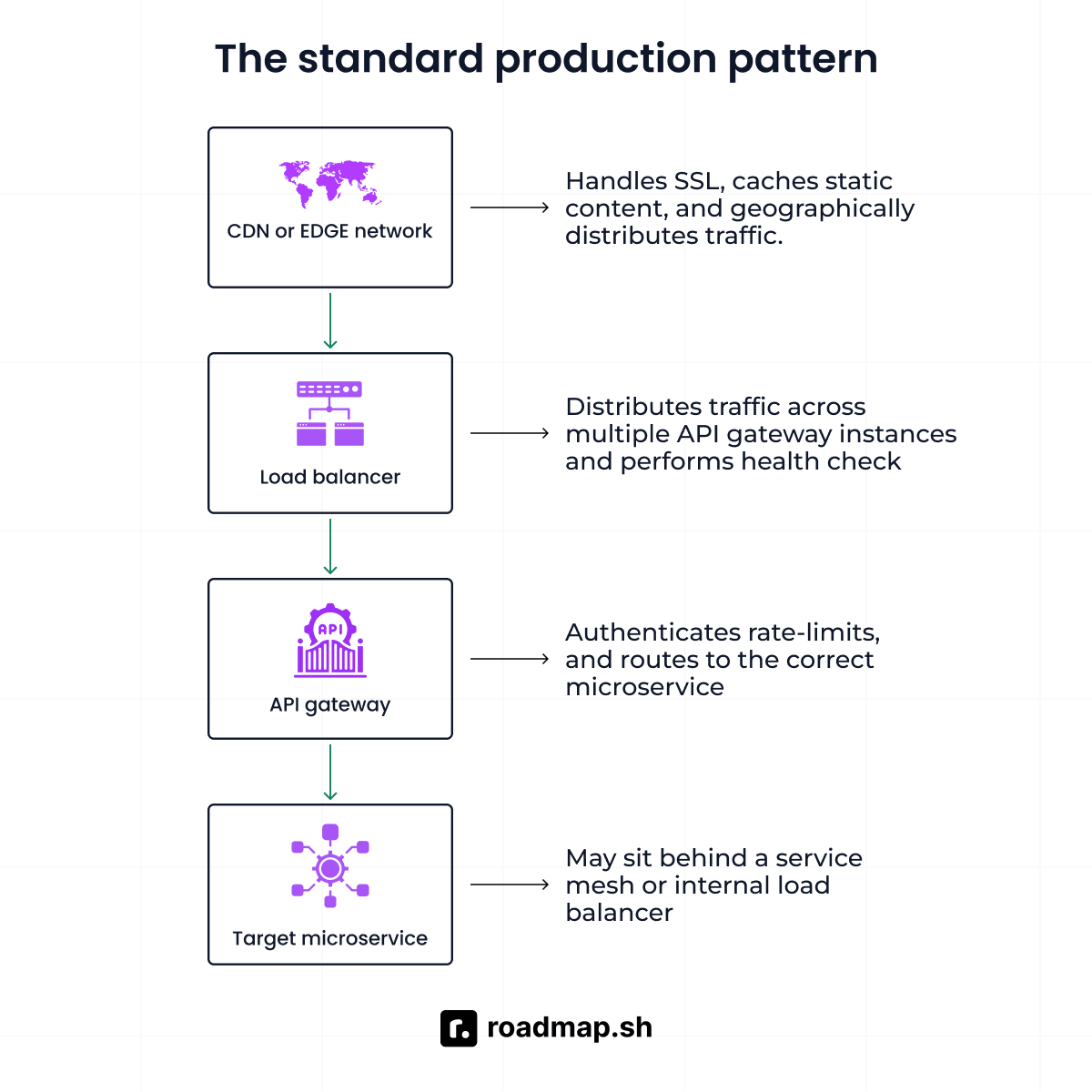
In production, requests move through a set of layers in a specific order. The following is how that sequence works:
CDN or edge network: The first stop for every request going to the server. It decrypts HTTPS traffic, caches static content, and spreads the load across regions.
Load balancer. Receives dynamic API traffic from the CDN and sends it across multiple gateway nodes. Health checks run in the background to keep traffic away from unhealthy ones.
API gateway. The control point between the load balancer and your microservices. It verifies authentication, enforces policies, and routes each request to the appropriate microservice.
Target microservice. The final stop for each request after it clears the gateway. It may sit behind a service mesh or internal load balancer depending on your setup.
Career and learning context
Load balancers teach you the core principles of horizontal scaling and traffic distribution. This knowledge is important for anyone working on backend infrastructure engineering. Teams rely on this tool to manage network traffic and maintain continuous uptime.
An API gateway becomes more important as teams adopt cloud-native microservices. More services create more complexity, and the gateway helps manage it. This growth in microservices pushed the global API management market to $8.86 billion in 2025.
Both tools come up often in system design interviews, especially at the senior level. To pass these technical reviews, you cannot just list tool definitions. You must explain where each one fits in a production architecture. Both topics appear in the Network Engineer Roadmap and Backend Roadmap on roadmap.sh.
Common errors and best practices
Many engineers still make a few mistakes when using an API gateway and a balancer. The following covers the most common mistakes and the best practices to prevent them.
Common mistakes
Using an API gateway as an alternative to load balancing. A single gateway has no built-in failover and needs a balancer in front to be production-ready.
Implementing auth rules and rate limiting in every microservice. It duplicates policy logic across services and makes changes expensive to roll out.
Routing all traffic through a gateway with no horizontal scaling. A single instance becomes a bottleneck and a single point of failure. Deploy multiple instances behind a balancer instead.
Confusing a Layer 7 balancer with an API gateway. The two tools operate at different levels of your architecture. Using one as a substitute for the other leaves your services open to risks that each tool exists to prevent.
Over-engineering a monolith with an API gateway. A load balancer alone is enough for a single application running on a couple of web servers.
Best practices
Deploy gateway instances behind a load balancer. This gives you horizontal scaling and automatic failover at the gateway tier.
Centralize cross-cutting concerns at the gateway. Authentication, policy enforcement, logging, and CORS belong at the gateway, not in each microservice.
Terminate SSL at the balancer or CDN. This lets the gateway and your services communicate over internal HTTP and cuts the encryption load.
Apply least privilege at the gateway. Define scopes and permissions per consumer and endpoint rather than granting blanket access.
Monitor the gateway as critical infrastructure. Latency, error rates, and rate limit hits at the gateway are early signals of backend problems. The network engineer roadmap shows how to build this monitoring setup using common tools.
Conclusion
A load balancer and an API gateway solve different problems. A load balancer keeps your infrastructure available at the network or HTTP layer. It routes traffic across your server instances, preventing the load from piling up on any single one. On the other hand, an API gateway protects and manages your APIs at the application layer. It authenticates requests, applies rate limits, and sends them to the right service.
For simple applications, a load balancer may provide everything you need. As your systems grow and move toward microservices, gateways become much more important. In modern production architectures, these technologies often work together. The load balancer sits in front of the gateway, and the gateway sits in front of backend services. Each layer adds a specific capability that the others do not provide.
Service meshes like Istio and Linkerd now handle some internal service communication that API gateways once owned. That shift lets gateways focus more on external API traffic. API gateways, service meshes, and observability tools now work closer together. This combination is shaping the future direction of enterprise architectures.
Keep learning with the Network Engineer Roadmap, Backend Roadmap, and other system design resources. Use the AI Tutor to review your architecture and test your understanding of API traffic management.
- Types of NoSQL Databases: How to Choose the Right One
- Backend Developer Job Description in 2026
- Top 7 Backend Frameworks to Use in 2026: Pro Advice
- Top 10+ Backend Technologies to Use in 2026: Expert Advice
- 20 Backend Project Ideas to take you from Beginner to Pro
- 25 Essential Backend Development Tools for 2026
- 8 In-Demand Backend Developer Skills to Master
- The 5 Best Backend Development Languages to Master (2026)
