LLM as a Judge: What It Is, How It Works, and Best Practices

 Ekene Eze
Your AI app generates thousands of open-ended answers, and manually reviewing every one for accuracy, relevance, and helpfulness isn’t practical at scale. String-matching tests don’t solve the problem either, because two correct answers can express the same idea in different words. This makes it hard to reliably assess output quality, especially when you tweak a prompt or swap models. A change intended to improve output quality can introduce an unnoticed regression, letting poor responses reach users and eroding trust in your app.
LLM-as-a-judge is one of the most popular techniques employed by AI engineers to address this problem. It uses a Large Language Model to evaluate another model’s outputs against criteria you define. It assigns a score or label, often with a short explanation, helping you assess response quality at scale. However, judges can be biased and make mistakes, so you must validate their reliability before you depend on their evaluations.
In this guide, you’ll learn what LLM-as-a-judge is, how it works, how reliable it is, and how to build your own evaluator in Python. You’ll also explore best practices for validating the judge and making its evaluations more trustworthy.
What is LLM-as-a-judge?
LLM-as-a-judge is an evaluation approach that uses a Large Language Model to assess another model's outputs against defined criteria. These criteria can include correctness, relevance, coherence, or helpfulness. The judge returns a score, label, or preference and often explains its decision.
The approach gained prominence through the 2023 research paper titled Judging LLM-as-a-Judge with MT-Bench and Chatbot Arena. The researchers investigated whether language models could give human-like judgments on conversational quality and serve as scalable evaluators. This makes LLM-as-a-Judge a scalable way to evaluate responses and understand why they received certain scores, without the high cost of collecting human feedback for every evaluation.
Practical example of LLM-as-a-judge
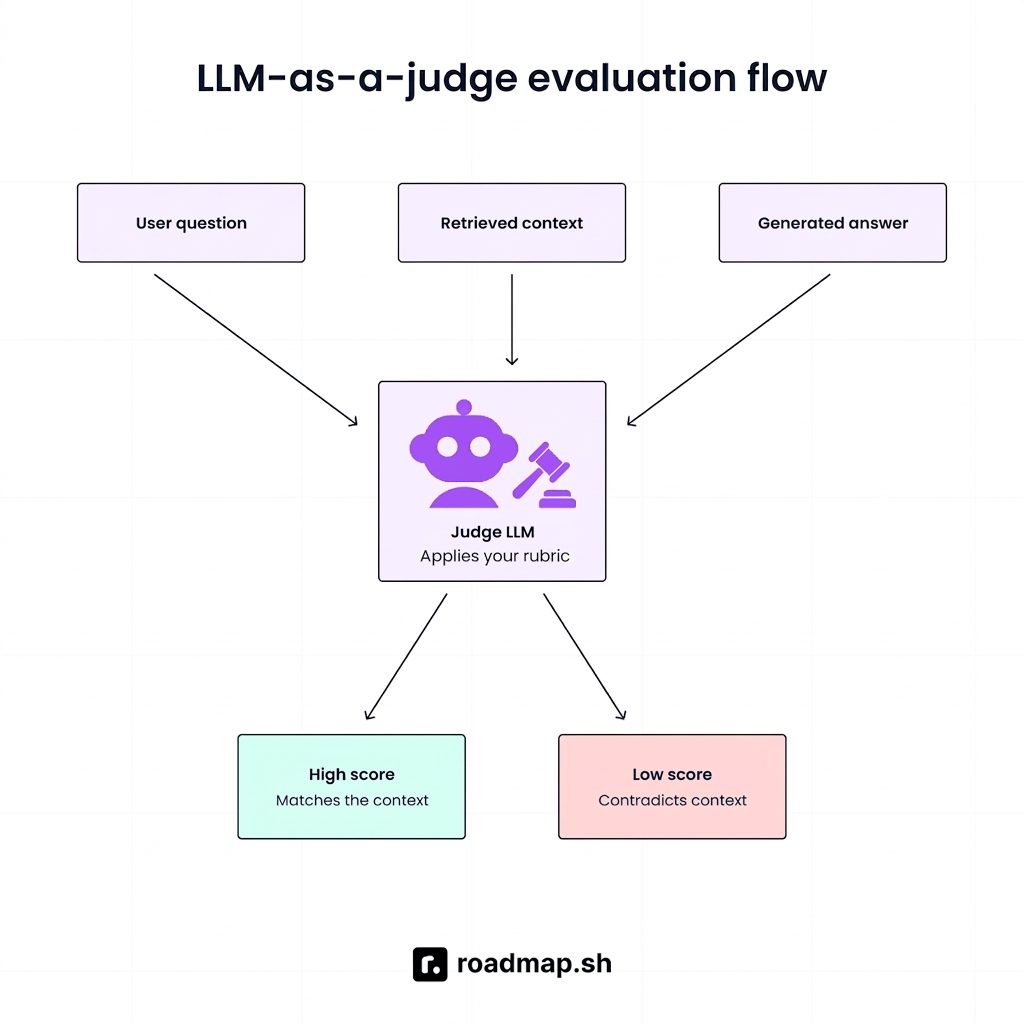
To see how LLM-as-a-judge works, consider a retrieval-augmented generation (RAG) application that answers questions using documents from a knowledge base. The judge model receives three inputs:
User question: “What is the refund window?”
Retrieved context: “Customers can request a refund within 30 days of purchase.”
Generated answer: “Customers can request a refund within 30 days of purchase.”
First, the judge compares whether the generated answer is grounded in the retrieved context. In this example, it is. So, the judge uses a score to evaluate the answer's quality. Using a 1-to-3 rubric, it would score this answer a 3 and explain why. If the answer instead said “Customers can request a refund within 60 days of purchase,” the judge would give a low score, such as 1 or 2, because the answer contradicts the context.
Why use an LLM-as-a-judge?
To understand what an LLM judge adds, let’s compare it with other evaluation methods, looking at how each works, their strengths and weaknesses, and when to use each.
Method | How it works | Strengths | Weaknesses | Best for |
|---|---|---|---|---|
Human evaluation | People read outputs and rate them | The most trusted signal | Slow, expensive, hard to scale or repeat | Building ground truth and validating other methods |
Traditional metrics (exact match, BLEU, ROUGE) | Compare output text to a reference answer | Cheap and consistent | Miss meaning, penalize valid answers worded differently | Tasks with short, constrained answers |
Code-based checks | Rules and scripts test the output | Cheap and deterministic | Can only test what you can express as a rule | Format, length, JSON validity, required keywords |
LLM-as-a-judge | A model scores output against a rubric | Handles open-ended criteria at scale, explains its scores | Has known biases and needs validation | Helpfulness, faithfulness, tone |
Human evaluation is the most trusted signal, but it is slow, expensive, and hard to repeat consistently. You can’t have a person review every output after every prompt change.
Traditional metrics like exact match, BLEU, and ROUGE compare generated text to a reference answer. They are cheap and consistent, but they measure word overlap rather than meaning. A correct answer phrased differently from the reference gets a low score.
Code-based checks are excellent for anything you can express as a rule: output format, length, JSON validity, or required keywords. Use them wherever they work. They’re cheaper than a model call and fully deterministic.
LLM-as-a-judge handles the open-ended criteria the others can’t, such as helpfulness, faithfulness, and tone, and it can explain its scores. The original paper describes it as a scalable and explainable way to approximate human preferences that would otherwise be expensive to collect.
Evaluation hierarchy: Use code checks for deterministic formatting, LLM judges for subjective criteria, and human reviews to validate the judges.
How LLM-as-a-judge works
A judge setup is defined by two choices: how many outputs the judge sees (one or two) and whether it has a reference answer to compare against. Below are the three setups for a judge model:
1. Single-output scoring
The judge rates one response against your criteria, with or without a reference answer. Without a reference, it’s called reference-free evaluation. This is the most common setup for production monitoring because it needs no ground truth and lets you score each output as it arrives.
2. Pairwise comparison
The judge compares two responses to the same input and picks the better one or declares a tie. This approach is useful for comparing prompts or models, with results typically reported as a win rate. It can be easier for a judge to compare two answers than to assign an absolute score, especially when quality differences are subtle.
Always give the judge the explicit option to declare a tie, and state this clearly in the prompt. If it is forced to choose a winner between two equally good or equally bad answers, it may hallucinate a difference, undermining the reliability of the win rate.
Pairwise judging is particularly susceptible to position bias, since judges can favor whichever answer appears first or last. The standard mitigation is to run each comparison twice with the order swapped and only count verdicts that agree.
3. Reference-based evaluation
The judge compares a response to a known good answer, often called a gold or ground-truth answer. This fits test sets where expected answers already exist. Unlike exact-match methods, the judge can recognize that two differently worded answers mean the same thing. Keep in mind that for open-ended questions, a reference is one valid answer, not the only one.
Anatomy of a judge prompt
The quality of a judge depends heavily on its prompt. A good judge prompt should have the following:
Role and task: Tell the model it is evaluating, and what it is evaluating.
Criterion: The single thing you want it to assess, plus what to ignore.
Scoring scale: A small scale with what each score means. Binary (pass/fail) or 3 to 5 points is usually more reliable than a wide range like 1 to 10, where adjacent scores are hard to tell apart.
Inputs: The question, the context, and the response, clearly separated from the instructions.
Reasoning first: Ask for a short explanation before the score. Because models generate text in order, a score written first can't benefit from the reasoning that follows it.
Structured output: Define an output structure, such as JSON with reasoning and score fields, so your code can parse the result. Use your provider’s Structured Outputs or JSON mode if available. Without these features, LLMs may wrap JSON in Markdown code fences (
json ...) or prepend conversational filler such as “Here is your score:”, causing a standardjson.loads()call to fail.
Here’s a good example of a short groundedness judge for a RAG answer:
Common evaluation criteria
These are the common criteria to consider when evaluating outputs with an LLM judge:
Faithfulness or groundedness: Is the answer supported by the provided context?
Answer relevance: Does it address the question that was asked?
Correctness: Is the information actually true? This differs from groundedness, because an answer can be faithful to a source that is wrong. Judging correctness is also less reliable without a reference answer or retrieved evidence, since the judge falls back on its own knowledge.
Completeness: Does it cover everything the question needed?
Safety and toxicity: Is it free of harmful or offensive content?
Tone and style: Does it match the voice you want?
Instruction following: Did it respect the constraints in the prompt?
Note: Give each criterion its own judge or its own score. A single blended "quality" number hides what went wrong: If it drops, you can't tell whether answers got less accurate, or less relevant. Separate prompts cost more calls but are usually easier to debug and calibrate than one prompt scoring everything at once.
How reliable is an LLM-as-a-judge?
Reliable enough to be useful, but not something to trust blindly. The paper names four known weaknesses, each with a practical mitigation:
Position bias: The judge favors the first or second option in a pairwise comparison. Mitigation: Run the comparison in both orders and only count results that stay consistent.
Verbosity bias: The judge prefers longer answers. Mitigation: Write criteria that don’t reward length, and add a length check in code.
Self-enhancement bias: The judge favors outputs from its own model or family. Mitigation: Use a judge from a different model family where possible.
Limited reasoning: The judge struggles to grade math or logic. Mitigation: Provide reference answers or use code checks for verifiable answers.
How to get started with LLM-as-a-judge
A basic judge takes a few dozen lines of Python. The harder part is checking that it agrees with human reviewers. If you want to follow along, create a project folder and set it up by entering the following prompts:
On Windows: Activate the environment with .venv\Scripts\activate (Command Prompt) or .venv\Scripts\Activate.ps1 (PowerShell), and set the key with set OPENAI_API_KEY=your-key-here (Command Prompt) or $env:OPENAI_API_KEY="your-key-here" (PowerShell).
This example uses Python 3.9+ and the OpenAI SDK, but the steps are the same for any provider.
Define one criterion and a scale
Pick a single, specific criterion and write down what each score means. For a RAG application, you could measure how well the answer is supported by the retrieval context. For example:
3: Every claim is supported by the context.
2: Most claims are supported, but at least one minor claim is not.
1: The answer contradicts the context or makes major unsupported claims.
Narrow criteria beat a general "quality" score for two reasons. The judge has a clearer job, so its scores are usually more consistent. And when a score changes, you know what changed.
Build a small labeled set
Have human label examples for that criterion using the same scale. A practical starting range is 30 to 100 examples. Treat that as a rule of thumb for getting started, not a statistical rule. Include clearly good, clearly bad, and borderline cases. This becomes your validation set.
Create a file called labeled.jsonl in your project folder and paste the following:
Write and run the judge
Next we create a file to hold the judge prompt, ask the model for JSON, and parse the score. Call the file judge.py and paste the following:
A few notes on the code:
temperature=0reduces run-to-run variation but doesn't remove it. Some models don't accept a custom temperature, so remove that line if you get an error.response_formatuses Structured Outputs to enforce the Pydantic schema, including the required reasoning and score fields and their types. The SDK parses the response into aJudgeResultinstance, so you can accessmessage.parseddirectly without callingjson.loads().The reasoning comes before the score in the output format on purpose, so the model explains before it scores.
Replace the model with whichever model you're using.
Once it works, save the exact version of all the installed packages whose names contain openai so your results remain reproducible:
You use this command when you want a requirements.txt file that contains only the OpenAI library and its pinned version, rather than every single package installed in your virtual environment
Measure agreement with human labels
Run the judge over your labeled examples and compare its scores to the human scores. Create a file called evaluate.py and paste the following:
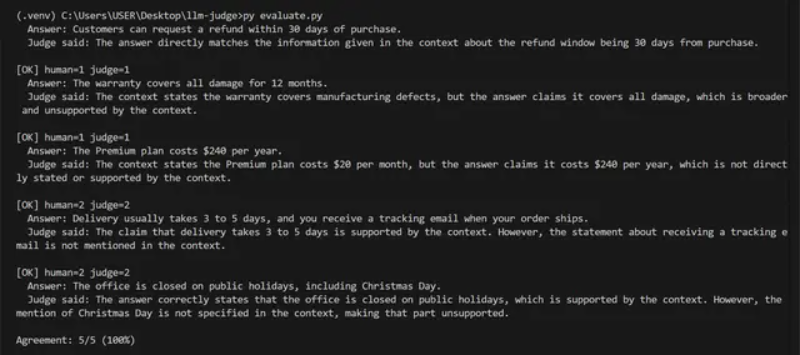
Run it with python evaluate.py. The agreement rate is the share of examples where the judge's score matches the human's. The script also prints every disagreement with the judge's reasoning, so you can see why they differ.
Disagreements usually point to a vague line in the rubric or a missing example. Edit the prompt, run again, and repeat until agreement is acceptable for your use case. Keep a few labeled examples aside and don't tune against them, so you have an honest final check.
This is what the output should look like:
Run it where it helps
There are two places a judge pays off most:
In Continuous Integration, against a fixed test set, before you ship a prompt or model change. Because judge scores are noisy, gate on an aggregate threshold across the set rather than on single examples.
On a sample of production traffic, to track quality over time. Attach the scores to your traces.
Eval and observability tools such as Langfuse, MLflow, DeepEval, Promptfoo, and Ragas offer built-in judges, saving setup time and making evaluations easier to refine.
Note: Use a capable model, ideally from a different family than the model you’re judging, to reduce self-enhancement bias, balanced against cost. If your application generates answers with an OpenAI model, consider judging with a model from another provider, which means swapping the client call in judge.py.
LLM-as-a-judge best practices
An LLM judge will always give you a score, whether or not that score is any good. Below are some of the practices you should apply to make sure it’s worth trusting:
Use one judge per criterion, not one blended score. A single “quality” number hides what went wrong. Separate scores for groundedness, relevance, and tone tell you exactly what changed when a number drops.
Write explicit rubrics with examples for each score. Define what every score means and add a labeled example or two for borderline cases. Without this, the judge has to guess your standards and may score similar outputs differently.
Ask for reasoning before the score, and use structured output. Models generate text in order, so reasoning written first can inform the score that follows. Enforce a reasoning and score schema with your provider's structured output feature so your code can parse and validate the result.
Prefer binary or small scales. Pass/fail or a 1-to-3 scale is usually more consistent than 1 to 10, where adjacent scores are hard to tell apart.
Validate against human labels, and recheck after any judge change. Measure agreement with a small set of human-labeled examples before you trust the judge, and use a held-out portion so you aren’t just tuning to the examples you’ve already seen. Repeat the check whenever you edit the prompt or switch models.
Use deterministic checks wherever they can do the job. Format validation, exact-match answers, required keywords, length limits, and code execution are cheaper, faster, and fully repeatable. Save the judge for qualities that code can’t measure.
Mitigate position bias by swapping order in pairwise comparisons. Run each comparison twice with the answers in opposite order, and only count verdicts that agree. Let the judge declare a tie, so it isn't forced to invent a winner between equal answers.
Use a different model family for the judge where possible. Judges tend to favor outputs from their own model family, so a judge from another family reduces self-enhancement bias.
Sample production traffic instead of judging everything. Scoring a representative sample controls cost while still showing quality trends. Judge more heavily on new releases or flagged traffic.
Version the judge prompt and model, and log them with every score. A score is only meaningful alongside the exact prompt and model that produced it. Without that record, you can’t tell whether a change in scores came from your application or from your judge.
Keep humans in the loop for high-stakes decisions and edge cases. Use the judge to triage and monitor at scale, and send high-stakes outputs and low-confidence cases to human reviewers.
Wrapping up
Reviewing every LLM output by hand doesn’t scale, and exact-match tests mark correct answers as wrong whenever they’re worded differently from the expected one. LLM-as-a-judge addresses this by scoring outputs against defined criteria, either independently, against reference answers, or through pairwise comparisons. However, judges can be biased or struggle with complex reasoning. For reliable results, use clear rubrics, validate scores against human judgments, automate verifiable checks with code, and reserve human review for high-stakes cases.
Start by building your first judge using the steps in the guide, then write clearer prompts so the model can follow your rubric and instructions. Next, integrate the judge into automated regression testing to catch quality drops before release, and use observability tools to monitor output quality in production. For a broader foundation, follow the AI Engineer roadmap to develop the skills needed to build and evaluate AI-powered applications.
Don’t forget to create a roadmap.sh account to track your progress, save learning paths, and access personalized roadmaps as you continue building your skills. The AI Tutor can also help you explore concepts or answer follow-up questions.
