Automated Regression Testing: The Complete 2026 Guide
 William Imoh
You're having a great day working on your application, you make a harmless change, and suddenly an unrelated part of the application stops working. Nobody touched the authentication flow or the checkout page, yet one of them is now broken. Things get even more complicated when you're working in a team. Different developers and AI engineers are making changes to the same codebase every day, and there's no realistic way to retest every existing feature before deployment.
This is the problem automated regression testing was built to solve. Instead of manually retesting your application after every bug fix, feature, dependency update, or refactor, it reruns a regression test suite whenever you update your code to verify that the functionality that worked yesterday still works today.
In this guide, you'll learn what automated regression testing is, and how tools like Playwright, Pytest, GitHub Actions, MLflow, and Langfuse support different parts of the workflow. You'll also see how the same regression testing principles apply to LLM applications, where regressions appear as quality drops rather than broken functionality.
What is automated regression testing?
If a feature stops working after you fix a bug, add a feature, or refactor part of your application, you've introduced a regression.
Regression testing is the process of verifying that existing functionality still behaves as expected after a code change. Its goal is to catch unintended side effects before they reach production. You can do this either manually or through automation.
Manual regression testing requires a QA engineer to execute predefined test cases by hand after each significant change. Automated regression testing uses a testing framework to execute those same test cases programmatically after every commit, during a pull request, before deployment, or at other stages of a CI/CD pipeline without human intervention.
Before those tests can run, you need something to run them against. A regression test suite is a collection of test cases representing behavior you've already confirmed works. Run the suite, and it checks whether that behavior still holds. A test that passed last week and fails today is telling you something: a recent change probably broke it.
There are three common regression testing strategies:
Full retesting: Runs every test in the regression test suite after every change. Since every test runs, it gives you the highest confidence that nothing else has been broken. The downside is that it's also the slowest and most expensive strategy to execute, which is why teams usually reserve it for major releases or changes whose impact isn't completely understood.
Test selection: Rather than running the whole suite, test selection targets only the tests affected by the code you changed. You get results much sooner because you're not waiting on tests that have nothing to do with your change. The hard part is knowing exactly which tests are affected, which usually means investing in tooling or keeping your test suite organized enough to trace dependencies by hand.
Test prioritization: Not every test carries the same weight. Test prioritization ranks tests based on factors such as business impact, risk, and historical failure rates. Critical workflows like authentication, payments, or checkout run first, making it more likely that high-impact regressions are caught before the rest of the suite finishes.
The concept of regression extends beyond code. In LLM applications, a prompt update, a model version update, or a retrieval configuration change can introduce a regression. The application still returns HTTP 200, but the response may contain hallucinations, lower-quality output, or incorrect information. We'll cover how to detect these regressions later in this guide.
Implementing automated regression testing
You may already have regression tests in place, but one common mistake is running the entire suite after every commit. That works fine with a small regression suite, but as it grows, every code change takes longer to validate. The solution is to build a layered test strategy, where different sets of tests run at different stages of your CI/CD pipeline.
Building a layered test strategy
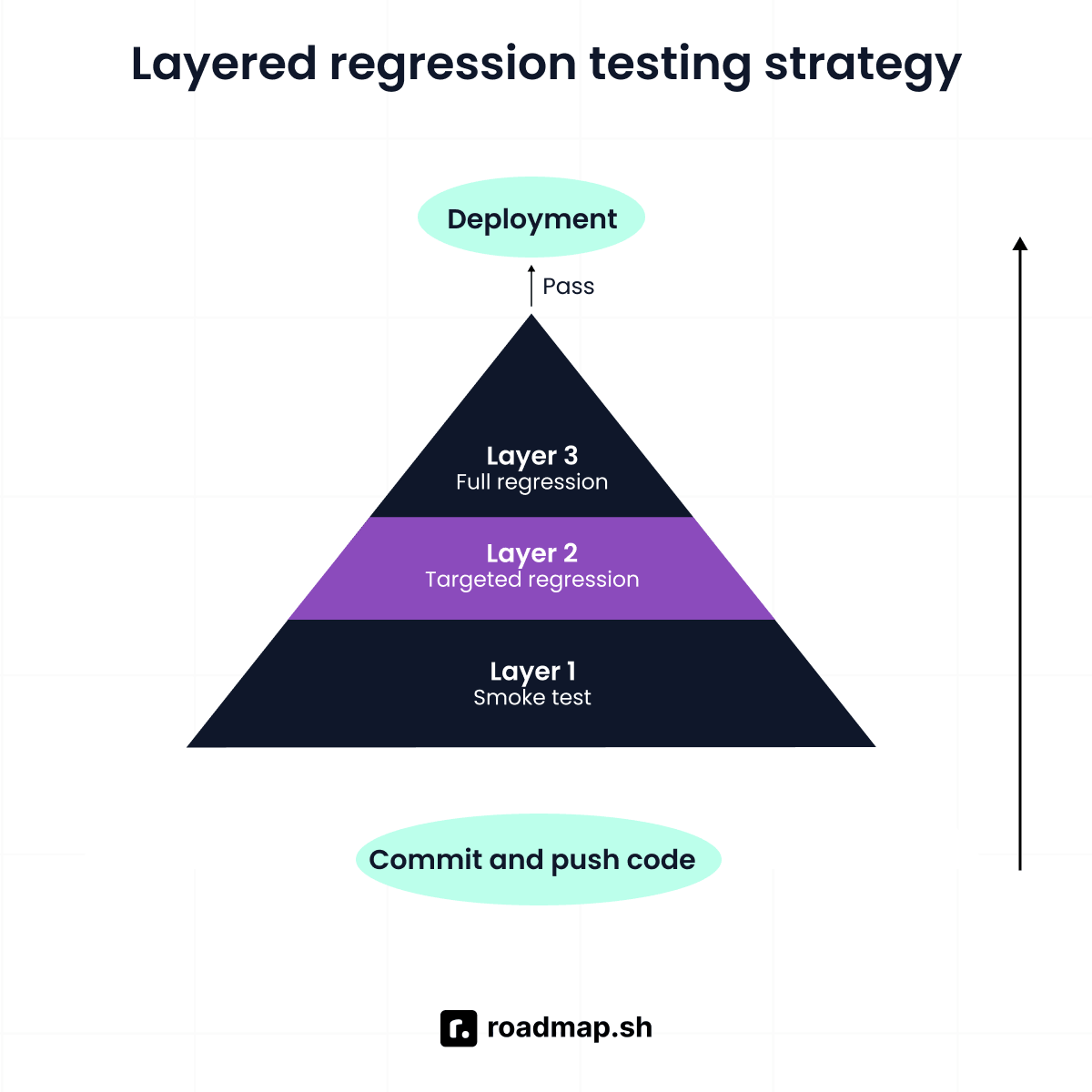
Rather than treating every regression test the same, organize them into three layers. Each layer answers a different question about the health of your application. Start with the one that gives you the fastest indication that something is wrong.
Layer 1: Smoke tests
Smoke tests are a small collection of tests that determine whether an application is healthy enough to continue. Rather than checking every feature, they focus on the critical paths that must always work. This includes verifying that the application starts successfully, users can authenticate, core API endpoints respond correctly, and the application can connect to the database.
Smoke tests run on every commit. They're designed to complete in about two minutes, giving you immediate feedback on whether a recent change introduced a failure before the rest of the regression suite runs.
For example, one of the first things you might verify is that the application is reachable. The following Playwright smoke test checks that the homepage loads successfully and the server responds with an HTTP 200 status code:
Layer 2: Targeted regression tests (on pull request)
Once your application passes the smoke tests, the next step is to verify the parts of the application most likely affected by the proposed changes.
Targeted regression tests focus on the feature being modified and the code paths surrounding it. Depending on the scope of the change, this test layer may include unit tests, integration tests, and end-to-end tests that exercise the affected functionality without running the entire regression suite.
Because these targeted tests run on pull requests, they should provide enough coverage for developers to review the results before merging. Most teams aim to keep this layer between five and twenty minutes, balancing execution time with meaningful validation.
For example, if a pull request changes a user profile endpoint, you can write a test to make sure it still works. The following example uses Flask's test client with Pytest:
This test sends a request to the changed endpoint and checks the response. If the API breaks or changes unexpectedly, the test fails before the pull request is merged.
Layer 3: Full regression suite (nightly or pre-release)
Once targeted regression tests pass, the final layer is what comes next. It validates the application as a whole.
A full regression suite runs every relevant test, including end-to-end tests, cross-browser tests, performance regression checks, and edge cases that would be too expensive to execute after every code change. The goal is to catch issues that only become visible when the entire application is exercised together.
Because this layer can take anywhere from 30 minutes to two hours to complete, it usually runs on a nightly schedule or serves as a final quality gate before a release branch is merged or deployed. The longer execution time is acceptable here because developers aren't waiting on the results before continuing their work.
Writing maintainable regression tests
You don't want to spend time fixing tests when you could be building features. Most regression suites become difficult to maintain because small UI changes break some existing tests. Here are four practices that help prevent that:
1. Use the Page Object Model (POM) for UI tests: Suppose every test that logs a user in contains its own page interactions. A small UI change now means updating every one of those tests. Instead, keep the page interactions in one place and let your tests reuse them. The Page Object Model (POM) is designed for exactly this. The following example wraps the login flow inside a reusable Page Object using Playwright.
With page interactions handled by the Page Object, the test can focus on verifying the expected behavior. In this example, it verifies that a user with valid credentials is redirected to the dashboard after signing in.
2. Write tests that assert behavior: Focus on whether the feature actually works. In the login example, verify that the user reaches the dashboard after signing in instead of checking that the login button has a particular CSS selector. Otherwise, a small UI change can break the test even when the login flow still works.
3. Avoid test interdependence: Every regression test should be able to run on its own. This is known as test isolation. For example, if one test signs a user up and another test assumes that the user already exists, the second test now depends on the first. Instead, let every test create and clean up its own data. This also makes parallelization possible because the tests no longer rely on one another.
4. Use fixtures or data factories: Use a test fixture or data factory to generate the data your tests need instead of hardcoding values or relying on a shared test database.
Integrating regression tests into a CI/CD pipeline
You've written your regression tests. That's only one part of the process. The next step is deciding when they should run. Instead of relying on someone to execute them manually, use a CI/CD platform such as GitHub Actions to automate the process. The workflow below runs the smoke test suite on every push, targeted regression tests on every pull request, and uses a cron job to schedule the full regression suite every night.
With regression tests integrated into your CI/CD pipeline, you can validate every code change before it reaches production. Here are four practices that make the integration more effective:
1. Fail fast: The fail-fast principles catches issues as early as possible, so you don't waste time running the rest of the pipeline. If the smoke test suite fails, stop the pipeline immediately and fix the issue before continuing.
2. Parallel execution: Parallel execution reduces the total time it takes to run your regression suite. Split the full regression suite across multiple test runners so different groups of tests run at the same time.
3. Test result reporting: Make failed tests easier to identify and fix. Include screenshots, logs, and other useful context in your test reports so you know exactly what broke and where.
4. Flaky test handling: Prevent flaky tests from blocking deployments. If a test fails intermittently without any code changes, isolate it and investigate the root cause. If it cannot be fixed immediately, quarantine it and set a clear Service Level Agreement or expected timeframe for fixing it before adding it back to the regression suite.
The GitHub Actions workflow you've built in this section is a proven way to integrate regression tests into a CI/CD pipeline. The same principles can be implemented with other CI/CD tools such as GitLab CI, Jenkins, and CircleCI, even though the configuration may differ.
If you want to build a stronger understanding of Git, GitHub, and the workflows behind modern software delivery, the Git & GitHub guide is a good place to continue.
Choosing a regression testing framework
There are several regression testing frameworks available today. The right one depends on your testing goals, programming language, and the type of application you're building. Here are some of the most common options and when to use them:
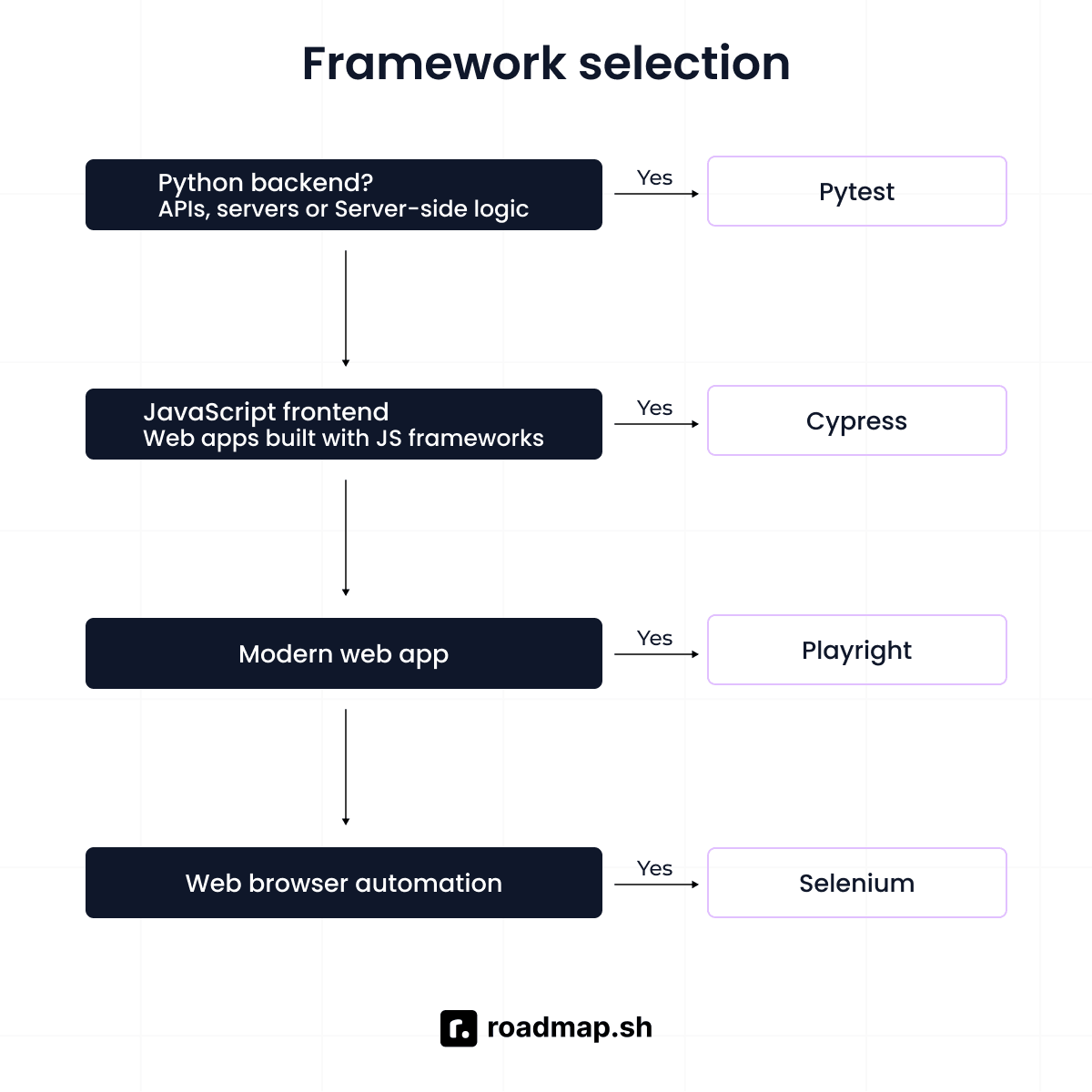
Playwright: Playwright is a fast, cross-browser testing framework for end-to-end and UI regression testing. It supports Python, JavaScript, and TypeScript, and is a good choice for teams that want a single tool for browser automation and API testing.
Pytest: Pytest is the standard test runner for Python unit and integration regression testing. It has a rich plugin ecosystem, including pytest-cov for test coverage and pytest-xdist for parallel execution. Use pytest when your regression tests focus on Python applications, APIs, or backend services.
Cypress: Cypress is a JavaScript framework for browser-based regression testing. It provides real-time test execution and is well suited for frontend applications built with JavaScript frameworks. Its main limitation is that it's scoped to browser-based testing, with support for Chrome and Firefox. Use Cypress when your regression suite targets browser-based frontend applications.
Selenium: Selenium is one of the most widely adopted frameworks for browser automation and regression testing. It supports multiple programming languages and offers broad cross-browser coverage across platforms. It has the highest maintenance overhead of the four frameworks, but remains a strong choice for teams with an existing Selenium suite or projects where browser compatibility is important.
Practical applications of automated regression testing
The next thing to figure out is when to run regression tests. The following examples show where automated regression testing fits into the software testing process.
1. CI/CD pipelines: One of the best ways to automate your regression testing process is through your CI/CD pipeline. Once your tests are connected to the pipeline, they can run automatically whenever new code is pushed. A common automated testing strategy is to run smoke tests after every commit, targeted regression tests for pull requests, and complete regression testing before a release. This is the pattern used by teams that deploy multiple times per day.
2. After dependency updates: Updating a library or framework can introduce breaking changes, even if you didn't modify your own code. After a dependency update, run the full regression suite to confirm that existing test cases still pass before shipping the update. This is useful when applying security patches that need to be released on time.
3. Database migration validation: After a schema migration or data migration, run regression tests on the data access layer to confirm that queries return the expected results and the application can still read from and write to the database correctly.
4. Cross-browser and cross-device validation: Web applications don't behave the same way across browsers and devices, which is why cross-browser coverage is a core part of web application testing. Run your UI regression suite against multiple browser and device configurations to catch rendering issues, layout breakages, or JavaScript incompatibilities before they reach your users.
5. API contract testing: A small change to a backend API can break every client application that depends on it. Run regression tests against the API contract to confirm existing requests and responses still behave as expected, catching breaking changes before client applications feel them. This matters even more in microservices architectures, where multiple services depend on the same API.
6. Pre-release gating: Before merging into a production or release branch, teams run the full regression suite as a release gate. If a test fails, the release is blocked until the issue is fixed or the test is updated to reflect an intentional change in behavior.
7. LLM prompt and model evaluation: AI applications also need regression testing. When you update a prompt, switch to a new model, or modify the retrieval configuration, run a regression evaluation against a golden dataset before deployment. Just like a dependency update, the code may stay the same while something the application depends on changes. The evaluation confirms that response quality hasn't regressed before users are affected.
Regression testing for LLM applications
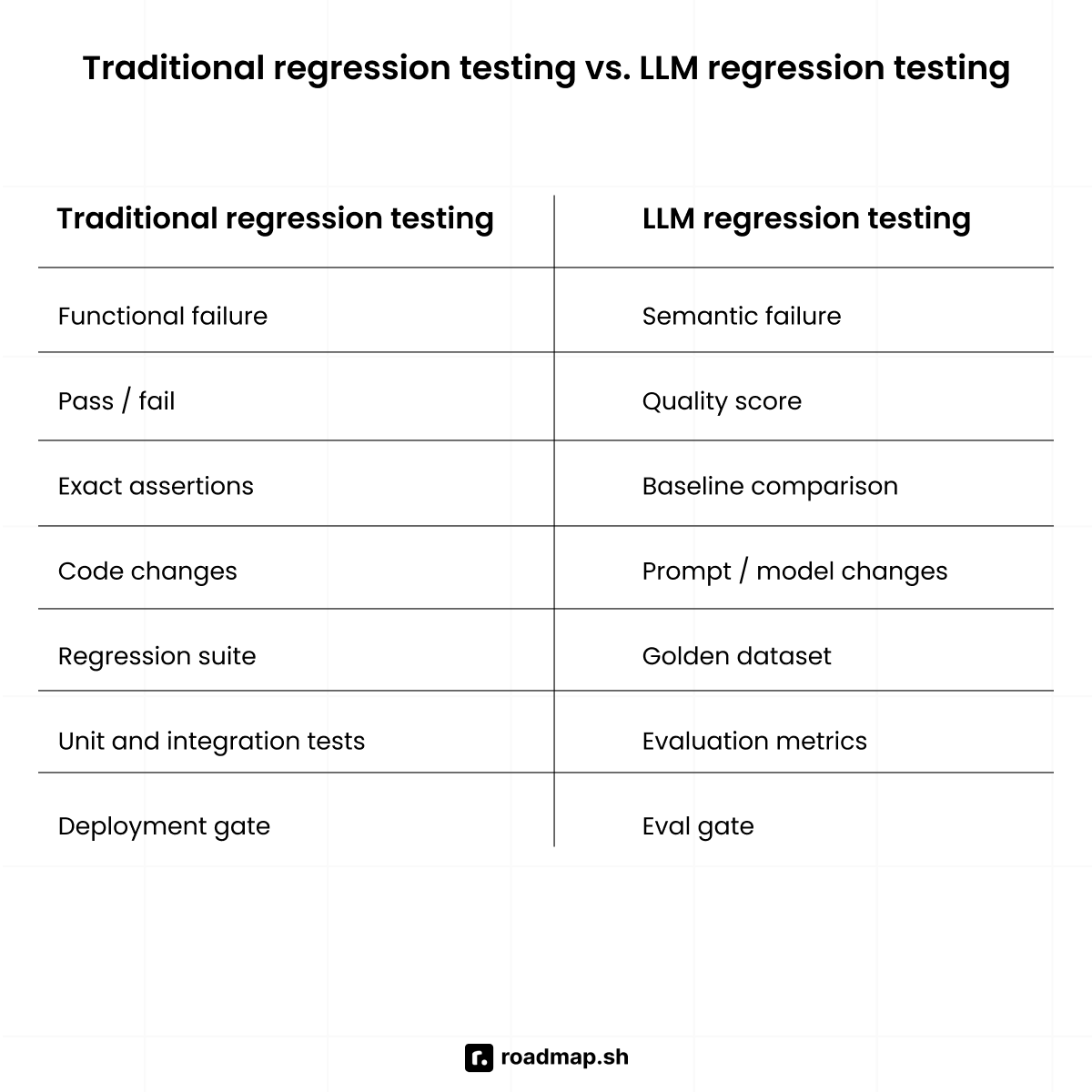
Traditional regression testing catches functional failures: something the application was supposed to do, but no longer does. A function returns the wrong value, a page refuses to load, or an API responds with a 500 error. LLM regression testing catches semantic failures: the application still responds, but the answer may be factually wrong, lower in quality than before, or inconsistent with previous outputs. These failures rarely produce an error signal, so standard monitoring may report everything as healthy even when response quality has dropped.
What makes LLM regression testing different
In traditional regression testing, a test either passes or fails. LLM evaluation works on a spectrum instead. A response can be partially correct, phrased differently but semantically equivalent, or slightly worse than a previous response. Instead of relying on exact-match assertions, compare new outputs against a baseline to catch quality regressions. This is because a semantic failure is often a drop in answer quality rather than an application error.
There are three common triggers for an LLM regression run:
Prompt changes: Even a small wording change can noticeably affect response quality or increase hallucinations.
Model updates: Switching providers, upgrading to a newer model, or changing parameters like temperature can produce different outputs for the same prompt.
Retrieval configuration changes: In RAG applications, changing the chunk size, embedding model, or retrieval threshold can reduce answer faithfulness without changing a single line of application code.
The goal is the same as traditional regression testing: catch quality regressions before deployment, just as code regression tests catch functional regressions before a merge.
Building an LLM regression test suite
Building an LLM regression test suite starts with measuring response quality with prompt and model changes. The following components are a good way to evaluate outputs and spot regressions:
Golden dataset: Build a golden dataset using representative prompts, expected responses, or quality rubrics. Include the questions users ask most often, important edge cases, and other high-stakes cases where response quality matters most.
Evaluation metrics: Before running an LLM regression test, define what quality means for your application. Common evaluation metrics include faithfulness (does the answer accurately reflect the source material), relevance (does the answer address the question), hallucination rate (does the answer introduce facts not present in the context), and task completion (did the model accomplish the intended goal). Track these scores across runs so regressions appear as score drops.
Scoring responses with another model: Exact matching doesn't work well for open-ended responses, so you'll usually let another LLM score them against your evaluation rubric instead. It's the easiest way to evaluate responses at scale. One thing to watch for is consistency. The same judge model can score the same response differently, which is why teams normally set the temperature to 0 and use structured scoring prompts.
Human annotation: For high-stakes applications, validate a sample of responses with human annotation. Human review helps calibrate the LLM judge and confirms that automated scores correlate with real response quality.
Integrating LLM evaluation into CI/CD
LLM regression evaluation should be part of your CI/CD pipeline, just like unit and regression tests. If a prompt or model update causes the faithfulness score to fall below the accepted baseline threshold, the deployment should fail instead of shipping lower-quality responses to users. A typical LLM evaluation workflow looks like this:
1. The basic pipeline: Run the golden dataset through the updated prompt or model version, score the responses using your evaluation metrics, compare the results with the previous version, and let the CI/CD pipeline block the deployment if any metric regresses beyond the defined tolerance.
Here's a short Python example using MLflow to evaluate two prompt versions:
This example shows the basic idea behind an eval-gated deployment. The new prompt is evaluated, its scores are compared with the baseline, and the deployment is automatically blocked if a critical metric falls below the accepted threshold.
2. Tools that support eval-gated deployments: Several tools automate different parts of the evaluation workflow. Braintrust integrates eval pass/fail gates into CI/CD pipelines. MLflow tracks experiments and compares evaluation metrics across prompt versions. Langfuse supports prompt versioning and before-and-after quality comparisons. You might also want to explore the LLM observability tools guide for a broader overview.
3. Note the practical challenge: LLM evaluations are slower and more expensive than unit tests, so running the full golden dataset on every commit isn't practical. The same layered approach used for code regression testing applies here: run a smaller, high-priority subset of the golden dataset on every pull request, then the full golden dataset on a nightly schedule or before major releases.
Common errors and best practices
Software engineering teams, QA engineers, and AI engineers all hit a few of the same test automation mistakes. Here's what trip them up most, and how to avoid it.
Common mistakes to avoid
Running the full suite on every commit: A 60-minute suite on every commit kills fast feedback and pushes people to skip tests. Use the layered approach instead: smoke tests on commit, full suite on a schedule.
Testing implementation instead of behavior: Tests tied to CSS selectors or element IDs break on every UI change, even when nothing actually broke. Test what the user can do, not how the code does it.
Skipping test isolation: Tests that share a database, a login session, or a global variable fail at random once execution order changes or runs go parallel. Every test should create and clean up its own state.
Letting flaky tests accumulate: A test that fails 10% of the time isn't a small thing; it wrecks trust in the whole suite. Once you start ignoring failures, the suite stops doing its job. Quarantine flaky tests quickly and set a deadline for fixing them.
Never updating the test suite after intentional changes: If a feature changes on purpose, the test needs to change with it. Otherwise, you get false failures that block pipelines and teach engineers to stop trusting the results.
Over-automating: Exploratory testing, usability checks, and tricky edge cases still need a tester's judgment. Manual testing isn't obsolete, it just doesn't scale the way automation does. Automate the stable, repetitive, high-value stuff and leave the rest to your QA engineers.
Best practices
Start with the highest-risk path: Look at your user journeys critically. Automate login, checkout, and payment flows first. A bug in the admin settings might only annoy the admin user, but a failure in the checkout flow is a production incident.
Apply the test pyramid: Unit tests sit at the base; they are fast, cheap, and also cover the logic in detail. That's where most of your automated regression test cases should live. Integration tests are in the middle, checking that components work together. End-to-end tests sit at the top, confirming critical user flows still hold. Keep more of your tests low in the pyramid; that's where they're cheap to run and cheap to maintain.
Use change-based test selection: Instead of running all 2,000 tests on every PR, identify which tests cover the code that actually changed and run only those. Regression testing tools like Pytest-coverage mapping and Playwright's component-level test tagging can support this.
Parallelize execution: This keeps continuous testing fast. Split the test suite across multiple runners to reduce wall-clock time. A 60-minute suite can often be brought under 10 minutes with six parallel runners.
Treat tests as production code: Apply the same code review standards, naming conventions, and refactoring discipline to test code that you apply to application code. The same discipline should extend to your automated test scripts. Poorly structured tests are one of the main sources of regression suite maintenance debt.
Conclusion
Automated regression testing sustains your code delivery without second-guessing every release. Throughout this guide, we've covered a layered strategy: smoke tests catch problems on every commit, targeted regression tests catch problems on every PR, and the full suite catches what's left overnight, so you don't drown in slow tests. Together, these give you useful feedback at every stage. A layered suite is what stops the harmless change that breaks something unrelated before your users do.
The same idea applies to LLM applications. A golden dataset evaluation suite, run against every prompt change and model update, does for LLM deployments what the regression suite does for code: it makes them systematic and trustworthy instead of a guess. In both cases, the suite is only as useful as the trust engineers place in it.
Explore the AI Engineer and the QA roadmaps to understand how testing fits into the broader software delivery pipeline. The AI Tutor is also there to help you learn faster and with more confidence.
