Vibe Coding Best Practices: How To Get Consistent Results

 Ekene Eze
You’re a vibe coder who opens your AI coding tool, writes a prompt, hits accept all the way, and spins up a working feature in no time. The output looks plausible, but by the time you start reviewing the code, the cracks appear. You’re left with AI-generated code that is difficult to review, potentially vulnerable, and inconsistent in both style and output.
What is meant to be a faster approach becomes a bottleneck. The problem is not the tool but how you use it. With vibe coding, you must assume the role of a supervisor who gives clear instructions and puts in place a working model that helps you get consistent results. Otherwise, you find yourself spending more time fixing code, burning through tokens, and hitting usage limits mid-session.
This guide explores the 10 best practices to help you move from inconsistent to reliable results. While the examples use Claude Code, the underlying practices apply whether you’re using Cursor, Windsurf, Gemini CLI, Codex, or any other AI coding tool.
TL;DR
Use the table below as a checklist before and during your vibe coding session:
# | Best practice | What to do |
1 | Keep your context config file lean and current. | Remove outdated content from CLAUDE.md, GEMINI.md, .cursorrules, or equivalent |
2 | Reset context between features. | Have one feature per session. Use your tool’s reset command. |
3 | Plan before every feature. | Ask for a plan before any code is written. |
4 | Write scoped, constrained prompts. | Name the goal, list constraints, specify what not to touch. |
5 | Give the AI an example file. | Provide code examples instead of abstract descriptions. |
6 | Review every diff before accepting. | Check deletions, API changes, new deps, and off-limits files. |
7 | Run tests after every accepted change. | Do a typecheck + test + lint every time. |
8 | Declare off-limits zones. | Document where sensitive data resides in your config file and related prompts. |
9 | Require migration plans. | Read summary of schema changes, rollback, before generating code. |
10 | Build skills for repetitive tasks. | Save best prompt patterns, reuse, remove variance. |
The vibe coding lifecycle
Vibe coding means using natural language to create software. You describe the desired functionality, and AI generates code, manages files, runs tests, fixes bugs, and refactors, while allowing for iterative refinement.
While this approach mirrors the traditional software development lifecycle, the big difference is that the AI writes the code while you ensure the output aligns with the architectural direction.
As a result, a clear chain of failures can occur. If the AI starts a session with stale context, its plan will be built on wrong assumptions. A bad plan produces misaligned code. Misaligned code that isn’t reviewed carefully introduces bugs and security gaps. And without repeatable workflows, you’ll get inconsistent output across sessions.
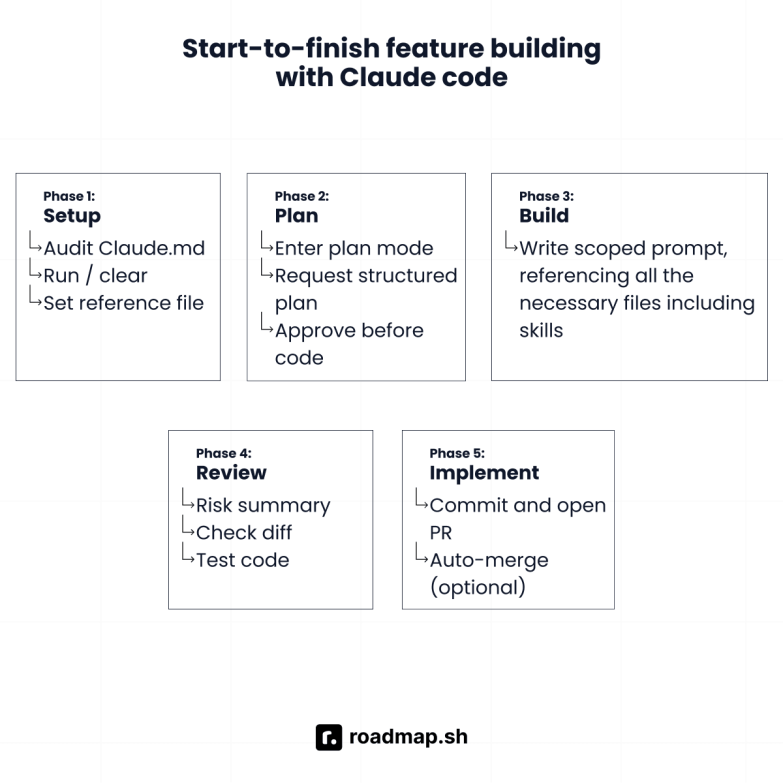
Vibe coding follows a repeatable workflow:
Keep context clean and focused.
Plan prompts.
Review output.
Prevent unwanted changes to critical code.
Standardize workflows to scale.
Let's break down each stage and the practices that keep your output consistent.
1. Manage context
Most AI-generated code failures come from stale or overloaded context. An AI tool’s context window fills up quickly, and output quality drops as the conversation expands. As sessions grow, the AI has more messages, files, and command outputs to process. This makes it easy to lose track of earlier instructions. The following practices will help you manage context better and keep your sessions accurate and focused.
Practice 1: Keep your context config file lean and current
Every major AI coding tool reads a project configuration file at the start of every session. It is equivalent to the technical context given to a new pair programmer, including the stack, conventions, and parts of the functional code they should or shouldn’t touch. The config file name varies across tools:
Claude Code: CLAUDE.md
Gemini CLI: GEMINI.md
Cursor: .cursor/rules/ (place .mdc rule files in this directory)
Windsurf: .windsurfrules
OpenAI Codex: AGENTS.md
One common mistake I see developers make is treating the config file like documentation. It shouldn’t contain instructions for every possible decision; rather, it should contain instructions relevant to that particular session.
The table below shows what to keep and what to remove:
Keep in your config file | Remove from your config file |
Build and run commands | Bug context from a session last week |
Folder structure overview | Temporary deadline or sprint notes |
Naming and style conventions | Experiments you’re about to remove |
Off-limits files and folders | Decisions that were reversed |
Testing framework and how to run tests | Long explanations of why decisions were made |
Not following these rules means the AI starts with stale or contradictory context, leading to incorrect implementations.
Most config file issues come from allowing it to grow unchecked. For example, I've seen CLAUDE.md files balloon to 200+ lines. By the time Claude reads all that, it struggles to prioritize the right instructions. Keep it under 50 lines if you can.
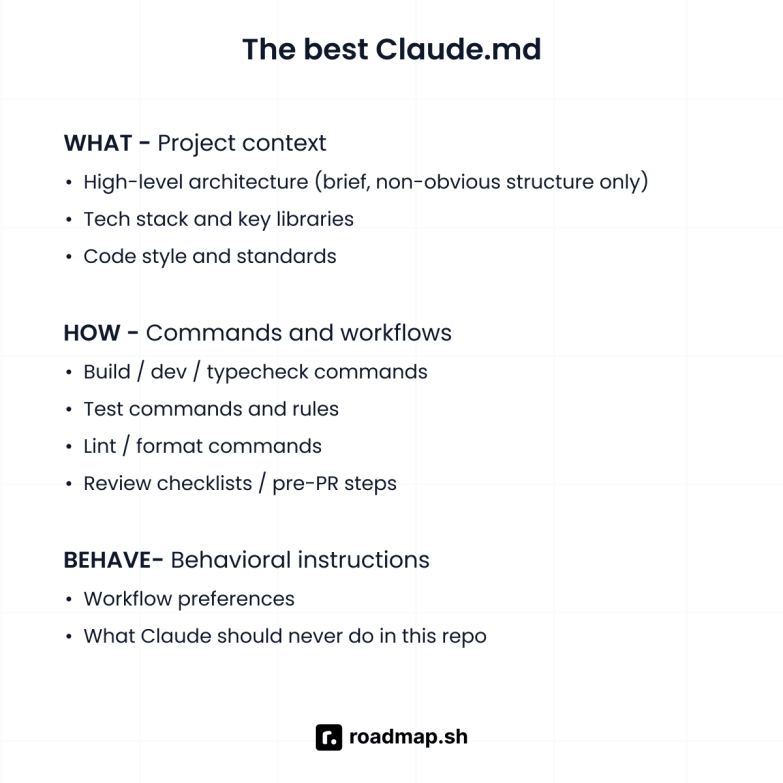
Here’s what a lean, useful CLAUDE.md looks like for a TypeScript project:
Practice 2: Reset and refine context
Context bleed is one of the most common causes of subtle bugs in AI coding workflows, and it often goes unnoticed. It occurs when you work on multiple features in a single long session. The AI carries context from earlier conversations into subsequent ones and tends to follow previous patterns and reference files that have been worked on before. The output may look correct at first glance, but contain incorrect assumptions.
In Claude Code, three commands help you manage context bleed:
/clear: Resets the context window. You should always run this after every discrete task. After you run/clear, do not assume Claude remembers anything from the previous session. Re-feed with goal, current file state, and constraints only.
/compact: Summarizes conversation history to preserve important code and decisions while freeing space. Use it when the context is nearly full, but you still need continuity. After you run/compact, skim the summary before you continue and look for anything that is off or missing.
/rewind: Rolls back to a previous checkpoint. Use it when Claude has made a wrong turn in the last few steps, and you want to undo its changes. The/rewindcommand opens a rewind list, which shows each of your prompts from the session. Select the point you want to work on, and then choose an action. You can perform actions like restore code and conversation, restore conversation, restore code, summarize conversation, or return without making changes.
/rewind is not a substitute for /clear. /rewind undoes actions, while /clear resets context. You can also double-tap Esc to rewind.
In Gemini CLI, /clear and /rewind work similarly, use /compress to summarize chat context. For Cursor and Windsurf, it is recommended to start a new chat for each new feature.
2. Plan prompts
Bad prompts are one of the main reasons for inconsistent AI output results. A common problem among developers is writing vague prompts.
When you give an AI assistant vague instructions, it tends to fill in missing details with its best interpretation of what you probably want, which may be incorrect. The following practices will help you write prompts that produce reviewable, consistent code, while avoiding patterns that lead to messy outputs.
Practice 3: Use Plan Mode for every new feature
Avoid letting the AI generate code without seeing and approving a plan. This single habit has saved me more time than any other practice on this list. I never skip it.
The idea is to have the AI read your codebase, outline what it intends to create or modify before any code is written. Most AI coding tools have plan modes that enable you to review what it is about to build. Without a plan, they can make architectural decisions mid-implementation, change approaches or naming conventions, and create multiple unnecessary files. At the end, you are left with an incorrect implementation process and a bloated, inconsistent codebase.
For Claude Code, the ideal Plan Mode workflow is as follows:
Press
Shift + Tabtwice or use the/planslash command to enter Plan Mode.
Describe the features and ask Claude to outline: what files it will create or edit, the function signatures it will introduce, and any edge cases or error handling. For example:
Review the plan and ask questions. If the plan mentions touching a file you didn’t expect, ask why before approving.
When you are satisfied, exit Plan Mode and ask Claude to implement it.
After implementation, ask Claude to commit with a descriptive message and create a pull request.
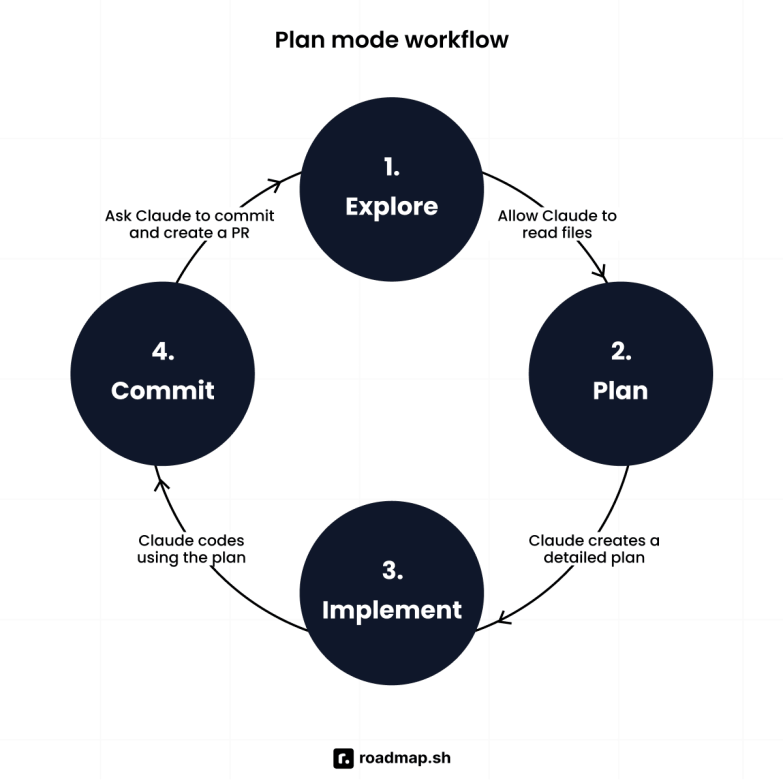
Remember to always include “List any assumptions” when writing the plan prompt. Claude’s assumptions are where mismatches occur, and it’s best to be aware of them before it generates code.
Practice 4: Write scoped and constrained prompts
Every prompt should include a goal, a list of constraints, and instructions for verifying success. Avoid open-ended prompts like 'Add error handling to my app’. Prompts like this often lead the AI to make unintended changes across your project, such as adding error handling everywhere.
To save yourself from spending extra time and tokens on reviewing changes you never asked for, write prompts that have a defined scope and explicit constraints. This is important in complex projects where Claude's output can cascade across multiple files and programming languages.
Here’s an example of a good prompt:
Practice 5: Give Claude an example file to match
For the AI to efficiently produce code that matches your coding style, you need to point it to a specific file as a reference. One good reference file is better than a hundred words of stylistic descriptions, because it shows the AI exactly what desired functionality looks like in context.
Instead of a “always use try…catch, prefer async/await”, reference a model file like this:
This way, you’ve shown Claude a file that mirrors your coding patterns, which it can replicate across sessions.
I found this to be particularly effective when working with UI frameworks like Tailwind CSS, where consistent class usage and component structure matter throughout the codebase.
3. Review output
Since vibe coding tools can generate misleading or incorrect code, review it before it enters your repository. The following practices help you understand what to look for and how to structure your review so it doesn’t become a bottleneck.
Practice 6: Always review the diff before accepting
After every code generation, go through it like you would a pull request from a junior developer: Read it, test it, and only merge it when you understand what changed and why.
AI coding tools often assume changes are safe and apply them broadly. If they think a file is redundant, they may delete it, or if they think an API endpoint signature should change, they'll change it everywhere. I've caught Claude silently renaming public API endpoints more than once. If I hadn't checked the diff, those changes would have broken every client.
Accepting AI's output without reviewing the diff means you’re relying on the AI’s judgment over your own, which is risky.
There are key categories of changes you should always look out for in a diff:
File deletions: Check for any files that might have been deleted. The file might be imported somewhere outside the scope of the AI scanned, or it might contain relevant documentation or patterns you’ve deliberately kept.
Public API changes: Cross-check for renamed functions, changed signatures, and new imports. This is critical, especially in web applications, where an API endpoint change can break the application's flow.
Off-limits files: If the AI touched a file declared off-limits in your context config file, reject the change and investigate why before accepting it in the diff.
New dependencies and API keys: Check every new entry in your
package.json. Also, check for hard-coded API keys or credentials in your source code.
Schema changes: Scrutinize every modification to a migration file, ORM model, or database schema. This is critical for the safety of your application data in production.
Also, keep an eye out for new data sources, changes to model behavior, or business logic that has been silently rewritten. These are easy to miss during a quick scan, but they can significantly affect your application.
After implementation, prompt for an explicit risk review before you accept:
This helps catch issues that a quick scan of the diff can miss.
Practice 7: Run tests and type checks after every accepted change
After accepting Claude’s output, run your test code suite and type checks immediately. Claude can produce code that looks correct but fails at runtime or breaks adjacent functionality. The longer you go between accepted changes and running tests, the harder it is to trace which change caused a failure.
Always run tests and type checks like this after every accepted output:
If any of these fail, don’t continue. Use /rewind or fix the issue before your next prompt.
4. Protect codebase
Vibe coding tools can introduce security vulnerabilities in user authentication, input validation, and access control checks. AI models are trained on large volumes of public code, including potentially insecure code patterns.
The Cloud Security Alliance and leading security experts consistently highlight that AI-generated code requires the same rigorous security review as human-written code, sometimes even more.
The following practices will teach you how to build constraints that protect your high-risk code from unsolicited changes.
Practice 8: Declare off-limits zones in CLAUDE.md
Sensitive aspects of your code should be explicitly listed as “off-limits” in your CLAUDE.md file and should be repeated in every relevant prompt. This matters especially for security best practices around sensitive data and environment variables.
In Claude Code, define them in your CLAUDE.md like this:
The same pattern works in GEMINI.md or any equivalent config file for your tool. From my experience, declaring off-limits areas is necessary but not sufficient. You need to repeat it in the prompt, especially when working near those files:
Important notes on off-limits code
Always pay extra attention to AI-generated code that handles user inputs, implements rate limiting, or manages API keys. These areas are prone to security vulnerabilities, including injection attacks and the exposure of sensitive data.
Also, make sure to validate inputs and review all AI-generated access control logic before accepting it.
Practice 9: Require a migration plan before any schema change
A migration plan is essential before any schema change. Avoid letting the AI write a schema migration without first producing a written plan that includes the migration itself, a rollback path, and the tests that will verify correctness.
Typically, the plan should define:
The forward change (up SQL)
The reversal path (down SQL)
The application code updates required to support the new schema
A rollback strategy, if something fails in production
Approving this plan before any other code is written ensures the change is intentional, reversible, and safe, reducing the risk of data corruption.
Here’s how to prompt for a migration plan:
Requiring the up and down migration upfront ensures it exists and is reviewed before touching your data.
5. Scale with repeatable workflows
Efficient vibe coders don’t retype the same prompt patterns in every session; instead, they codify their most-used workflows into reusable dedicated files. With that in place, you no longer need to write a testing prompt, a security review prompt, or a migration prompt every time.
Practice 10: Build skills for repetitive, high-stakes tasks
Skills are reusable prompt patterns saved as a markdown file to ensure consistent output for a recurring task. Skills originated from Claude Code but have since become an open standard, compatible with various AI platforms and tools. They are supported natively by Claude Code, Gemini CLI, Codex CLI, and a growing number of agents. For Cursor and Windsurf, the equivalent concept lives in the config files.
Skills are particularly useful for generating unit tests, performing security reviews, performing safe refactorings, handling migrations, and creating release checklists. These are the kinds of tasks where small changes in how you prompt the AI affect the quality of the generated code. Strong skills make your workflow more consistent and repeatable.
In Claude Code, create a skill by adding a directory with a SKILL.md to .claude/skills/:
Skills can also define a repeated workflow, like fixing a GitHub issue or reviewing code:
You can run your skills with /skill-name, e.g., /write-tests, /review-code, directly in Claude Code. It can also load the skill automatically when the context makes it relevant.
There are four important skills you should build in your projects:
Generate unit tests: Produces test code that follows your project’s framework and conventions. Also, covers edge cases and error cases. Use this before every pull request.
Security review pass: Checks for exposed sensitive data, unvalidated user input, missing access control checks, injection attacks, and unsafe code patterns around API keys and environment variables. Use this before merging code related to APIs, authentication, or user input.
Safe refactor: Preserves public API, updates callers across the entire codebase, adds a changelog entry, and runs tests. Use this when restructuring existing code.
Generate safe migration: Requires up SQL, down SQL, schema changes, application code updates and a rollback plan before code creation. Use this before every schema change.
Important notes on skills
Keep the following tips in mind when working with skills:
Build skills after you’ve run the same prompt pattern three or four times and know what the best output actually looks like.
Commit your skills directory to version control, such as GitHub, to make your best prompt patterns available to your team members and sub-agents in more complex workflows and for follow-up prompts that build on previous work.
Wrapping up
Your AI coding tool is one part of your software development workflow, not a replacement for your judgment and expertise. With any of these tools, you’re the architect, the reviewer, and the decision maker. The AI acts as a fast, capable collaborator who amplifies your work. Getting the best out of it requires clear briefs, a tight scope, and honest feedback.
Apply these vibe coding best practices consistently, and you will see shorter sessions, smaller diffs, faster debugging, and more consistent output. If you want to build a robust foundation, follow our roadmaps for vibe coding and Claude Code, and start building a smarter vibe coding experience.
