Top 60+ Angular Interview Questions (and answers)
 William Imoh
When preparing for an Angular interview, don't just memorize everything. Interviewers can tell when you're reciting answers without understanding. You need to know the main concepts, no matter how much experience you have. Angular interview questions cover both basic and advanced topics.
Interviewers, for example, won't only ask you a simple "what is an Angular component?" question. Instead, they will ask you to explain how to structure Angular components across large applications. You'll discuss when OnPush a change detection strategy makes sense and how to avoid memory leaks. Expect questions about RxJS operators, routing guards, lazy loading, and performance debugging.
The goal is to assess how you think, not just what you can build (your practical skills). That's why it's a good idea to review some common questions ahead of time to help you feel more confident.
TL;DR
60+ Angular interview questions, covering beginner to advanced concepts.
Beginner concepts: Web components, Angular modules (
NgModule), data binding, directives, pipes, services, forms, and TypeScript basicsIntermediate concepts: Dependency injection, lifecycle hooks, routing, RxJS, change detection, guards, observables vs. promises
Advanced concepts: Change detection internals, performance optimization, state management, memory leaks, security, and testing
In this guide, I'll cover the most common Angular interview questions and answers, organized by experience level, to help you get ready. I'll cover the basics, such as standalone components, as well as more advanced topics like state management. You can also check out the interactive flashcards to help you practice and learn better. If you want to get started with learning Angular, take a look at the Angular roadmap.
Tips for Preparing for Angular Interviews
Angular interviews are more framework-specific than general frontend interviews. They focus on the framework's structure and inner workings.
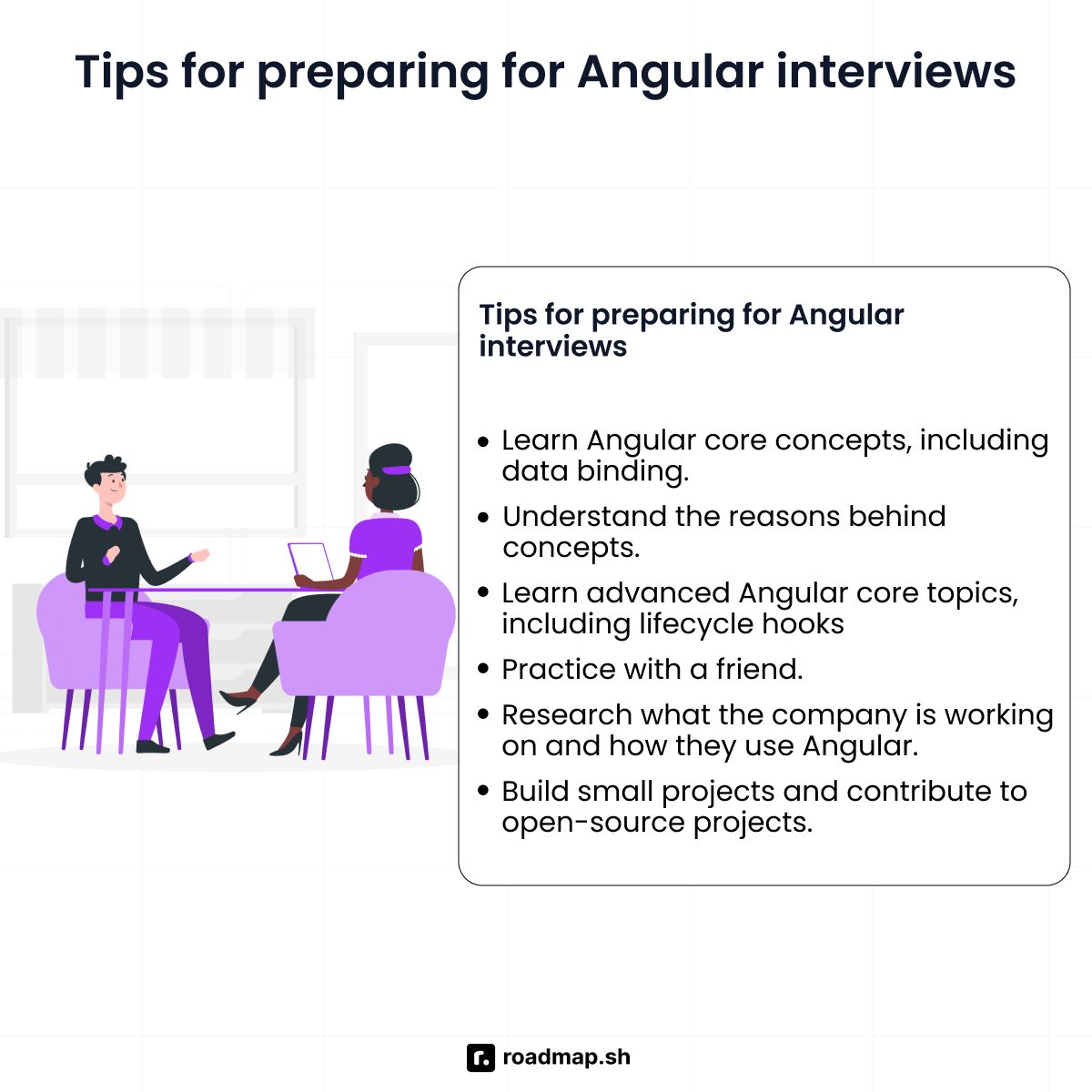
The following are some best practices to help you get ready for your Angular interview:
Learn the Angular core concepts, including web components, modules, and data binding.
Understand the reasons behind concepts so you can explain them well in your interview.
Learn advanced Angular core topics, including lifecycle hooks and dependency injection.
Use this guide to study and practice Angular interview questions and concepts. If you can, practice with a friend to make it feel like a real interview and build your confidence.
Research what the company is working on and how they use Angular.
Build small projects and contribute to open-source projects. Show off your skills on websites like GitHub or CodeSandbox.
Test yourself with Flashcards
You can either use these flashcards or jump to the questions list section below to see them in a list format.
What is Angular, and how is it different from AngularJS?
Angular is a modern, TypeScript-based frontend framework for building web applications. Google released the framework on September 14, 2016, to meet the needs of mobile web apps and large applications. It comes with all the built-in tools you need, along with a good dependency injection system. Angular uses TypeScript, a superset of JavaScript, to spot code errors before it runs.
The following is a detailed comparison table of Angular and AngularJS:
Feature | Angular | AngularJS |
|---|---|---|
Data binding | One-way (default), Two-way (available) | Two-way data binding |
Language | TypeScript | JavaScript |
Architecture | Component-based | MVC (Model-View-Controller) |
Performance | Faster | Slow in larger apps |
Mobile support | Built for mobile and web | Limited mobile support |
Support status | Active | No longer supported |
Angular is a full rewrite of AngularJS, released as Version 2 and above. AngularJS was first released on October 20, 2010, and is the original version of Angular. It's built using plain JavaScript and follows the MVC (Model-View-Controller) design pattern.
Google created Angular to address some of AngularJS's major issues. For example, AngularJS had performance issues when developers used it to build large applications. Its two-way data-binding system made the app slower as it grew. These performance limits led Google to stop supporting AngularJS on December 31, 2021.
Questions List
If you prefer to see the questions in a list format, you can find them below.
Beginner Angular Interview Questions for Developers
What is Angular, and how is it different from AngularJS?
Angular is a modern, TypeScript-based frontend framework for building web applications. Google released the framework on September 14, 2016, to meet the needs of mobile web apps and large applications. It comes with all the built-in tools you need, along with a good dependency injection system. Angular uses TypeScript, a superset of JavaScript, to spot code errors before it runs.
The following is a detailed comparison table of Angular and AngularJS:
Feature | Angular | AngularJS |
|---|---|---|
Data binding | One-way (default), Two-way (available) | Two-way data binding |
Language | TypeScript | JavaScript |
Architecture | Component-based | MVC (Model-View-Controller) |
Performance | Faster | Slow in larger apps |
Mobile support | Built for mobile and web | Limited mobile support |
Support status | Active | No longer supported |
Angular is a full rewrite of AngularJS, released as Version 2 and above. AngularJS was first released on October 20, 2010, and is the original version of Angular. It's built using plain JavaScript and follows the MVC (Model-View-Controller) design pattern.
Google created Angular to address some of AngularJS's major issues. For example, AngularJS had performance issues when developers used it to build large applications. Its two-way data-binding system made the app slower as it grew. These performance limits led Google to stop supporting AngularJS on December 31, 2021.
How does an Angular application work?
The following is how an Angular app works from start to finish:
Your Angular app starts when the
main.tsfile runs and loads the root module, calledAppModule. From Angular 14 onwards, you can also bootstrap standalone components directly.Next, Angular reads
AppModuleand loads all the components, services, and other parts you added.It creates a component tree that starts with
AppComponentand links all its child components together.Angular turns each component’s template into HTML and displays it in your browser.
When someone clicks or interacts with your app, Angular listens and responds using event binding.
If your data changes, Angular checks the component tree and updates the view, so users always see the latest information.
What are Angular components?
Angular components are important pieces that make up any Angular application. You create components using the @Component decorator. Each one has its own scope, so its data and styles are separate from those of the others. You can reuse components and nest them together to build complex user interfaces. An Angular component consists of:
Template: HTML that controls your component displays in the browser
Class: TypeScript code that stores data and handles user actions like clicks
Styles: CSS that controls your component's template appearance
Metadata: The
@Componentdecorator that tells Angular how to process your component
What is an Angular module?
An Angular module lets you group related components, services, and other features. Every Angular application starts with a root module called AppModule.
For bigger applications, you create feature modules to keep similar code together. You can load these modules when needed using lazy loading, which makes your app load faster.
You make Angular modules with the @NgModule decorator. Here’s what you include in a module:
Declarations: These are the components, directives, etc., you create for this module.
Imports: Other modules your module depends on.
Providers: These are the services that your module will offer.
Bootstrap: The main component that starts your app (used only in the root module).
The following code example shows how to define a module:
What is the Angular CLI?
Angular CLI stands for Angular Command Line Interface. It's a command-line interface tool that helps you build Angular applications by automating tasks such as creating components, running your app, and handling configuration.
Angular CLI provides commands for every part of development:
ng new project-name: Create a new Angular project.ng serve: Start development server.ng generate service authorng g s auth: Create service.ng add: Add libraries (likeng add @angular/material)ng lint: Check code quality.
What is the difference between @Input() and @Output()?
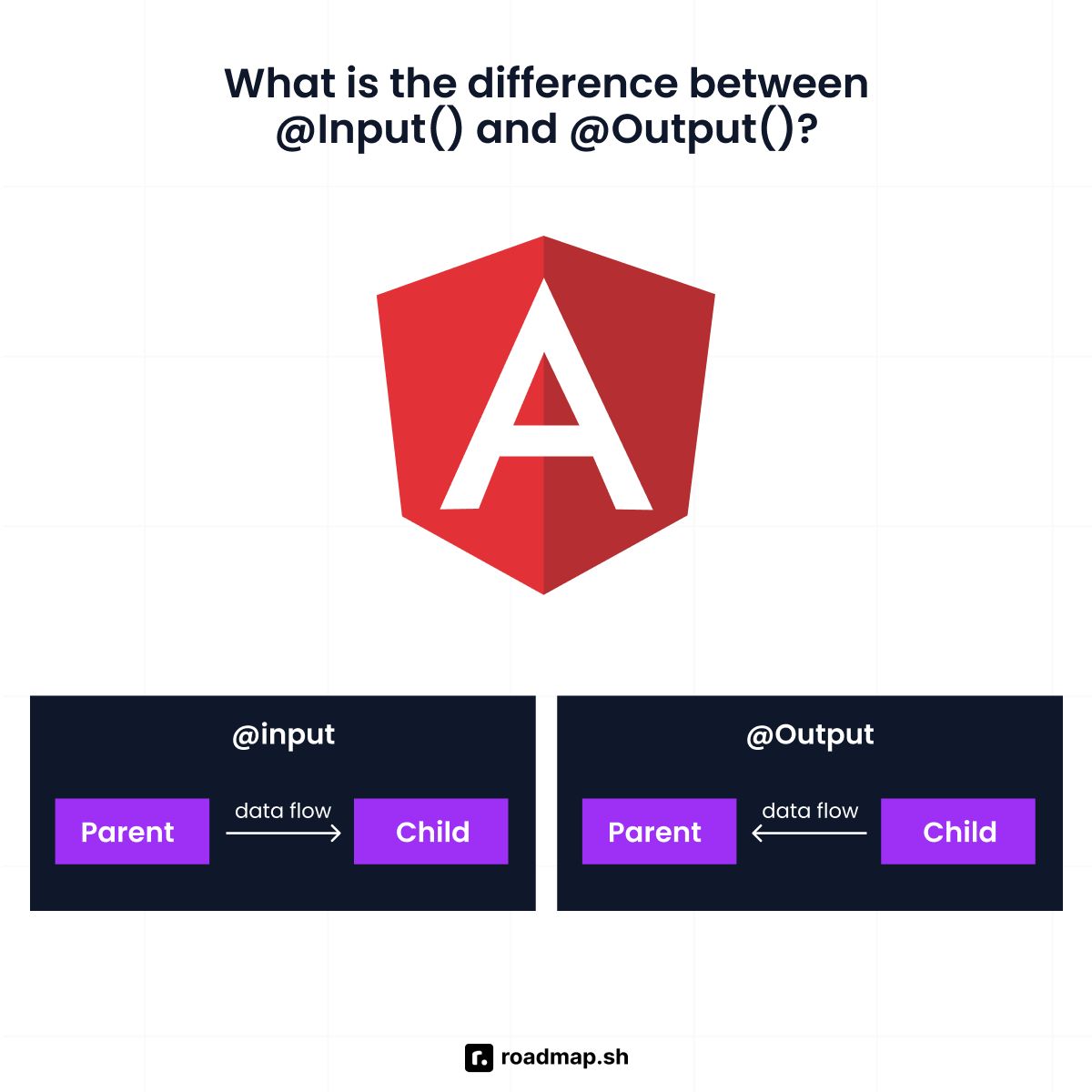
@Input() allows parent components to pass data down to child components. The child declares what data it needs using @input, and the parent provides it via property binding in Angular templates.
On the other hand,
@Output()allows child components to send data to parent components. The child declares anEventEmitterwith@Output(), and the parent listens using event binding. When something happens in the child, such as a button click or form submission, the child emits an event that the parent can handle.
What is data binding in Angular?
Data binding connects the data in your component class with your component's template. It lets you see updates to the data model without writing any extra code to keep them up to date.
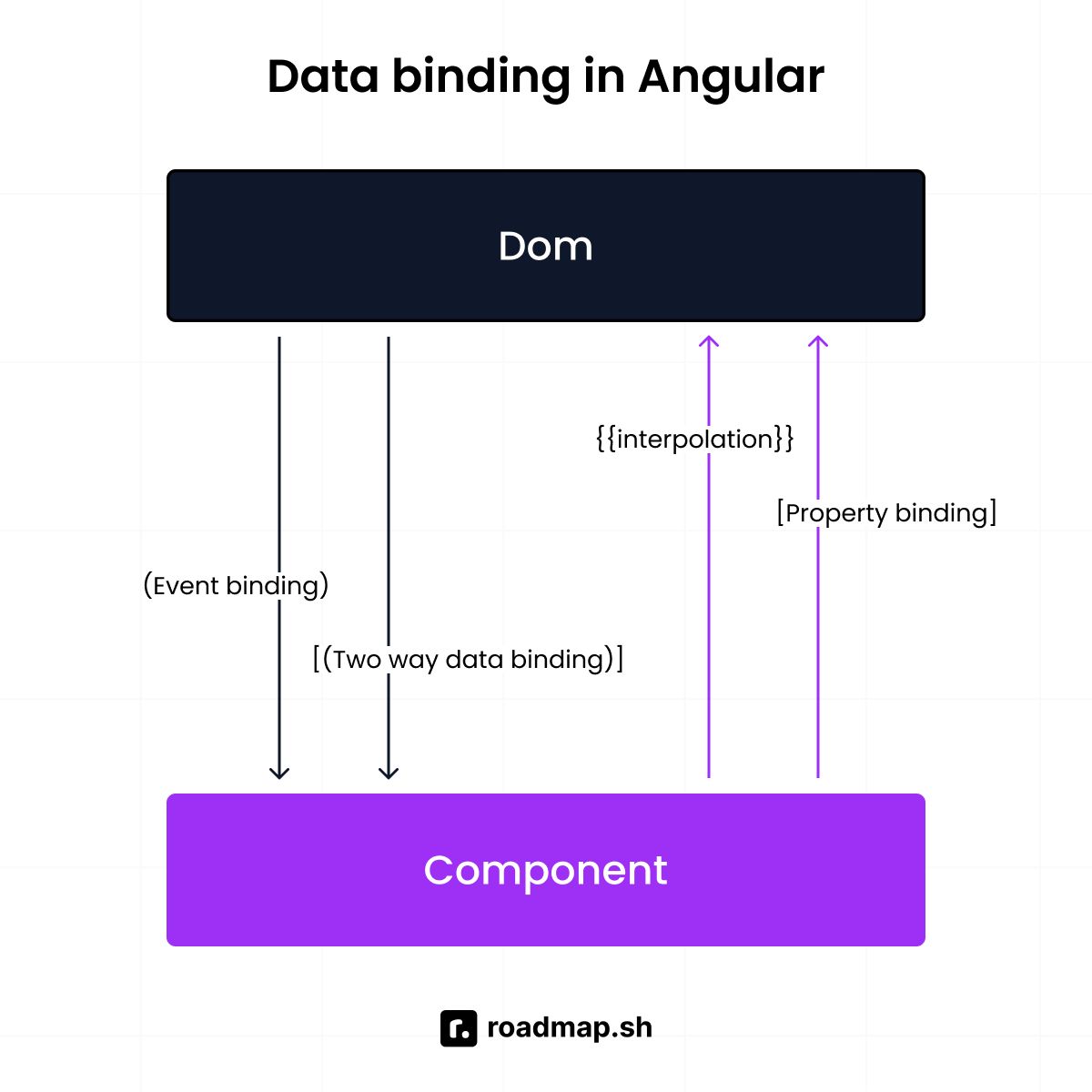
Angular has three main types of data binding to control how data moves in your app:
One-way data binding: Your component sends data to your template, which displays it on the screen. Values appear on the screen through interpolation using double curly braces
{{ value }}. For setting element properties, you use property binding with square brackets[ property ].Event binding: Your template captures user actions and sends them to your component class. You capture events like clicks using parentheses
( event ).Two-way data binding: Data flows in both directions between your component class and its template. You use
[(ngModel )]to keep them in sync, which is helpful for forms.
An example of the different types of data binding:
Data binding makes your Angular application interactive. You do not need to write extra code to update DOM elements whenever your data changes. Angular detects changes to your data and updates the view so users see the new values.
What is the difference between Angular expressions and JavaScript expressions?
Angular expressions are expressions you write in your component's template to display and bind data. You place Angular expressions inside double curly braces {{ }} to show data on the screen or within property bindings [] to set values for child components or HTML elements.
Angular expressions have a simpler syntax than standard JavaScript, making them safer for templates. They're more forgiving with undefined values than regular JavaScript expressions, but runtime errors can still occur. However, they don't support complex logic such as loops, assignments, or global variables (window or document).
JavaScript expressions, on the other hand, are standard JavaScript code that runs in your component classes, services, or TypeScript files. They support full JavaScript syntax without restrictions and have complete access to browser tools. JavaScript expressions are strict; a missing value can cause your app to stop working.
What are Angular directives?
Directives are special instructions you add to DOM elements in your Angular templates. They control these elements, including how they behave, how they look, and whether they appear at all. With directives, you can manage your HTML without having to write your own code to change the DOM.
Below is an example of how you use Angular directives in your templates:
How many types of directives does Angular have, and what are they?
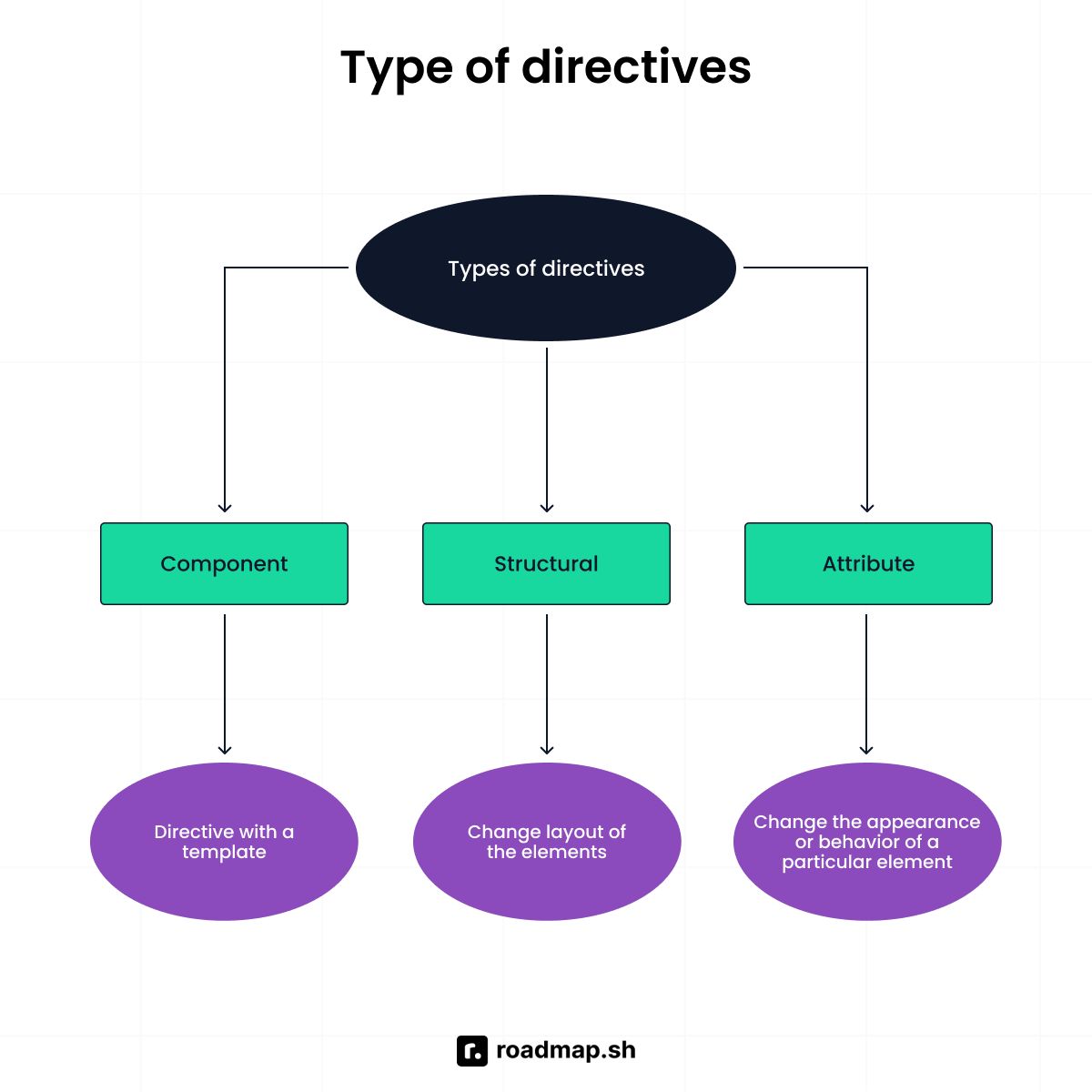
There are three types of Angular directives: components, structural directives, and attribute directives. Angular components have their own section in this guide, so I focus on the other types here:
Structural directives: Structural directives add or remove DOM elements from your template. You use them to decide what shows up on the screen. They start with an asterisk
*before their name. Some examples include*ngIf(show/hide),*ngFor(repeat), and*ngSwitch(choose one option).Attribute directives: They modify existing DOM elements without removing them. You use them to change how elements look (color, size, font) or behave (how they react to a mouse click). Examples include
ngClass(manages classes),ngStyle(manages styles), andngModel(binds form data).
How does a child component detect when input values change from the parent?
The following is how a child component detects when input values change from the parent:
What are Angular pipes?
Pipes are functions that transform data for display in Angular templates. They take input values and return your desired output format without changing the original data. You can use them to format numbers, dates, strings, and more.
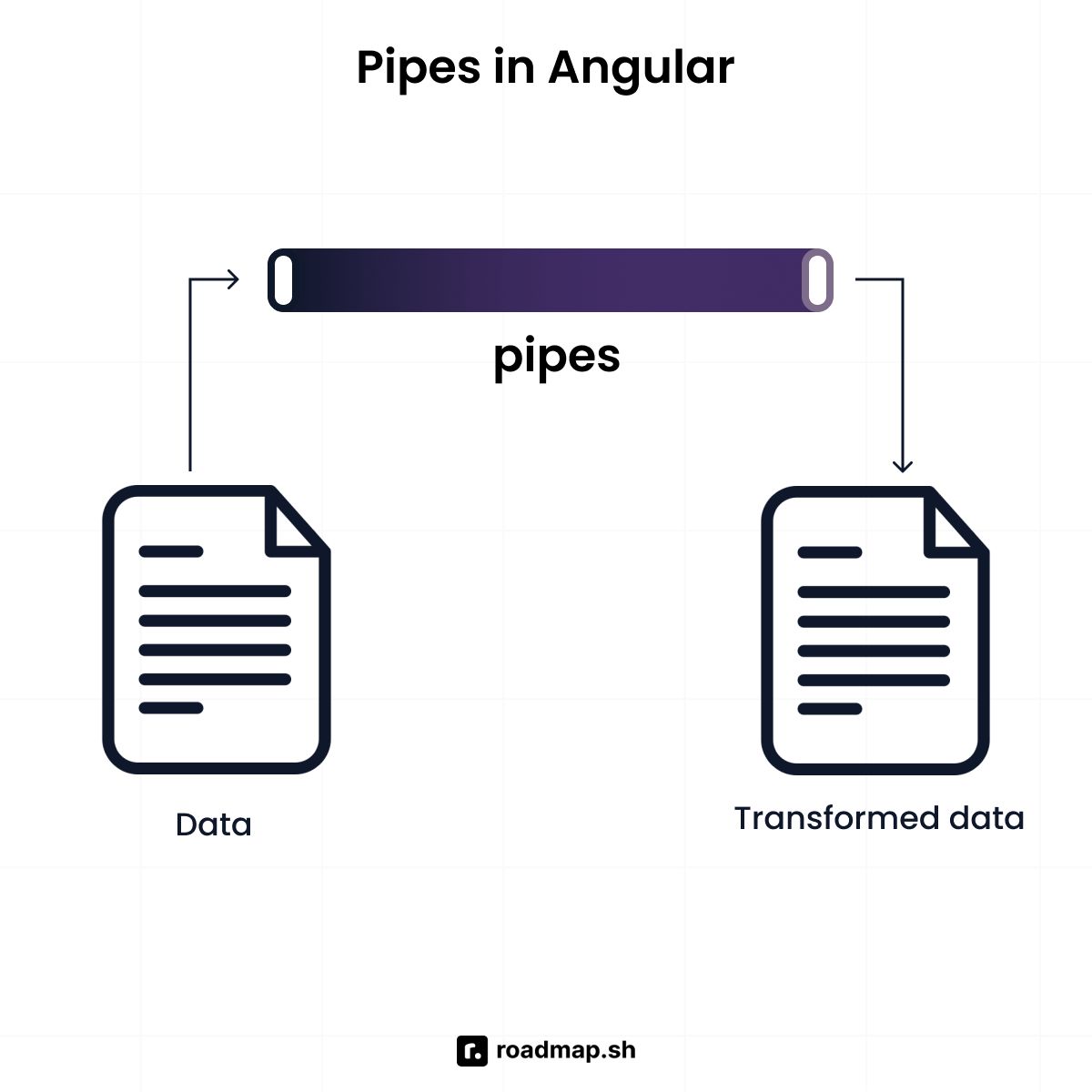
Angular provides built-in pipes like date, uppercase, currency, and json. You can also create custom pipes for any logic that the built-in pipes don’t cover. The syntax for Angular pipes is very simple. You use the pipe operator (the vertical bar |) inside your interpolation braces:
What is the pipe transform interface?
PipeTransform is an interface in Angular that you use to build custom pipes. It requires a transform() method that converts the input values to the format you need.
What are the differences between reactive forms and template-driven forms?
Reactive forms define the form structure in your component class using TypeScript. You create FormGroup and FormControl objects that represent your form. Then, you set validation rules, handle value changes, and manage form state all in code. Reactive forms give you total control within your TypeScript file, which makes your forms very easy to test.
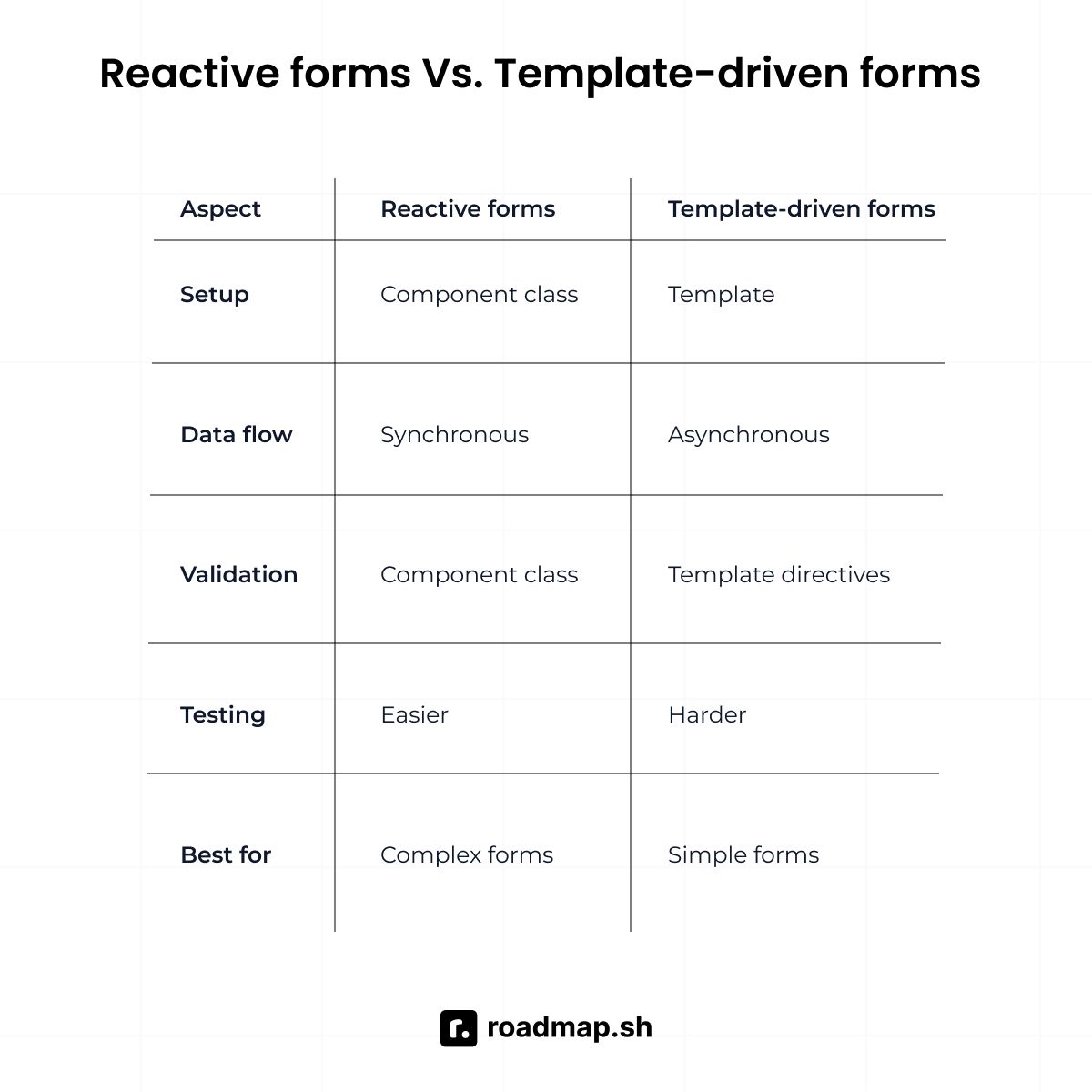
On the other hand, template-driven forms define form structure and validation in your component's template using HTML directives. You use ngModel for two-way binding, and HTML attributes like required and email for validation rules. Angular creates form controls for you based on your HTML.
What are decorators in Angular?
Decorators are TypeScript functions that add metadata to classes and members in Angular. They start with the @ symbol before every class, property, or method. Decorators give Angular extra information about a class and how to process your code.
How many types of compilation does Angular provide?
Angular has two types of compilation:
Just-in-Time (JIT) compilation: It compiles your code in the browser when users load your app. On page load, the browser downloads three things: the Angular compiler, your Angular templates, and your TypeScript code. The browser compiles all of them at runtime to make your app work. You use JIT during development with
ng servebecause it builds fast and lets you see changes as soon as they happen. However, the app can take more time to load for users.Ahead-of-Time (AOT): Your app compiles on your machine (computer) before deployment. When you run
ng buildin production mode, Angular uses AOT compilation by default. Angular compiles your templates and TypeScript code during the build process. The compiler converts everything into optimized JavaScript code before the browser sees it.
Since Angular 9, the Ivy compiler handles both JIT and AOT compilation. It increases speed and keeps the final bundle smaller.
What's the role of interceptors in Angular?
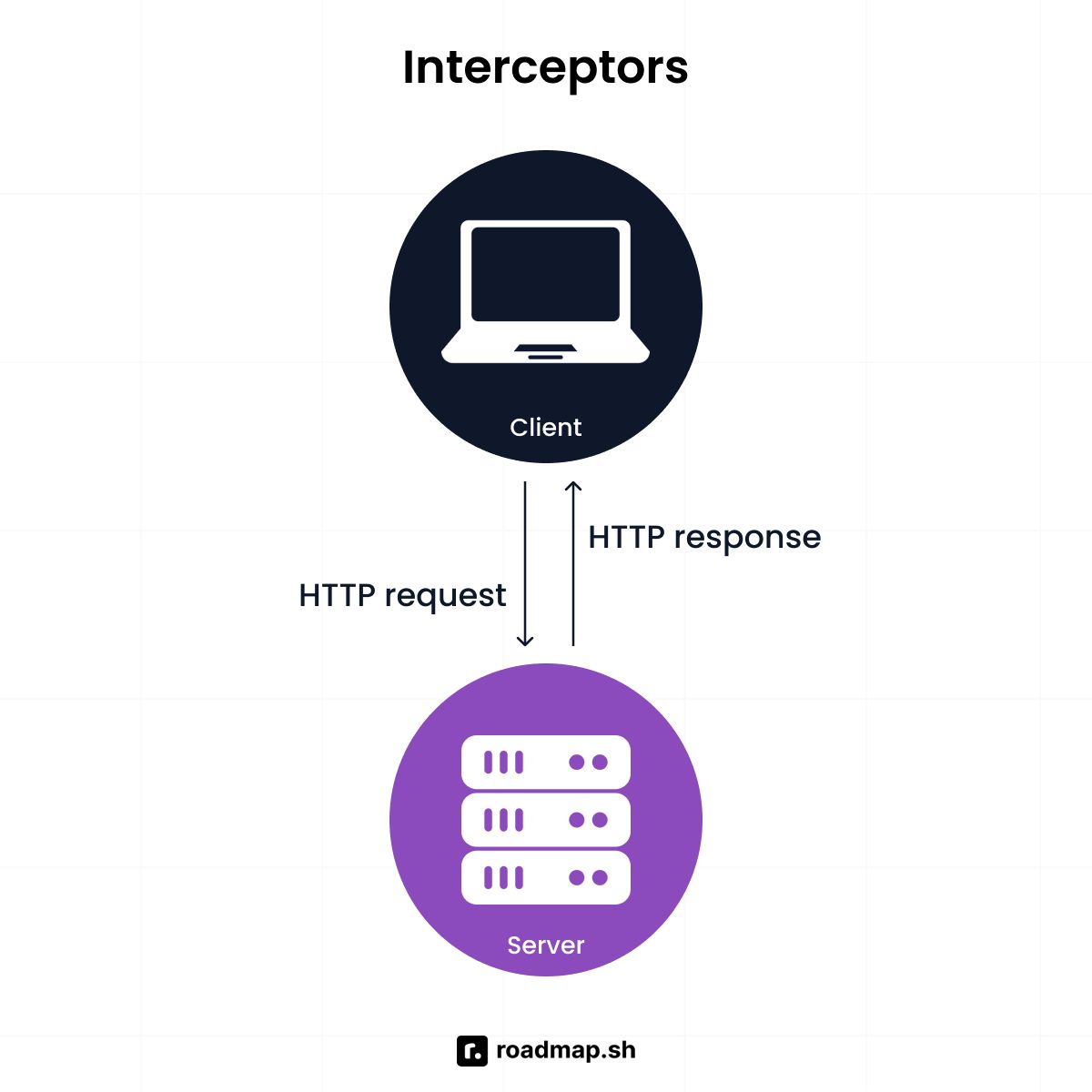
Interceptors are services that let you inspect and modify HTTP requests and responses in a single central location. They sit between your Angular application and the backend server. It helps you handle common tasks in one place rather than repeating code everywhere. These tasks include adding authorization tokens to requests and error handling for network failures.
How do you create a new Angular project using the Angular CLI?
The following are simple steps to create an Angular project using the Angular CLI:
If you don't have Angular CLI installed, run
npm install -g @angular/clito install it globally.Open your terminal and run
ng new project-name(replace "project-name" with the name you want).The Angular CLI will ask setup questions about routing and styling preferences.
When finished, the Angular CLI creates a complete project structure ready to use.
Go to your project folder with
cd project-nameand runng serveto start the development server.
What does Angular Material mean?
Angular Material is Google's user interface component library for Angular applications. It provides pre-built components such as buttons, forms, dialogs, and navigation menus. You can use these components right away in your app instead of building them from scratch.
Use this CLI command to open your terminal inside your Angular project folder:
Angular Material also has layout tools that help you create a responsive design. All components are accessible, mobile-friendly, and customizable with themes.
What is the difference between a constructor and ngOnInit?
A constructor is a TypeScript feature for dependency injection. It runs before Angular finishes setting up your component. On the other hand, ngOnInit is an Angular lifecycle hook feature. It runs after the constructor, once Angular prepares the component's inputs and is ready for you to set up data and logic.
Which compilation mode should you use for Angular production deployments, and why?
AOT is the default and recommended approach for production builds. It makes your app faster, creates smaller bundles, catches errors in your Angular templates early, and improves security. Use JIT for fast development and AOT for production performance.
What are the two ways to define a component's template in Angular?
The component decorator's template config offers two ways to define a component's template:
Use the template property to define HTML inline within the component file with backticks:
Create a separate HTML file and link to it using the templateUrl property:
What is string interpolation in Angular, and how does it work?
Angular uses double curly braces {{ }} to represent string interpolation. The text between the braces is the name of the component property. Angular replaces that name with the string value of the corresponding component property.
What is HttpClient in Angular?
HttpClient is an Angular built-in service for making HTTP requests and calling APIs. You use it to fetch, send, or interact with APIs using methods like get(), post(), put(), and delete().
Explain how the following code displays data in the browser:
Angular reads the fullName property from the component. It gets the string value ('Angular Developer'). Then it replaces {{ fullName }} with that value, displaying "Welcome, Angular Developer" in your browser.
The following are some Angular interview questions on intermediate concepts:
Intermediate Angular interview questions for developers
How does dependency injection work in Angular?
Dependency injection (DI) is a design pattern in which objects receive their dependencies from external sources rather than creating them. It's how Angular supplies services and dependencies to your Angular components.
Dependency injection in Angular works when you create a service and decorate it with the @Injectable decorator. Then, you set providedIn: 'root' to make it available throughout your Angular applications. Angular creates one instance and shares it across your app.
When your Angular component needs the service, you add it as a parameter in the constructor. Angular sees the dependency and injects the service instance into your component. The following code shows how dependency injection works:
What are Angular lifecycle hooks?
Lifecycle hooks are methods that help you run code at important moments in your component's lifecycle. Each Angular component goes through three stages: creation, updates, and destruction. Lifecycle hooks let you run code to handle each stage.
Here’s a code example using the two most common lifecycle hooks, OnInit and OnDestroy:
What are the key lifecycle hooks every Angular developer should know?
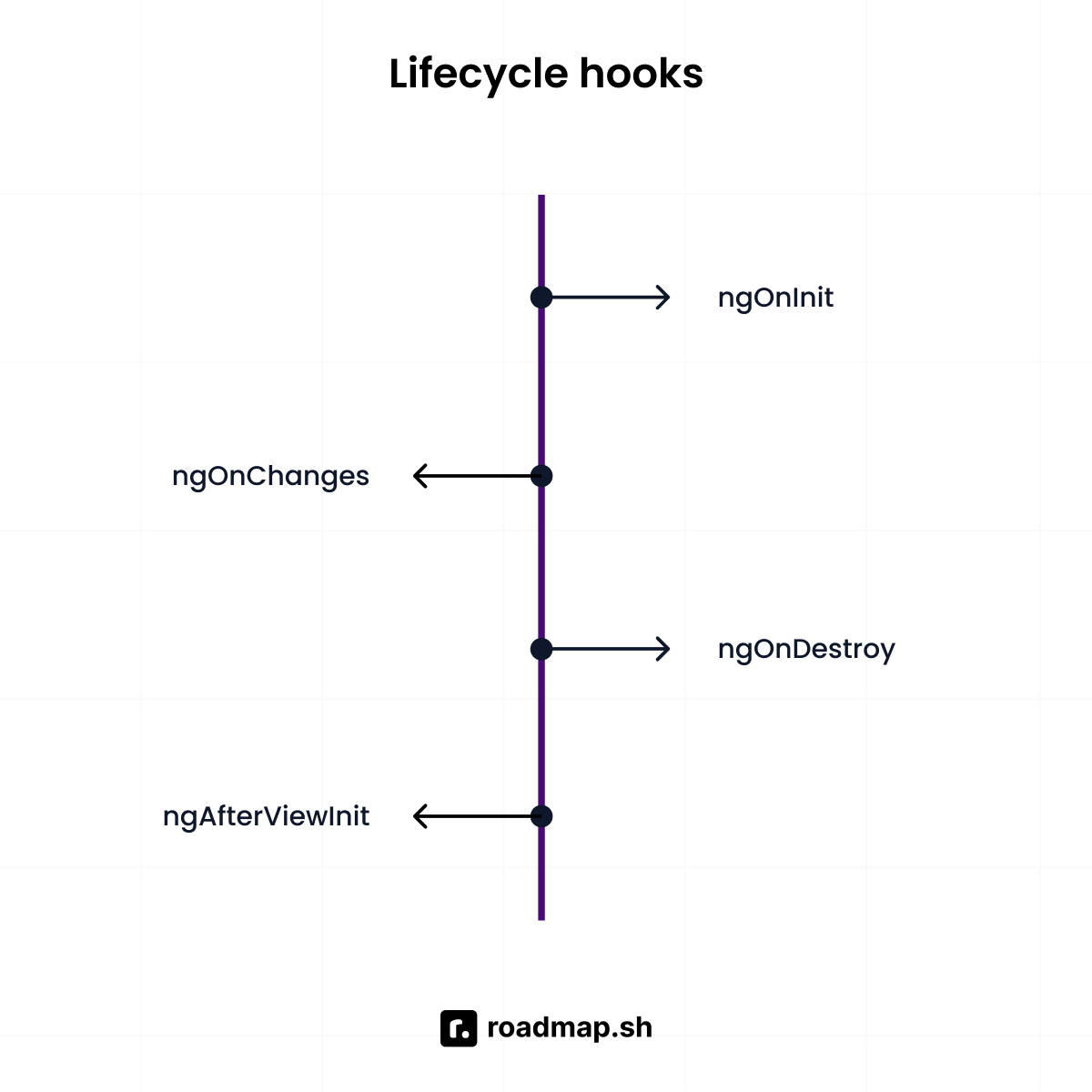
The most important lifecycle hooks you'll use are:
ngOnInit: Runs after your Angular component loads. It's the most used hook by developers, and where most of your setup code goes.ngOnChanges: This lifecycle hook runs whenever input data (called@Inputproperties) from a parent component changes.ngOnDestroy: This runs just before Angular removes your component from the DOM.ngAfterViewInit: This runs after Angular initializes your component's view. Use it to access child components or DOM elements via@ViewChild.
In your project, you need to access projected content after Angular renders it. Which lifecycle hook should you use and why?
Use ngAfterContentInit() because it's called once after Angular projects external content into the component's view. It makes sure the projected content is available before you try to access or change it.
How does routing work in Angular?
Routing allows users to move between different views without reloading the page. The Angular Router listens for changes in the browser URL and loads the right component for each URL.
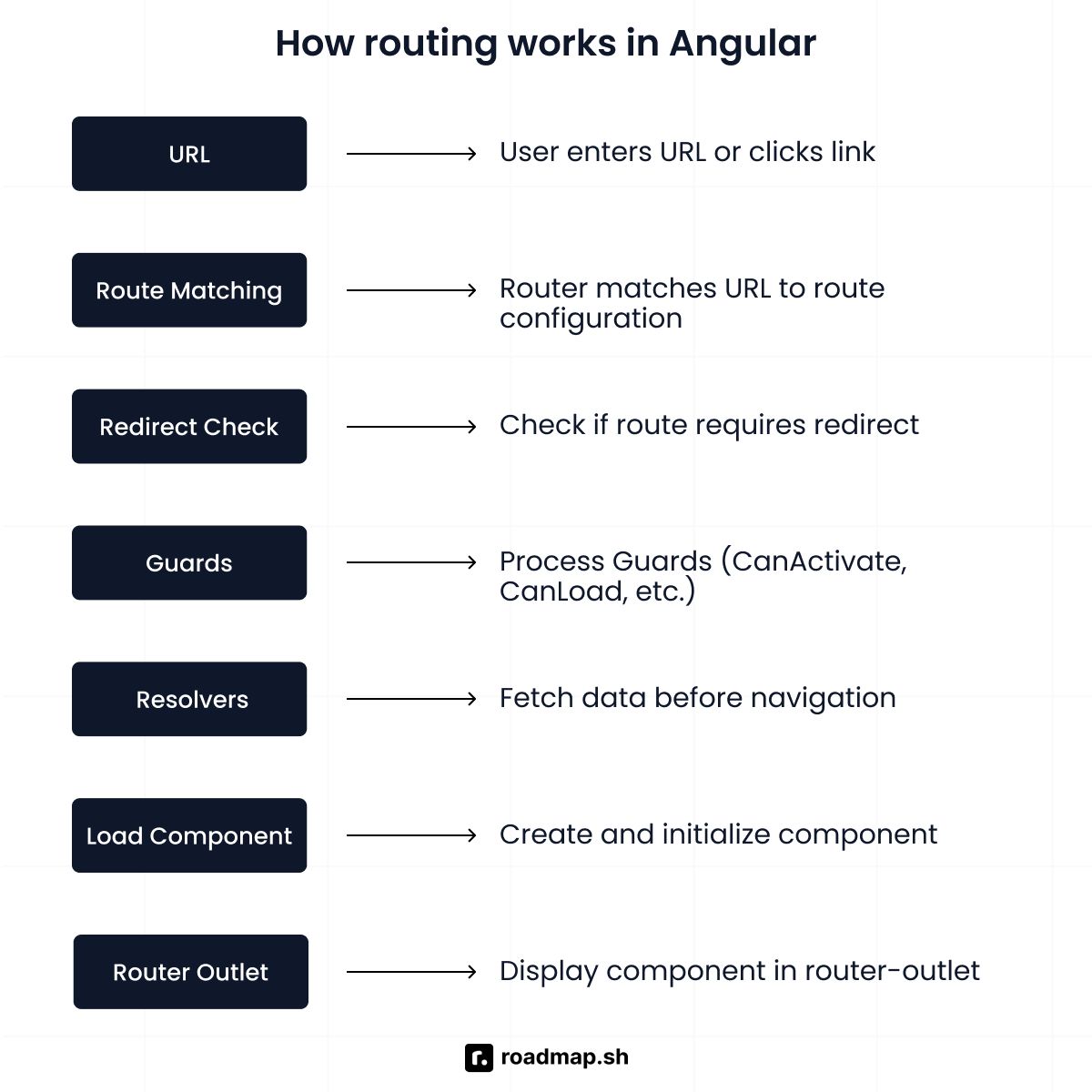
Routing in Angular works when you define routes in a Routes array, mapping paths to components. Each tells Angular which component to display for a specific URL, such as showing HomeComponent when the URL is /home. Modern Angular (v14+) also supports configuring routes with standalone components using provideRouter().
A code example of how you define routes:
After you define routes and configure the Angular Router module, you set up navigation in your template by adding navigation links using routerLink. You also place a <router-outlet> in your template where Angular displays the matched components.
Code example of how you add navigation and the router outlet:
When users click your link, the Angular Router updates the URL. It then finds the matching component and displays it in the router outlet without refreshing the page. Each route can show a different component based on the URL. This lets users move well between different sections of your application.
What is a bootstrapping module?
The bootstrapping module is the root Angular module that launches your application. It's the first module that Angular loads when your app starts. This module tells Angular where to begin and which component (usually AppComponent) to show first on the screen.
Most Angular applications use the AppModule for bootstrapping. When Angular starts this module, it generates the root component and adds it to your index.html file. Angular 14 and above let you skip modules in favor of standalone components. Use bootstrapApplication() to start your app, and you won't need a bootstrapping module.
What is the difference between ViewChild and ContentChild?
ViewChild is a decorator that finds elements inside your component's template. You use it to reference and access these elements after the view loads.
On the other hand, ContentChild is a decorator that finds elements projected from outside the component. It finds elements that parent components insert between your component tags via ng-content.
Code example of ViewChild and ContentChild:
What is the purpose of Angular services, and how are they used within components?
Angular services are reusable classes that handle the logic and data that your application needs. They centralize business logic, API calls, and state management across your application. Services prevent code duplication across different components. You write the logic once in a service and inject it into multiple components that need it.
To create a service, add the @Injectable({ providedIn: 'root' }) decorator. Components inject the service through their constructor, and Angular provides the same instance to each component.
A code example of how services work:
What is eager and lazy loading?
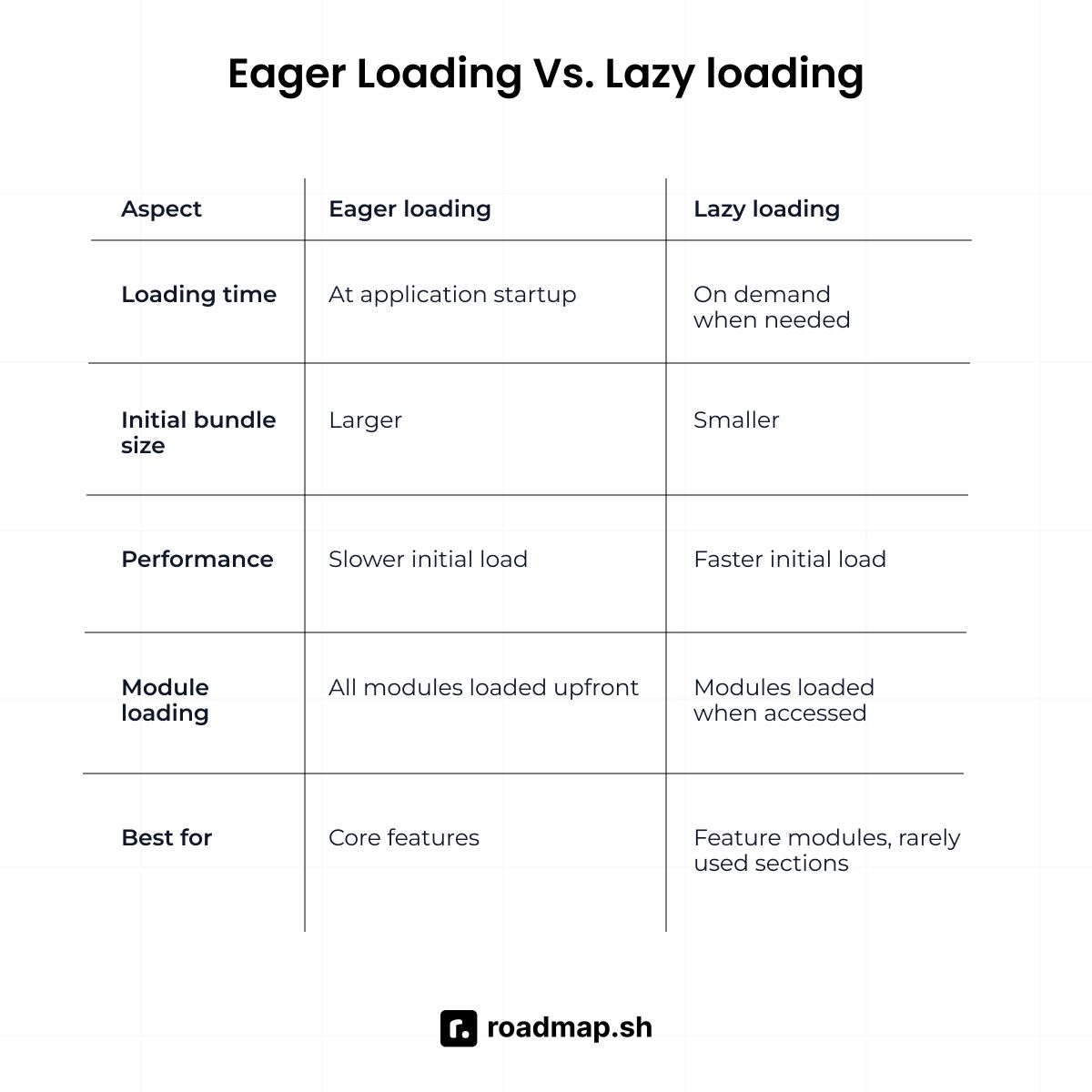
Eager loading is the default loading behavior of Angular applications. It loads all modules and components when your application starts. Angular loads and sets up everything all at once, even features users might never visit. This means the first bundle is large and takes more time to download. Users wait longer for the app to start, but after it loads, page changes are fast.
On the other hand, lazy loading loads modules and components only when users need them. Angular breaks your app into smaller sections and downloads each feature on demand. This means the file size is smaller, so it takes less time to download. Users may wait a bit when accessing a lazy-loaded feature, but the app loads much faster at first.
What is RxJS, and why is it used in Angular?
RxJS stands for Reactive Extensions for JavaScript. It's a library for working with asynchronous data streams using Observables. Observables let you handle async data such as HTTP responses. They can emit zero, one, or multiple values over time, support cancellation when needed, and include built-in operators that help you transform data.
RxJS operators let you handle complex logic by breaking it into small, readable steps. A code example of RxJS:
When you fetch data from an API using HttpClient, you get an Observable back. When users type in reactive forms, Angular gives you an Observable of their input changes. The Router sends Observables for navigation events such as NavigationStart and NavigationEnd. This consistent async pattern makes Angular applications more predictable and easier to manage.
What's the difference between an Observable and a Promise?
Both Promises and Observables handle asynchronous data in Angular applications. However, they differ in how they send values and how much control they give you over the data flow.
Feature | Promise | Observables |
|---|---|---|
Number of values | Returns one value | Can emit multiple values |
Execution | Starts immediately after creation (eager) | Starts only when you subscribe (lazy) |
Operators | Limited (then, catch) | Has operators (map, filter, debounce, etc.) |
Cancellation | Cannot be cancelled once started | Can be cancelled using unsubscribe() |
Promises handle single async values that resolve once. After it resolves (succeeds) or rejects (fails), it’s finished. When you create a Promise, it starts running right away, i.e., it's eager. You cannot cancel or stop a Promise once it starts running. Use a Promise for tasks that complete once, like fetching user profile data.
On the other hand, an Observable can emit multiple values over a long period of time (a stream). When you create an Observable, it doesn't start running right away; it only starts when you .subscribe(), i.e., they're lazy. You can cancel an Observable once it starts running by unsubscribing (.unsubscribe()). Use an Observable for tasks that require cancellation, such as search suggestions that update as users type.
What are Angular elements?
Angular elements convert components into custom elements (web components). It lets you package Angular components as standard HTML elements that work in any JavaScript framework or plain HTML.
Code example of an Angular element:
What's the difference between pure and impure pipes in Angular?
Pure pipes run only when Angular detects a change in the primitive input value (String, Number, Boolean, Symbol) or in an object reference. By default, every pipe you create in Angular is a pure pipe.
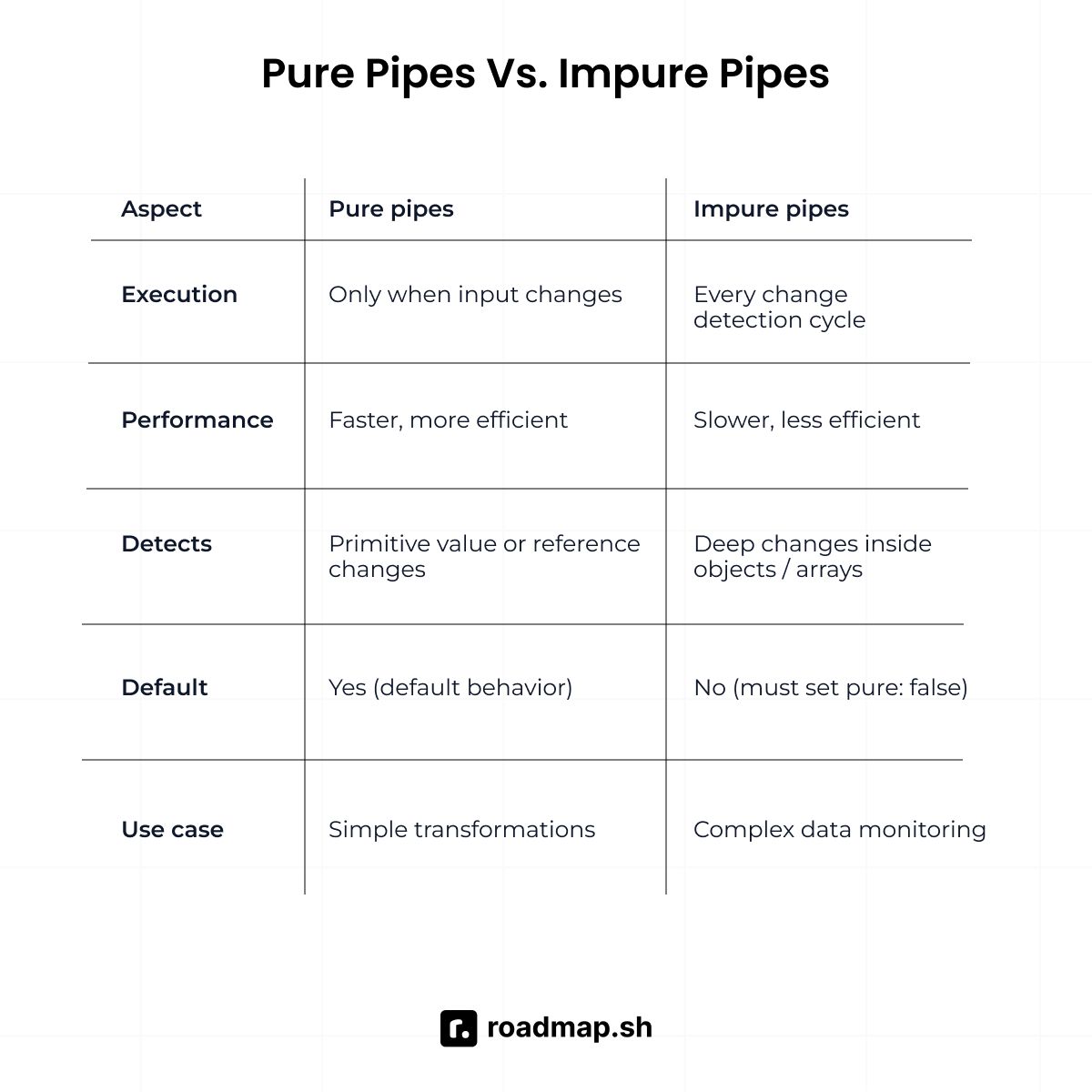
On the other hand, impure pipes run every time Angular checks for updates, not just when input values change. They detect changes to objects and arrays, not just to references. You create an impure pipe by adding pure: false to the @Pipe decorator.
How does change detection work in Angular?
Change detection keeps your component's view in sync with your model data, ensuring the user interface updates when properties change. When an event occurs in your Angular application, such as a user clicking a button, Angular responds. It starts a change-detection cycle to check for updates after the event.
In this cycle, it checks every component property to determine whether any value has changed. It starts from the root component and checks each child component. If Angular finds changes, it updates the component's view in the browser.
Code example of how change detection strategies work:
What are the types of change detection strategies in Angular?
You can update your app's user interface using two different change detection strategies:
Default strategy: Angular checks all components every time the change detection cycle runs. It's the easiest strategy, but it can be slow in large Angular applications. It works well for small apps or simple components where data changes often and the logic is easy to follow.
OnPush strategy: Angular checks a component only when its input properties change. It also updates it if something happens inside the component, such as a click event. This speeds up your application by skipping unnecessary checks. It works well for large apps or complex components where data changes less often, and you need better performance.
In your project, you noticed that the user interface updates on its own after clicking a button. How does Angular know when to update the view?
Angular uses zone.js to monitor async operations and DOM events such as button clicks. When these operations finish, zone.js tells Angular to perform change detection. Angular then checks your component properties and updates the view.
How does the Angular change detection mechanism work by default compared to the OnPush strategy? In what situations would you manually trigger change detection?
The Angular change detection mechanism checks all components whenever any change occurs by default. But with the OnPush strategy, Angular only checks when Input properties change or events run.
This approach improves performance, but because Angular skips some checks, it might not catch all property updates. In these situations, you'll use ChangeDetectorRef to manually trigger change detection. Use detectChanges() to detect changes immediately or markForCheck to mark the component for checking in the next detection cycle
What type of DOM does Angular use?
Angular uses the Real DOM (also known as the Browser DOM), not a Virtual DOM like React. When your data changes, Angular detects it using the change detection system and then updates the DOM. It modifies the actual DOM elements in the browser rather than creating a virtual copy first.
However, when it comes to component styling, Angular offers different ViewEncapsulation modes:
ViewEncapsulation.Emulated: The default option.ViewEncapsulation.ShadowDom: Uses the browser's Shadow DOM feature.ViewEncapsulation.None: No style isolation (styles can affect other components).
What is the difference between ViewEncapsulation.ShadowDom and ViewEncapsulation.Emulated in Angular?
When building Angular applications, you can choose different ViewEncapsulation options for component styles. ViewEncapsulation.ShadowDom creates a separate DOM tree, so styles do not affect other components.
The default option, ViewEncapsulation.Emulated, copies this behavior without requiring full browser support. It adds special attributes to DOM elements inside a component to identify them. Then it updates the CSS selectors so the styles stay within that component.
What is the Elvis operator?
The Elvis operator is also called the safe navigation operator. You write the Elvis operator with a question mark followed by a dot (?.). It prevents errors when an object is null or undefined (i.e., the value doesn't exist).
You use it in Angular templates to access properties like person?.age. Angular checks whether a “person” has a value; if it's null or undefined, it returns undefined instead of throwing an error.
How do you handle errors in Angular HTTP requests?
You can handle HTTP errors using RxJS operators in your service or component. Use the catchError operator in the pipe to handle errors from HTTP requests.
Convert server errors into messages users can understand. Retry failed requests, provide default data, or redirect users as needed. Implement an HTTP interceptor to centralize error handling across your entire application.
What is ahead-of-time (AOT) compilation in Angular?
Ahead-of-time (AOT) compilation compiles your Angular application during the build process, before deployment. AOT compiles Angular components and templates into optimized JavaScript. It removes the need for a heavy compiler in your production bundle, saving memory and reducing load times.
Some of the benefits of using ahead-of-time compilation are:
Apps load faster because the browser doesn't compile templates.
Production bundles are smaller without the Angular compiler.
Pre-compiled templates prevent attackers from injecting malicious code into your app at runtime.
You catch template errors during the build, not in production.
When you run ng build, Angular uses AOT as the default compilation mode. Angular transforms your code and templates on your development machine or build server. Users download finished, executable code that runs immediately without browser compilation.
How do you implement two-way data binding between parent and child components?
You implement two-way data binding by using both @Input() and @Output() decorators together:
What is the difference between switchMap, mergeMap, and concatMap?
switchMap drops old requests when a new one starts, keeping only the most recent request. Use it when you only care about the most recent result, such as autocomplete searches.
mergeMap handles multiple requests at once without waiting or canceling the previous requests. Use it when each operation should finish on its own, like in batch processing.
concatMap, on the other hand, runs requests one after another, waiting for each to complete before starting the next. Use it when tasks must follow a set order, such as sending messages or processing payments one at a time.
Explain dynamic components in Angular
Dynamic components load only when your app needs them, not ahead of time. Angular loads them based on conditions such as user actions. You decide which component to show while the app runs, not when you write the code.
Dynamic components help you build interfaces that adapt to the user's needs, such as pop-ups and modals. You inject ViewContainerRef as a placeholder in your template, then call createComponent() to insert a component into that placeholder when needed.
![import { Component } from '@angular/core'; import { switchMap, mergeMap, concatMap } from 'rxjs/operators'; import { fromEvent, of } from 'rxjs'; @Component({ selector: 'app-operators', template: `<input #searchBox>` }) export class OperatorsComponent { // switchMap - cancels previous, only latest matters searchWithSwitch() { fromEvent(this.searchBox.nativeElement, 'input').pipe( switchMap(() => this.http.get('/api/search')) ).subscribe(results => console.log(results)); // Types "abc" fast → only "c" search completes, "a" and "b" cancelled } // mergeMap - all run in parallel, no cancellation saveMultipleWithMerge() { const items = [1, 2, 3]; of(...items).pipe( mergeMap(item => this.http.post('/api/save', item)) ).subscribe(result => console.log(result)); // All 3 POST requests run at same time } // concatMap - waits for each to finish, maintains order processQueueWithConcat() { const tasks = [1, 2, 3]; of(...tasks).pipe( concatMap(task => this.http.post('/api/process', task)) ).subscribe(result => console.log(result)); // Task 2 waits for task 1, task 3 waits for task 2 } }](https://assets.roadmap.sh/guest/angular-advanced-interview-questions-9z1ry.jpeg)
The following are Angular interview questions on advanced concepts that you should know:
Advance Angular interview questions for developers
What is the difference between Angular and React?
Angular is a complete framework for building web applications. It includes all the necessary tools, such as routing, forms, and an HTTP client. For state management, you can use external libraries like NgRx or services with RxJS. Google maintains Angular, and it uses TypeScript by default. Angular follows an opinionated structure, i.e., it tells you how to structure your app.
On the other hand, React is a JavaScript library focused on building user interfaces. Facebook built it, and it uses JavaScript (TypeScript optional). React is flexible and unopinionated, i.e., you can structure your app however you like.
How do you optimize Angular application performance?
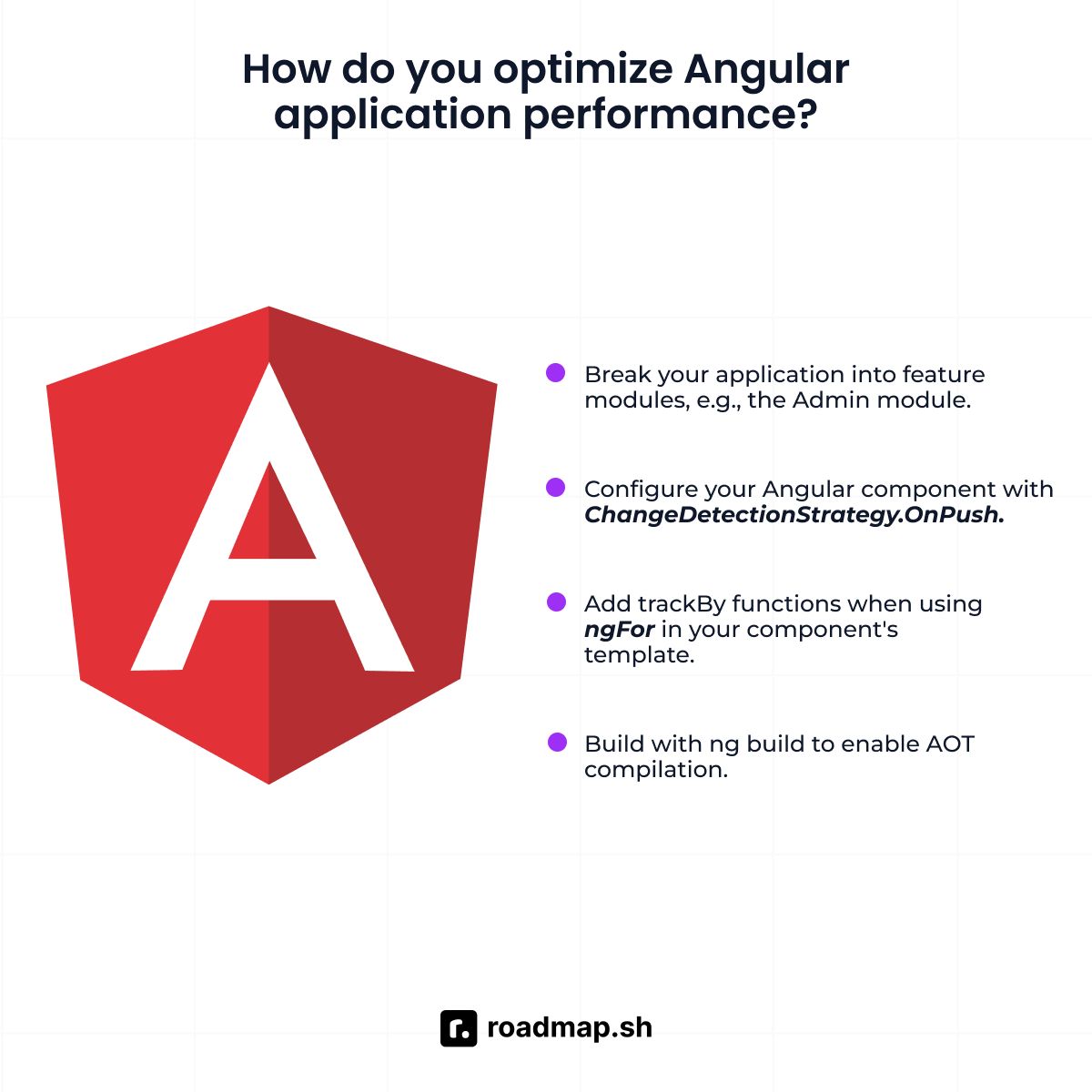
You can optimize your Angular application by following these main steps:
Use lazy loading: Break your application into feature modules, e.g., the Admin module. Then configure your routes, e.g.,
/adminusingloadChildren, to load them only when needed.OnPush change detection: Configure your Angular component with
ChangeDetectionStrategy.OnPush. Angular only checks the component when input references change, events occur within the component, or the async pipe receives new values. This method saves time in apps with multiple components that don't change often.TrackBy for lists: Add trackBy functions when using
ngForin your component's template. It finds the items that changed and skips rebuilding the entire list.Build optimization: Build with
ng buildto enable AOT compilation. It removes development code and unused dependencies from your bundle.
Code example of how to optimize an Angular application:
What is the difference between the Angular component and the custom element?
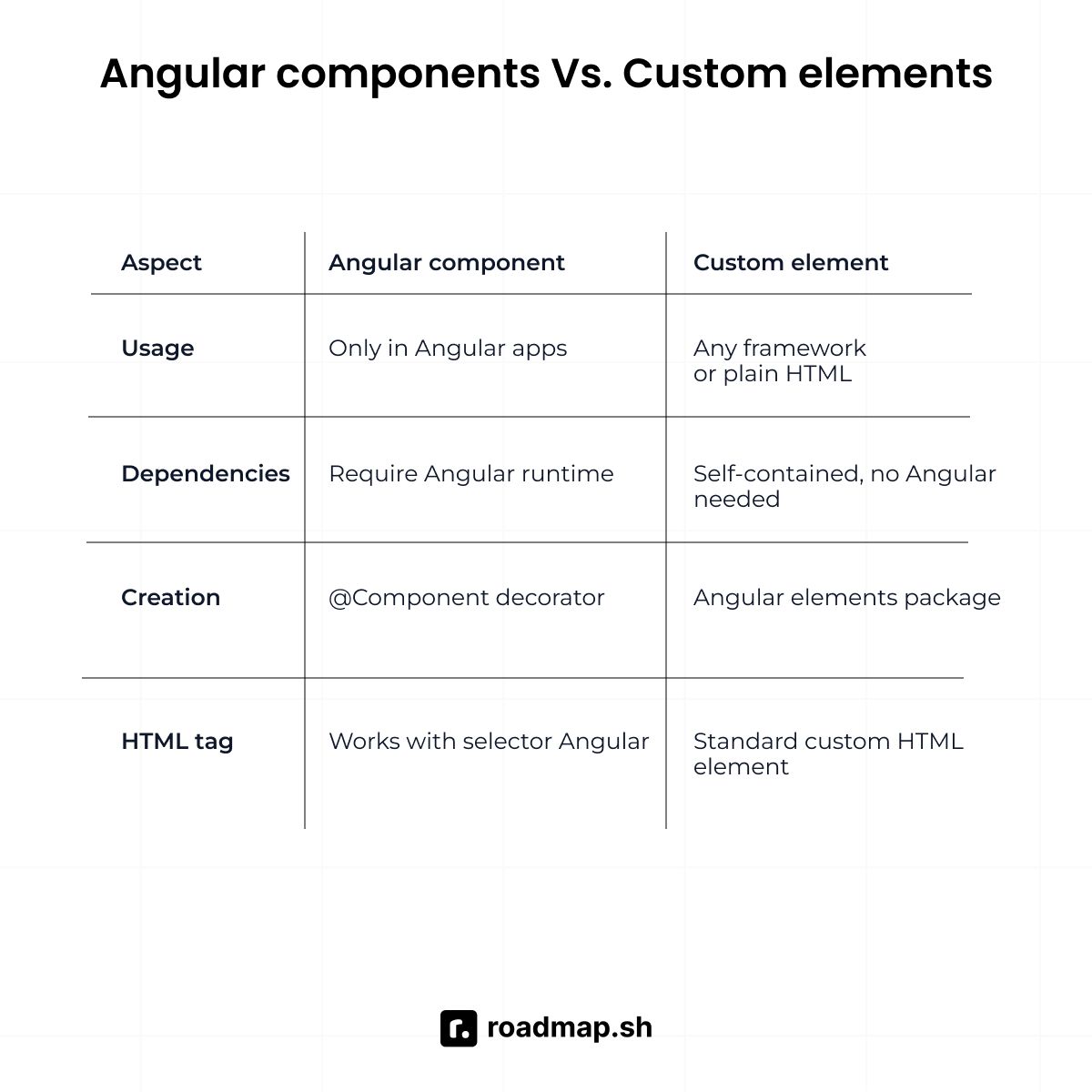
Angular components are framework-dependent parts of Angular applications. They use Angular's change detection, dependency injection, and lifecycle system. Components accept component input properties through the @Input() decorator, allowing parent components to pass data down.
On the other hand, custom elements are framework-independent web components that conform to web standards. They work with any JavaScript framework or in a vanilla JavaScript environment. Angular can convert a component into a custom element using Angular elements. It creates a standalone component with an associated custom element tag that you can use anywhere.
How do you handle memory leaks in Angular?
Memory leaks occur when your Angular components hold onto resources after they're destroyed. Your app will continue sending updates to a component that no longer exists. It will lead to unnecessary memory usage and slow down your app.
Follow these best practices to avoid memory leaks:
Unsubscribe from Observables in
ngOnDestroyto prevent memory leaks. You can also use the async pipe in Angular templates instead of manual subscriptions.Use the
takeUntilDestroyedoperator for components with many subscriptions.To stop timers when Angular destroys a component, use
clearInterval()andclearTimeout()inngOnDestroy.Don't store component instances inside long-lived services.
Remove event listeners in
ngOnDestroyusingremoveEventListenerto prevent memory leaks from old event handlers.
Code example on how to handle memory leaks in Angular:
How do you manage state in large Angular applications?
State management controls how data flows between multiple components. It's the data the application needs to remember, such as form data. When the state isn’t managed well, the app becomes harder to debug, and components can get out of sync.
Follow these best practices to manage state in large Angular applications:
Create a service to hold state and share it across different components.
Use
BehaviorSubjectorReplaySubjectin your services to make state reactive and stay in sync without manual updates.Always create new objects when updating state instead of changing existing ones.
When your app grows large with many components sharing state, use NgRx (a state management library).
Use
@Inputand@Outputfor parent-child components, shared services for sibling or distant components.
What is the purpose of NgModule in Angular?
NgModule organizes your application by grouping related Angular components, services, and directives into modules. It defines the compilation context, controls which components can use each other, manages dependency injection scope, and determines what’s visible to other modules through exports.
Developers still use NgModule, but Angular makes it optional. Modern Angular (v14+) now supports standalone components that don't need a NgModule. Standalone components provide a much simpler setup for all new Angular components.
What is differential loading in Angular?
Differential loading is a feature in Angular that creates two app versions during the build process. One is for modern browsers with the newer JavaScript (ES2015+) features like arrow functions. The other uses ES5, an older JavaScript syntax that works in older browsers. This optimizes performance for newer browsers while maintaining compatibility with older ones.
What are Angular Signals?
Angular Signals are a new reactive primitive for state management. They store data and notify Angular when values change, allowing the user interface to update.
You create signals with the signal() function and update them with set() or update(). For derived values, use computed(), and for side effects, use effect().
How do you debug Angular applications effectively?
The following are methods to debug Angular applications:
Use the Angular DevTools browser extension to view component hierarchy and state.
Set breakpoints in the browser DevTools (e.g., Chrome) to pause execution and examine variables.
Add
console.log()statements to track data flow and component behavior.Use RxJS debugging tools, such as the
tap()operator, to log Observable data.Check the browser console for error messages and stack traces.
How do you implement Progressive Web App (PWA) features in Angular?
The following are steps to implement Progressive Web App (PWA) features in Angular:
Run
ng add @angular/pwato install PWA support, which adds a service worker, manifest file, and icons.Modify
ngsw-config.jsonto specify caching rules for assets and data.Update
manifest.webmanifestwith your app details like name, theme color, and icons.Build your app with
ng buildfor production.Serve your app over HTTPS to enable service worker registration.
What is Angular Ivy?
Angular Ivy is the newest rendering engine and compiler for Angular. It replaced the previous compiler (View Engine) in Angular 9 and became the default compiler.
Ivy compiles your Angular components into smaller, faster JavaScript code. It enables features like better tree-shaking to remove unused code from your files. If you don't use a certain Angular feature, such as a pipe or directive, the Ivy compiler removes it from the final bundle.
What are Angular schematics?
Schematics are templates and rules that generate code in Angular projects. They automate tasks such as creating components, adding libraries, and updating project configurations. Angular CLI uses schematics when you run commands like ng add or ng generate. They help you write code that follows Angular conventions and keeps the project well-structured.
Wrapping up
Preparing for an Angular interview requires strong knowledge and project experience. You must understand the framework structure and know how to build large applications with it. Progress takes practice and effort, but the right approach makes a big difference. Use the questions in this guide to practice, build projects, and review often.
Practice explaining your answers so they are easy to follow. Interviewers look for developers who can explain complex topics with easy-to-understand words. Understand the core ideas, and be ready to discuss the pros and cons and how they apply to everyday projects.
Now it’s your time to practice. Ask our AI Tutor below to test your knowledge on Angular interview questions.
If you prefer a more interactive quizzing experience, with multiple-choice and open-ended questions, check out the dedicated AI Tutor page. Get quick feedback and personalized explanations for every question to help you remember what you've learned and prepare for Angular interviews.
If some questions feel challenging, don't worry: every expert started as a beginner. Fortunately, we’re here to help you along the way. Check out the Angular Roadmap to identify gaps in your knowledge and keep building your skills step by step.
