Python super() and init: Multiple Inheritance Guide

 Kimberly Fessel
A function and method walk into a class. Sounds like the start of a bad computer science joke, but it’s actually the beginning of a beautiful relationship built on cooperation, a few arguments here and there, and an inheritance hierarchy.
In Python, inheritance gives you the power to reuse and extend attributes and methods from base classes. In this article for intermediate Pythonistas, we’ll explain the __init__() method for initializing class instances along with the super() function to access methods inherited from other classes. You’ll learn how to pair the two together, work with multiple inheritance and the MRO, and avoid common “gotchas” along the way.
__init__ in Python: Object Initialization
When creating classes in Python, you’ll often want to initialize instances of that class with specific properties like name, age, or other details. A special method called __init__() helps you do exactly that. Python automatically calls the class’s __init__() when you create an instance. This lets you set attributes for the object’s initial state, which you can reference throughout your Python code.
You’ll usually refer to your newly created instance as self, the first argument of __init__(). You can then mention instance attributes as: self.attribute. You can also give parameters a default value of None, making them optional when creating an instance.
Here’s an example of an Employee class with two attributes: name and employee_id:
You can now create an instance of this class by providing the name and employee ID. After creation, find the name or employee ID as instance.attribute:
Python super(): Single Inheritance Example
You’ll likely find Python classes helpful for many situations, and it turns out that you can extend their usefulness beyond simple descriptions of single objects. Specialized subclasses (child classes) can inherit from superclasses (parent classes or others). The superclass describes general attributes and methods that all its subclasses can receive, while subclasses may add or override specific values and actions. Classes also support encapsulation, bundling data and methods together while controlling access from outside the class.
Let’s explain how this inheritance works in Python by demonstrating a RemoteWorker subclass that is based on our Employee class:
Because the child class RemoteWorker doesn’t define its own __init__(), it uses the initializer inherited from its base class, Employee. But what if you have extra attributes for RemoteWorker such as time zone? Here’s what happens when RemoteWorker has its own __init__():
Our RemoteWorker class inherited from Employee as its immediate superclass, but because it defines its own __init__(), Python calls that initializer when you create an instance of RemoteWorker. It doesn’t automatically call Employee.__init__().
To reuse Employee’s initialization while adding the new attribute to RemoteWorker, use super(). super() is a built-in Python function that lets you delegate method calls to another class in the inheritance hierarchy. Here’s the updated code:
The key line of code here is super().__init__(name, employee_id). In this simple example, Employee is the parent class of the RemoteWorker child class, so super() finds Employee.__init__() next according to Python’s method resolution order (MRO) and passes along name and employee_id. Note that you don’t need to pass self; Python supplies it automatically.
Without the Python super() function, you’d need to hard-code in the parent class function, and explicitly calling a parent class can accidentally skip other implementations in the MRO, limiting the class’s flexibility. So let’s take a closer look at multiple inheritance, including the ever-important MRO.
Multiple Inheritance and the MRO
You just saw an example of simple inheritance: the RemoteWorker class inherited from the Employee class. But what happens when a class inherits from more than one base class? This leads to multiple inheritance, and it’s prevalent throughout Python.
Say you have another class called TeamLead that inherits from Employee along with a fourth class, EngineeringManager, that’s derived from both RemoteWorker and TeamLead. You can imagine these four classes in a diamond shape:
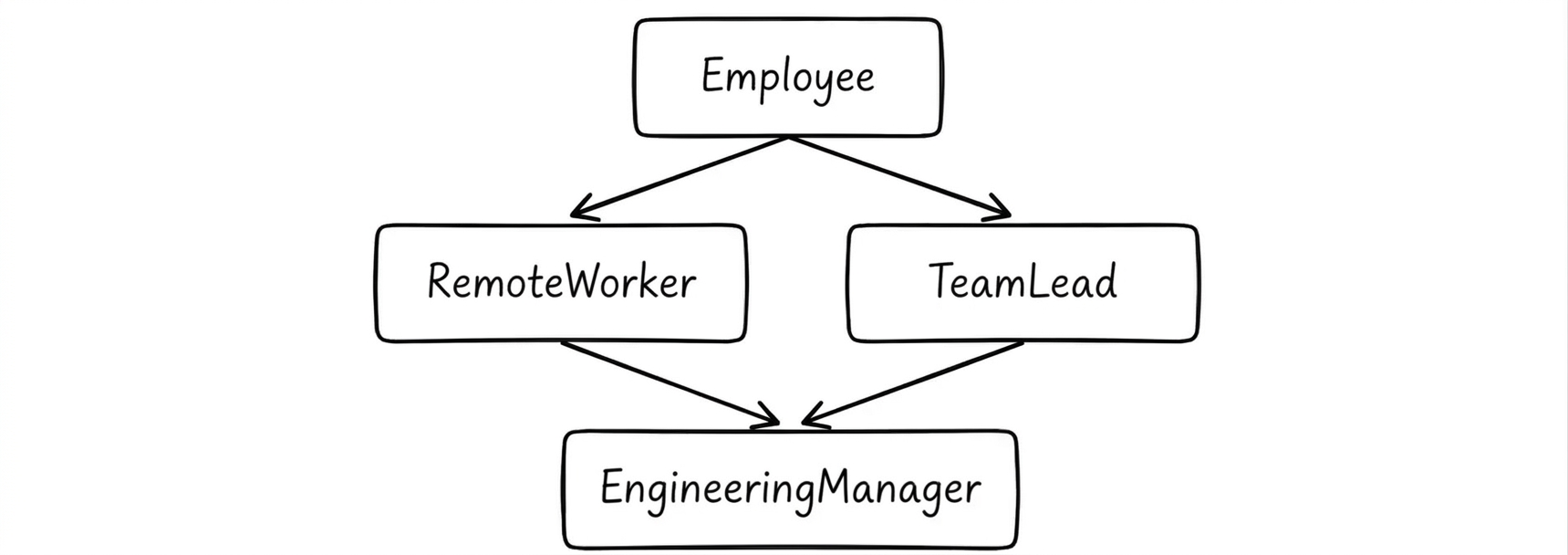
Inheritance like this sets you up for potential ambiguity since both paths lead back to Employee. Which one should take precedence when multiple classes define the same method? Python needs rules for determining where to look for inherited information.
What is the MRO?
The MRO, or method resolution order, provides the exact ordered sequence Python uses to search for methods in the class’s inheritance hierarchy. Every Python class has an MRO. Oftentimes, in the case of simple classes with single inheritance, the MRO follows a straightforward linear hierarchy from the subclass through its superclasses. But the MRO becomes critically important when classes inherit from many others so that Python knows which method takes precedence when more than one class defines one with the same name.
You can inspect the MRO of any Python class like this EngineeringManager.mro() or EngineeringManager.__mro__
For the EngineeringManager example described above, we’d expect to see a chain such as EngineeringManager → RemoteWorker → TeamLead → Employee → object (the generic Python class):
Python determines the order of your MRO using an algorithm called C3 linearization, which produces a consistent ordering that respects the class hierarchy and the order that you list the base classes. A child class always appears in the MRO before all of its parent classes, while C3 linearization determines the ordering among classes when inheriting from multiple classes creates more complicated relationships.
How is super called in Multiple Inheritance?
Calling super() creates a super object that lets Python search for methods, starting with the next class in the MRO (Method Resolution Order). It continues searching up the MRO until it finds a method by that name to execute. If no such method exists, you’ll get an AttributeError. Note that using super() is not the same thing as merely looking up information in the parent class. The Python super() function systematically travels up the MRO, which is most apparent in the case of multi-class inheritance.
For a concrete example, imagine each class has a method called .describe(), which prints the class name and calls super().describe(). You can see the entire MRO by running .describe() on an EngineeringManager instance in the following code:
Each implementation of describe() calls super.describe(), allowing the call to continue to the next implementation in the MRO until the chain ends with Employee.describe(). Surprisingly, super().describe() within RemoteWorker leads to TeamLead even though it doesn’t inherit from it. Python follows the MRO rather than merely hopping from the child class to the parent class.
Cooperative Multiple Inheritance
In the previous example, the code allowed each class in the MRO to execute its own .describe() because the subclasses also called super().describe(). This illustrated an example of cooperation. Here, “cooperative” means that each class performs its part of the method and then uses super() to give the next class in the MRO a chance to do its part.
Hard-coding a particular superclass can be a bad idea in cooperative multiple inheritance. For robustness, it’s better to use super() and let the MRO dictate which implementation comes next. Though, the cooperation depends on each participating class continuing the chain. Classes later in the MRO may never get a chance to run their methods if any one class fails to include super().
Cooperative multi-class inheritance proves incredibly important when it comes to __init__(). With cooperation, each class in the MRO gets a chance to perform its own initialization. You’ll likely want to use **kwargs, which lets each class accept and pass along additional keyword arguments, when making your initialization cooperative.
This pattern makes sense for our EngineeringManager, where several classes need to contribute to initialization:
Our engr_manager instance now has name, employee_id, timezone, and team attributes. Also note that we use keyword arguments instead of positional ones. This allows each initializer to take the arguments it needs and pass the rest along through **kwargs.
Over the course of initialization, each class consumes the arguments associated with it and sends the remaining values to the next class in the MRO. For example, RemoteWorker.__init__() explicitly accepts timezone. Python binds that value to timezone and bundles the rest of the keyword arguments in **kwargs. Here’s the full chain:
EngineeringManager → passes everything
RemoteWorker takes
timezone→ passesname,employee_id,teamTeamLead takes
team→ passesname,employee_idEmployee takes
name,employee_id→ passes emptykwargsobject
Python’s default object class doesn’t receive any arguments and thus ends the initialization chain. Any unexpected arguments left over at this point can cause a TypeError since object.__init__() does not accept them.
Common Errors and How to Fix Them
If you’re still struggling with complex inheritance hierarchies, you’re certainly not alone. Here’s a look into some of the most common pitfalls and how to avoid them.
What Happens if You Forget super().__init__()?
If a subclass defines its own __init__() and doesn’t include super().__init__(), Python won’t automatically call the next __init__() in the MRO. You might still be able to create instances of your subclass, but it might be missing instance attributes defined by your superclasses. If you later try to access any of those attributes, you’ll get an AttributeError.
Here’s what that would look like for RemoteWorker:
When you try to get the worker’s name, Python can’t find it since RemoteWorker.__init__() doesn’t call the parent class’s constructor through super().__init__(). Add super().__init__()—with appropriate arguments—back in to resolve this issue.
Missing Arguments in super().__init__()
You may have remembered to add super().__init__() to your subclass, but you still need to explicitly pass along any required arguments, either directly or through **kwargs. The super() function does not automatically guess which argument values to send to __init__().
This is what happens if you forget:
To fix this problem, pass the required arguments with super().__init__(name, employee_id) or switch to **kwargs throughout.
kwargs Mismatch between Parent Class / Child Class
As you saw in the cooperative multi-class inheritance example, each class consumes its expected keyword arguments with the rest of the arguments passing along the MRO through **kwargs. Any unused argument stays in **kwargs and eventually reaches object.__init__(); however, object.__init__() does not accept arguments, so you’ll get a TypeError.
Given the classes defined in the cooperative example above, this gives you an error because none of the classes have an email initialization argument:
Make sure every keyword argument you provide gets consumed by one of the initializers in the MRO to avoid a TypeError.
When NOT to Call Python’s super init
Despite its usefulness, you don’t need super().__init__() in every subclass to write valid Python. It’s unnecessary for single inheritance if your subclass doesn’t need any initialization from your superclass. If your subclass handles all of its own initialization, you can get rid of super().__init__(). You also don’t need it if your class isn’t based on other classes at all. Ultimately, use super().__init__() when you need to run initialization elsewhere in the MRO to properly initialize your subclass.
Wrapping Up
The __init__() method helps you set attributes when initializing an instance of a Python class; meanwhile, super() is a function that lets you pass calls to other classes in your inheritance hierarchy. Together they provide a way for you to coordinate initialization across an inheritance hierarchy. In simple inheritance, super() may access a method directly from the parent class, but keep the MRO in mind when designing and interacting with classes with multiple inheritance. Every argument must be consumed by a class when utilizing cooperative methods and **kwargs; otherwise, Python raises a TypeError.
Want to test out your new super() knowledge? Ask the AI Tutor to initialize a quiz for you. Here’s a prompt you can use to get going:
