Top 50 Kubernetes Interview Questions and Answers
 Ekene Eze
Kubernetes continues to appear in DevOps and backend engineering job descriptions, and that trend shows no signs of slowing. As cloud computing continues to grow, Kubernetes has become a widely used choice for deploying and managing applications at scale. Interviewers hiring an engineer are looking for depth. Not just knowledge, but proof that you have handled outages, corrected bad configurations, and fixed security issues.
But here's the part most people overlook. Interviewers don't care if you can recite what a pod is word-for-word. They care about how you think. Can you explain why a deployment failed? Can you reason through scaling issues when things break under pressure?
That's why we've curated 50 Kubernetes interview questions and answers, grouped by experience level: beginner, intermediate, and advanced. This guide is designed to help you revisit core concepts, identify weak spots, and prepare if you're serious about landing that role.
TL;DR
Learn 50 Kubernetes interview questions grouped into beginner, intermediate, and advanced levels.
Core topics include Kubernetes architecture, pods, nodes, services, scheduling, networking, scaling, storage, RBAC, security, and cluster management.
Explore the Kubernetes roadmap to strengthen your understanding of both basic and advanced topics and know exactly what to learn next.
To go even further, use the AI Tutor to ask questions, understand concepts, track your progress, and receive personalized learning advice.
Tips for Preparing for a Kubernetes Interview
Kubernetes interviews focus on how systems behave in production, such as how a pod recovers when a node fails or how traffic is routed when a service goes down. Understanding this alone puts you ahead of most candidates.
Explain concepts using real scenarios rather than definitions. It shows you have worked with the technology, not just read about it.
Spend time on how Kubernetes handles node failures. CrashLoopBackOff, broken Ingress or services, and RBAC misconfigurations show up in production. Be prepared to walk through your debugging process step by step.
Test yourself with Flashcards
You can either use these flashcards or jump to the questions list section below to see them in a list format.
What is Kubernetes, and why is it used?
Kubernetes, also known as K8s, is an open-source container orchestration platform for deploying, managing, and scaling containerized applications. Instead of manually juggling containers across servers, Kubernetes automates scheduling, improves scaling, and keeps your applications running.
Developers use Kubernetes to prevent downtime and handle complex processes such as rolling updates, service discovery, and fault tolerance, so you can focus on building features rather than firefighting infrastructure.
Questions List
If you prefer to see the questions in a list format, you can find them below.
Beginner Kubernetes Interview Questions and Answers
What is Kubernetes, and why is it used?
Kubernetes, also known as K8s, is an open-source container orchestration platform for deploying, managing, and scaling containerized applications. Instead of manually juggling containers across servers, Kubernetes automates scheduling, improves scaling, and keeps your applications running.
Developers use Kubernetes to prevent downtime and handle complex processes such as rolling updates, service discovery, and fault tolerance, so you can focus on building features rather than firefighting infrastructure.
What is a pod in Kubernetes?
A pod is the smallest deployable unit in Kubernetes. It holds one or more containers operating in the same network namespace, sharing storage and networking resources such as a single IP address, allowing tightly coupled containers to run together.
The main container is where your application lives. Pods support two additional container types:
An init container runs before the main container starts, handling setup tasks like checking dependencies.
A sidecar container runs alongside the main container, handling supporting tasks like logging or proxying without touching the main application.
What is a node in Kubernetes?
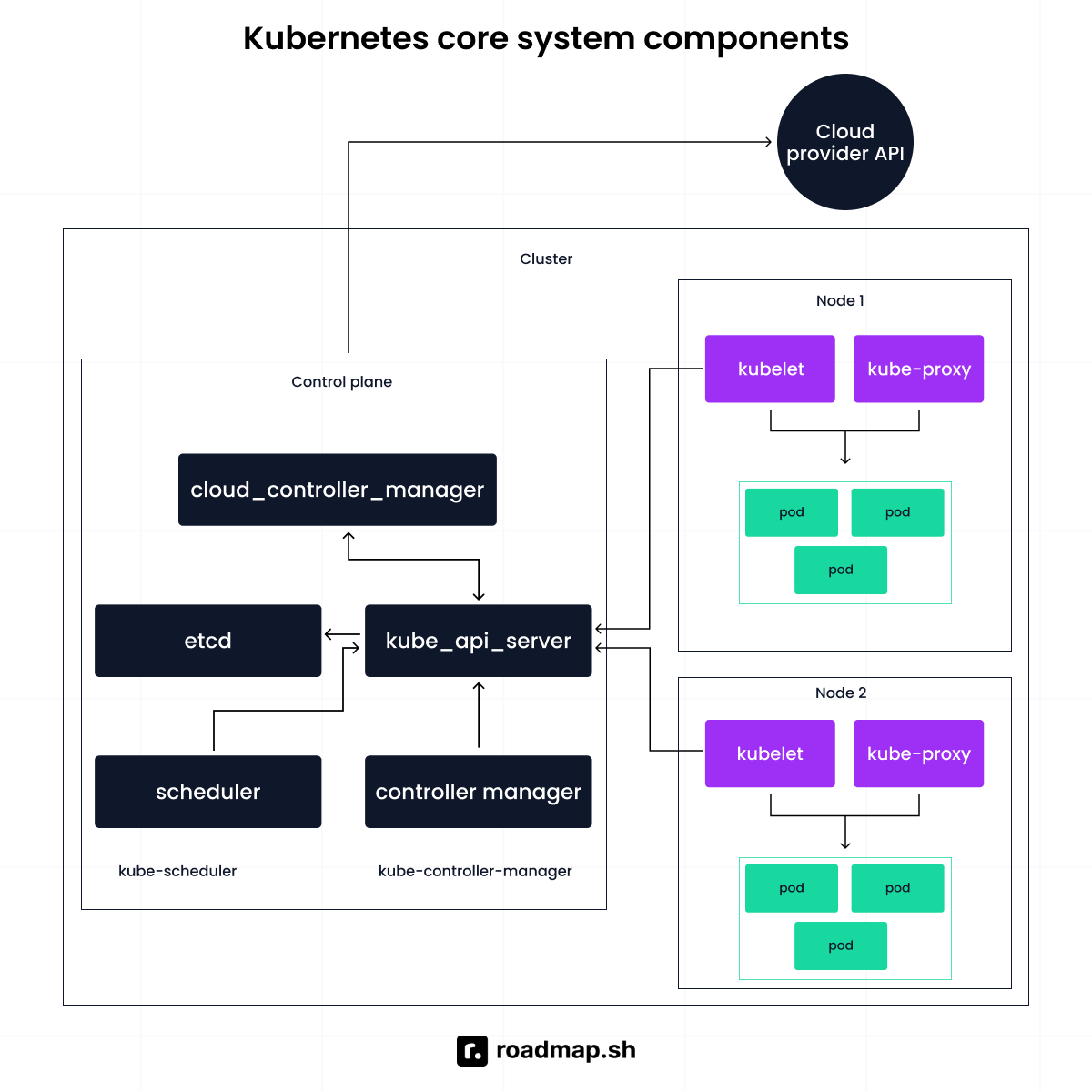
A node is a machine in a Kubernetes cluster. Worker nodes are where pods actually run. Every cluster has two main parts:
The control plane manages the cluster's state. It decides where pods run, whether containers should restart, and how scaling should occur. In production, it runs across multiple machines and spans availability zones to avoid a single point of failure.
Worker nodes run the actual application workloads. When you deploy an application, it is packaged into pods and scheduled onto worker nodes.
What is a service in Kubernetes?
Pods are disposable. When they are killed and replaced, their internal IP addresses change. A service solves this by providing a stable entry point that maps to those shifting pods, keeping the application reachable.
Kubernetes service types:
ClusterIP: Assigns a stable cluster IP address, reachable from inside the cluster. This is the default type and is used for pod-to-pod communication.
NodePort: Opens a static port on every node's IP. It allows external access to the service from outside the cluster.
LoadBalancer: Exposes the service using an external load balancer from your cloud provider. Sits on top of NodePort.
ExternalName: Maps a service to an external DNS name, routing traffic to a service outside the cluster.
What is a Namespace in Kubernetes?
Namespaces let you create multiple virtual clusters within a single physical cluster. Different teams get their own partition without stepping on each other. Resource names only need to be unique within a namespace, so conflicts across teams are not an issue. You can attach quotas, access controls, and policies to a namespace to keep resource usage in check.
What is the difference between Docker and Kubernetes?
Docker is a platform for building and running containers. It packages your application and everything it needs into a container that runs consistently across environments, from a local laptop to a CI/CD pipeline.
Kubernetes is a container orchestration platform. It does not build containers. It schedules and manages them across a cluster of machines. Today, Kubernetes does not rely on Docker as the runtime. It connects directly to container runtimes like containerd or CRI-O through the Container Runtime Interface.
What is the Kubernetes control plane?
The Kubernetes control plane is the brain of the cluster. It runs as a group of control plane components, including the API server, scheduler, and controller manager. In production clusters, these components run across multiple nodes to improve reliability and avoid a single point of failure. Everything flows through the control plane, which is why understanding Kubernetes architecture starts here.
Imagine you deploy an online store. You package the application into a container and push it to the cluster. The control plane schedules the pods onto worker nodes. If traffic increases, the deployment scales. If a node fails, it reschedules the workload to another node.
Describe the role of ReplicaSet
A ReplicaSet is a Kubernetes controller that keeps a stable number of identical pod replicas running in the cluster.
You declare the desired count. From that point, it watches the actual state. If one pod crashes or a node fails, a new one is created on a healthy node. If there are more pods than specified, the extras are terminated.
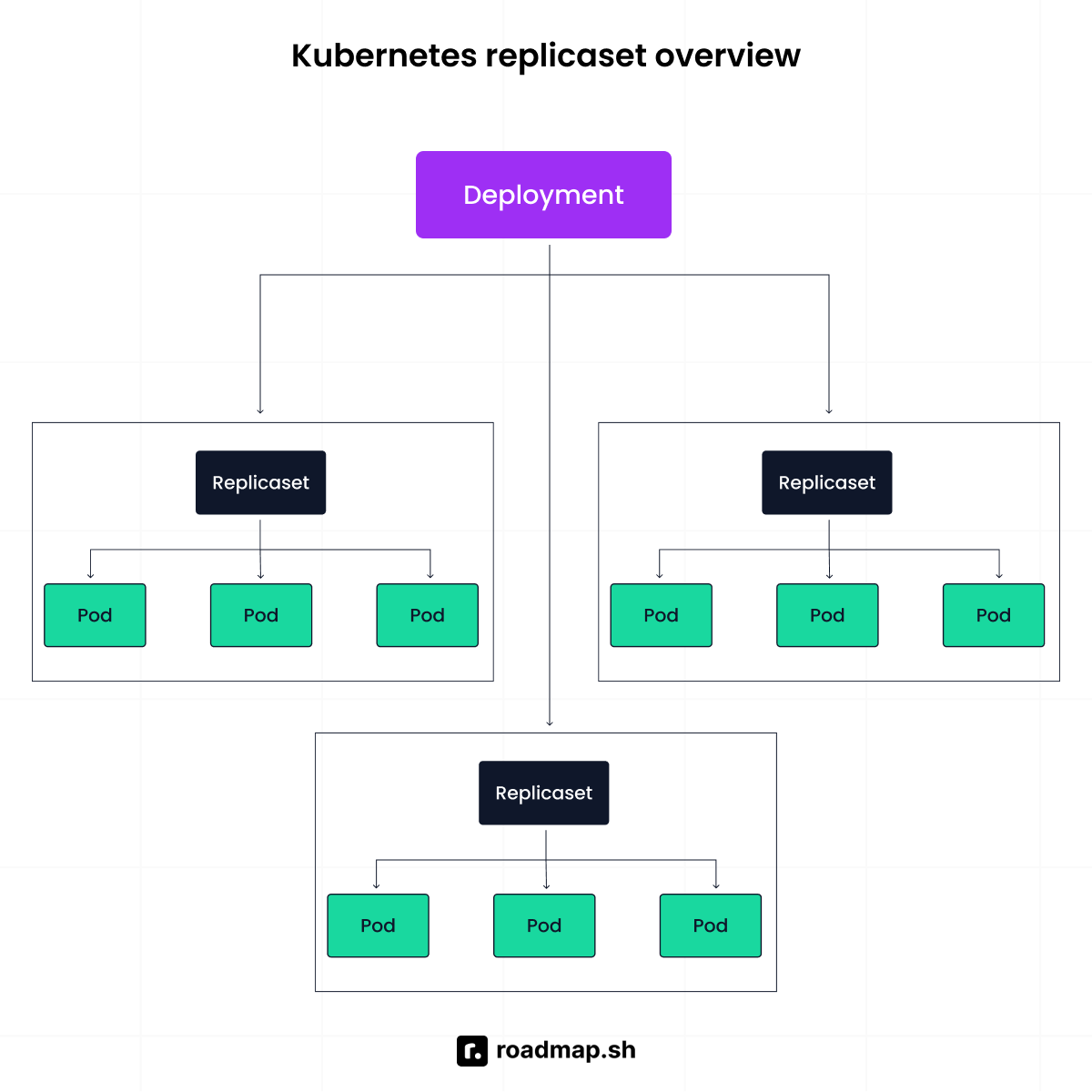
The example below demonstrates a ReplicaSet designed to maintain three identical pods:
How do you perform a rolling update in Kubernetes?
A rolling update keeps your application responsive while the backend is being updated. Instead of shutting everything down at once.
Here’s how it works:
Kubernetes creates a new pod with the updated version of the application.
It waits for that pod to pass its readiness check.
Once the new pod is healthy, the old pod is terminated.
This process repeats until all pods are running the new version.
What happens when a Kubernetes deployment is created?
When you create a Kubernetes deployment, you are telling Kubernetes the desired state: how many replicas to run, which container image to use, and how much resource each pod needs. Kubernetes works to make that state real across the Kubernetes nodes in your cluster.
Behind the scenes, the Deployment creates a ReplicaSet that manages the actual pods. If a pod crashes or a node fails, the ReplicaSet creates a replacement automatically.
For traffic that grows over time, set up a horizontal pod autoscaler (HPA). It adjusts pod count based on resource usage, so your application handles demand without manual adjustment.
What happens when you run a Kubectl command?
Kubectl reads the kubeconfig file to determine which cluster to talk to. The request is then sent to the API server. The API server authenticates you, checks your permissions through RBAC, and then processes the request. If the request changes the cluster state, the API server stores that change in etcd.
Why does every request in Kubernetes go through the API server?
Kubernetes is structured so that all communication happens via the API, which is the central point. All requests must pass through it, whether from kubectl, the scheduler, or any other component.
Imagine if components could update cluster data directly without validation. You'd have inconsistent states and security issues. The API server checks every request, confirms permissions, and then either performs the action or returns information.
If the API server goes down, existing pods may continue to run, but you won't be able to deploy new workloads.
Describe the role of etcd in a Kubernetes cluster
Etcd is the distributed key-value store that holds the cluster's data. It stores configuration details, metadata, and system state, everything the cluster needs to function.
It is built to be fault-tolerant. Even if a node fails or a network partition occurs, etcd preserves data consistency using quorum-based consensus. In a multi-node control plane setup, this keeps the cluster state reliable when things go wrong.
If etcd becomes corrupted, the cluster goes blind. The control plane loses its memory of what should exist. That's why etcd backups are critical in production. Only the API server communicates with etcd directly. That separation protects the integrity of the cluster state.
Why can’t Kubectl work without a kubeconfig file?
A kubeconfig file resides on the machine where kubectl is installed. It holds the cluster endpoint and the credentials needed to authenticate. When you run a kubectl command, that is the first thing it reads. Without a valid endpoint and credentials, kubectl has no reference point. It wouldn't know which cluster to target or how to verify your identity.
What is a DaemonSet in Kubernetes?
A DaemonSet ensures one copy of a pod runs on every node in the cluster. Add a new node, and the pod lands on it automatically. Remove a node, and the pod goes with it.
This makes it useful for node-level tasks like log collection, monitoring agents, or network plugins, where every node needs the same workload running.
The beginner questions test whether you understand how Kubernetes is built. Next, the intermediate questions test whether you can work with it.
Intermediate Kubernetes Interview Questions and Answers
How does Kubernetes scheduling work?
The scheduler decides which node a pod should run on. When you create a pod, it has no node assigned yet. The scheduler watches for pods in this unscheduled state and checks available CPU, memory, and constraints across all nodes before making a decision.
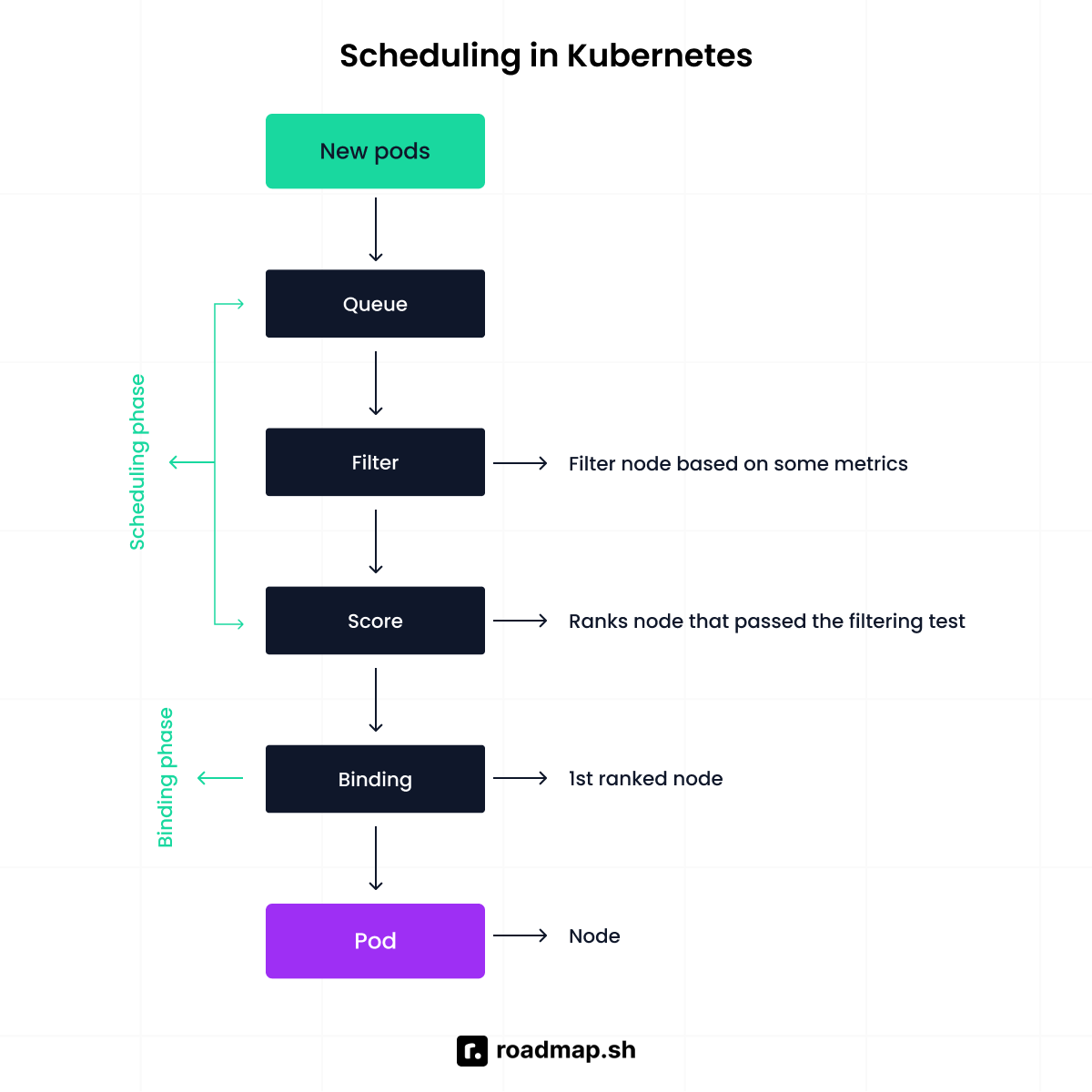
The scheduler logic is a mixture of three phases: filtering, scoring, and binding.
Filtering: removes any node that cannot satisfy the pod's requirements, such as not enough CPU, not in a ready state, or wrong taint.
Scoring ranks the remaining nodes based on available resources, affinity rules, and other preferences. The pod lands on the highest-scoring node.
Binding: assigns the pod to the winning node by updating the API server. The kubelet on that node takes over and starts the pod.
What is the difference between Deployment and StatefulSet?
Deployments and StatefulSets both manage pod replicas but treat identity and storage differently.
A Kubernetes deployment works best for stateless applications like website frontends and REST APIs. Pods can be created or destroyed because nothing depends on local storage. If one crashes, another takes its place, and nobody notices.
A StatefulSet is built for stateful applications like databases. Each pod has a unique identity and requires persistent storage that survives restarts. If a database pod is recreated, it comes back with the same name and the same persistent volumes. Without that stability, the database loses track of its whole data.
Below is a simple manifest that starts four replicas of pods running the NGINX web server using a Deployment:
Here is the equivalent StatefulSet running three MySQL replicas:
How does Kubernetes handle scaling?
Scaling means adjusting the number of running pods based on demand. You can do this manually by setting the replica count in your deployment:
If one pod fails, the deployment controller creates a replacement. But manual scaling is not practical in dynamic environments. Imagine you run an online shoe store. During the day, traffic increases; at night, it drops. Keeping a fixed pod count wastes resources at night and risks crashing during peak demand. That is where the Horizontal Pod Autoscaler (HPA) comes in. It adjusts replica count automatically based on CPU and memory usage.
How does networking work in Kubernetes?
By default, pods in a Kubernetes cluster can communicate with each other directly. Each pod receives its own IP address, and Kubernetes networking allows pods to communicate across nodes as if they were on the same network. This is implemented through a CNI plugin such as Flannel or Weave.
Pod IPs are temporary and change when a pod is recreated. To solve this, Kubernetes uses Services, which provide a stable IP address and load balance traffic across pods.
Ingress sits on top of Services. It manages incoming traffic from external clients and routes requests to the correct service based on domains or URL paths, using an ingress controller to enforce these rules.
What are ConfigMaps and Secrets?
ConfigMaps and Secrets keep configuration and sensitive information out of your container images.
Hardcoding values into application code creates security risks and makes the codebase harder to maintain. Kubernetes lets you inject configuration at runtime instead.
A ConfigMap holds non-sensitive information like URLs, port configurations, and environment variables. A Secret is for database passwords, API keys, and tokens.
Here is a code example of a ConfigMap and a Secret:
What happens if a pod exceeds its assigned memory limit?
The Linux kernel terminates the container with an out-of-memory (OOM) error. Memory limits are enforced; unlike the CPU, which can be throttled, memory cannot be overcommitted.
After termination, Kubernetes follows the pod’s restart policy. For Deployments, this defaults to Always. If the container exceeds its memory limit, the pod enters a CrashLoopBackOff state.
If the entire node runs low on memory, Kubernetes may evict pods to protect node stability.
How do you mount a secret in a pod?
A Secret can be mounted as a volume or injected as an environment variable. When mounted as a volume, the application reads sensitive data from the file system.
When used as an environment variable using secretKeyRef, a particular key from the secret maps to a variable in the container. This method is often used for database passwords or API tokens.
Describe the role of a proxy in Kubernetes.
Kube-proxy runs on every node and manages network communication for services. It watches the Kubernetes API for endpoint changes and updates the node's networking rules.
When traffic hits a Service's virtual IP, kube-proxy configures routing rules using iptables or IPVS so the kernel directs that traffic to the right backend pods.
How do readiness and liveness probes work in Kubernetes?
A probe is a health check mechanism used by the kubelet to determine the state of a container. There are three types:
Readiness probe: Checks if the container is ready to serve traffic. If it fails, the pod is removed from the service endpoint until it passes again.
Liveness probe: Checks whether the container is still alive. If it fails, Kubernetes kills it. You can use a liveness probe when you encounter issues like deadlocks and infinite loops.
Startup probe: Checks if the application has finished starting. Useful for slow-starting containers that would otherwise be killed by the liveness probe before they are ready. Once it passes, the liveness and readiness probes take over.
What are three common pod failure states, and how do you troubleshoot them?
Pods can get stuck in states like CrashLoopBackOff, Pending, or ImagePullBackOff. Here is how you recognize and fix them.
CrashLoopBackOff means the container keeps crashing. Kubernetes restarts it but backs off after repeated failures. Check the logs with kubectl logs and look for missing environment variables, dependency failures, or incorrect startup commands.
Pending means Kubernetes cannot schedule the pod. Usually, insufficient CPU or memory, missing PersistentVolumes, or taints blocking scheduling. Run kubectl describe pod to see exactly why the pod has not been assigned to a node.
ImagePullBackOff means Kubernetes cannot pull the container image. Caused by wrong image name, authentication issues with a private registry, or network problems. kubectl describe pod will tell you why.
How does Kubernetes use configuration files to manage cluster connections?
Kubernetes uses a kubeconfig file to manage how clients like kubectl connect to a Kubernetes API server. By default, it resides at ~/.kube/config.
The file is built around three things:
The cluster: Defines the API server address and the certificate authority data used to verify the cluster's identity.
The users: Stores the authentication credentials, whether tokens, client certificates, or other supported methods.
The context: Links cluster and user together. When you run kubectl config use-context, you are choosing which cluster and credentials to use.
Explain the concept of taints and tolerations in Kubernetes.
Taints and tolerations control which Pods can be scheduled on which nodes. A taint repels pods from a node. A toleration allows a pod to be scheduled on a tainted node. Taints block Pods; tolerations allow exceptions.
Taints have three effects:
1. NoSchedule: Prevents new pods from being scheduled on the node unless they tolerate the taint.
2. PreferNoSchedule: This is a soft rule; Kubernetes tries to avoid placing pods there but may still do so if necessary.
3. NoExecute: Not only prevents scheduling but also evicts existing pods that do not tolerate the taint.
How can you achieve communication between pods?
Pod-to-pod communication in Kubernetes relies on the cluster networking model. By default, Kubernetes expects a Container Network Interface (CNI) plugin to be installed. Once a network plugin such as Flannel or Weave is configured, every pod receives its own IP address and can communicate across nodes using the cluster network.
How do you debug Kubernetes Pods?
To debug a pod, run this:
kubectl describe pod <pod-name>
Scroll to the bottom where the events section lives. That is usually where Kubernetes tells you exactly what went wrong, whether it could not pull the image, could not schedule the pod, or something else entirely.
If the pod is running but still acting up, the application itself might be the problem. Check the logs:
kubectl logs <pod-name>
If there are multiple containers inside that pod, Kubernetes needs to know which one you are asking about:
kubectl logs <pod-name> -c <container-name>
The logs show what the container was doing before it crashed. Most debugging sessions start and end here.
What is a PersistentVolume and PersistentVolumeClaim in Kubernetes?
A PersistentVolume is a storage resource provisioned in the cluster that lives independently of any pod. This means the data survives even when the pod is deleted or rescheduled.
A PersistentVolumeClaim is how a pod requests persistent volumes by specifying size and access mode, and Kubernetes matches it to an available volume.
Advanced Kubernetes Interview Questions and Answers
How does Kubernetes ensure high availability?
Kubernetes ensures high availability by eliminating single points of failure at every layer, from the application down to the control plane itself.
At the application layer, you run multiple replicas. If one pod crashes or a node goes down, Kubernetes reschedules workloads onto healthy nodes and creates replacements. Even during updates, old versions are replaced so the application stays available.
At the control plane layer, multiple API servers run behind a load balancer so no single instance becomes a bottleneck. Etcd runs as a distributed cluster using quorum-based consensus, tolerating node failures as long as the majority of members are healthy. The scheduler and controller manager typically run multiple instances using leader election. One instance becomes the leader while others remain ready to take over if the leader fails.
Spreading both the control plane and worker nodes across multiple availability zones protects against zone-level failures.
How do you secure a Kubernetes cluster?
Kubernetes security starts by controlling access from end to end. First, you decide who can interact with the cluster. Then what workloads are allowed to be done. Finally, protecting the data that those workloads depend on.
Everything begins at the API server. Every request is authenticated using client certificates, bearer tokens, or OIDC. After authentication, RBAC determines what actions an identity can perform.
Pod security admission and pod security standards define what pods can do at runtime, such as preventing privileged containers or containers running as root. Network policies restrict how pods communicate with each other, limiting unnecessary internal traffic.
Secrets store sensitive data like passwords and API keys. By default, they are only base64-encoded, so encryption at rest must be enabled inside etcd. All cluster communication runs over TLS, and etcd should never be directly accessible to workloads or users. Only the kube-apiserver should communicate with etcd over a secure channel. Many production environments also integrate external secret managers like HashiCorp Vault or AWS Secrets Manager for tighter control.
How do you troubleshoot a failing pod?
Start with the logs. They show what the application was doing before it failed. If it keeps restarting, check the previous instance with kubectl logs --previous. The real error often appears right before the crash.
Next, inspect events using kubectl describe pod. Logs show application output. Events show what Kubernetes did or failed to do, such as image pull errors, failed probes, or volume mount issues. Check the pod status. Pending points to scheduling or resource constraints. CrashLoopBackOff means the container keeps failing during startup. At this stage, verify resource requests, environment variables, and external dependencies.
If nothing stands out, move to the node level. Check the kubelet logs on the node where the pod was scheduled. On systemd-based systems, use journalctl -u kubelet.
If the kubelet is not the issue, inspect the container runtime logs. containerd or CRI-O can surface lower-level errors that never appear through kubectl.
How does Kubernetes handle rolling updates and rollbacks?
Kubernetes handles rolling updates through Deployments, which manage versioned ReplicaSets. Whenever the Pod template changes, Kubernetes creates a new ReplicaSet and gradually scales down the old one.
The default strategy is RollingUpdate, controlled by two parameters. maxUnavailable defines how many pods can be unavailable during the update. maxSurge defines how many extra pods can be created above the desired replica count. Together, they balance rollout speed.
Monitor progress with kubectl rollout status. If something goes wrong, kubectl rollout undo restores the last stable state immediately.
Kubernetes retains old ReplicaSets for rollback with the revisionHistoryLimit field. The default is 10. Lower it to save resources. Raise it if you want more rollback options down the line.
How do you monitor and observe Kubernetes clusters?
Monitoring means staying aware of three things: how the system is performing, what it has been doing, and when something needs your attention.
Prometheus is the go-to for metrics collection. It scrapes data from cluster components, nodes, and your applications. Add kube-state-metrics to get visibility into the state of Kubernetes objects, things like replica counts, pod phases, and resource requests. Grafana turns those metrics into dashboards you can actually read.
When numbers look off, logs tell you what happened. If a pod keeps restarting, the logs show whether it was a failed connection, a missing config, or an exception. Fluentd, Loki, or the ELK stack centralizes those logs so you are not jumping between nodes.
Alerting is what ties everything together. You set thresholds in Prometheus Alertmanager, and when something crosses a limit, you get notified and fix it.
Check out our dedicated guide to discover the 15 Must-Have DevOps Monitoring Tools in 2026.
How does Kubernetes handle resource management and limits?
Kubernetes lets you define what your application needs and how much it can use through requests and limits.
Requests specify the minimum CPU and memory required. The scheduler uses them to decide where a pod runs. If a node cannot meet those requested resources due to limited resource availability, the pod will not be scheduled there.
Once the container is running, limits take effect. Managing Kubernetes resources at this level matters because exceeding the CPU limit throttles the container. Exceeding the memory limit terminates it with an out-of-memory kill. Watching resource usage helps you catch these issues before they hit your users.
How do you upgrade a Kubernetes cluster safely?
Upgrading a Kubernetes cluster is mainly about order and compatibility. You upgrade the control plane first, and that means upgrading its core components: the API server, controller manager, cloud controller manager, and scheduler. Worker nodes can run behind the control plane version but never ahead of it.
After that, you upgrade cluster nodes one at a time. Cordon and drain each node before upgrading so workloads move safely to other nodes, then bring it back and continue. This reduces disruption.
To minimize downtime, review version changes, back up cluster data, test beforehand, and ensure your apps have enough replicas to stay available.
Explain the concept of PodDisruptionBudget (PDBs) in Kubernetes.
A PodDisruptionBudget keeps your app stable during planned cluster work like node upgrades or maintenance. You define how many pods must stay running so the service does not drop below an acceptable level.
If you set a rule that only one pod can be unavailable at a time, Kubernetes follows that during node drains and will not evict more pods than the budget allows.
PDBs only apply to voluntary disruptions. If a node crashes, the budget does not protect you. They work through the eviction API, which is used during operations like node draining. Normal scaling changes that reduce replicas trigger standard pod termination and are not subject to the budget.
Explain the concept of CRDs in Kubernetes?
A Kubernetes custom resource definition lets you extend Kubernetes by creating your own resource types. Instead of being limited to built-in objects like pods or deployments, you define something new that fits your needs.
This is the foundation for a Kubernetes operator. An operator uses a CRD to define a custom resource, then watches it and acts on it automatically, the same way Kubernetes manages its own resources.
Think of it as teaching Kubernetes a new word. Once you define it, Kubernetes treats it like any other resource; you can create, update, watch, and manage it using the same API and tools.
How do you scale an application experiencing increased traffic?
When traffic increases, scale your pods. Adjust the replica count or let the Horizontal Pod Autoscaler handle it. The HPA watches CPU and memory usage through the metrics API and scales pods up or down based on what it sees.
For more control, use the Prometheus adapter to feed custom metrics into the HPA, things like request rate, queue depth. That is where autoscaling becomes useful in production. If nodes are running out of capacity, the Cluster Autoscaler steps in. It detects unscheduled pods and provisions new nodes. When demand drops, it scales them back down.
For event-driven workloads, KEDA extends Kubernetes autoscaling to support triggers like message queue depth, database row counts, or HTTP traffic, giving you more advantage than the HPA alone.
Briefly discuss what could happen in case of an Etcd outage.
If etcd goes down, Kubernetes loses its memory. Etcd stores the entire cluster state. Without it, the control plane can’t create, update, or manage resources.
Running pods may continue for a while, but no changes can be made. If the outage lasts or data is lost without backups, recovery can be difficult. That’s why protecting and backing up etcd is critical in production.
How can an organization enhance the efficiency of its technical operations and keep costs low using Kubernetes?
Kubernetes cuts costs by letting workloads share infrastructure instead of running on dedicated servers. By setting resource requests, limits, and autoscaling, applications use only what they need and adjust as traffic changes. Built-in automation handles deployments and recovery without manual intervention.
How would you help an organization change its deployment strategy with Kubernetes and build a more scalable platform?
Start by moving from manual releases to containerized applications managed by Deployments. That brings consistency and makes updates predictable. Introduce CI/CD, rolling updates, and health checks. Add resource limits and autoscaling so the platform handles growth without manual intervention. Back it with monitoring and access controls. Lastly, have a system that scales with the business.
Which tools does Kubernetes use to do container monitoring?
Kubernetes integrates with tools that collect metrics, gather logs, and track cluster health. It integrates with metrics tools like Prometheus to measure CPU, memory, and workload performance, while dashboards such as Grafana help visualize that data. For logging, tools like Fluentd, Elasticsearch, or Loki are used to collect and centralize application and system logs.
How is host application deployment different from container application deployment?
When you deploy directly on a host, the application depends on that server's setup. If servers are configured individually, the application may behave differently. Scaling means provisioning and configuring additional servers.
In container deployment, the application and its dependencies are packaged into a single unit. It runs the same way everywhere. Scaling means running more containers, not building more servers.
Describe the concept of “immutable infrastructure” and how it relates to the deployment and management of applications in Kubernetes.
Immutable infrastructure means you don't change systems after they're deployed. Instead of updating or patching a running server, you create a new version and replace the old one.
Kubernetes follows this idea. When you update an application, it creates new pods with the updated version and replaces the old ones step by step. If something goes wrong, you roll back.
How do you implement fine-grained access control using RBAC in Kubernetes?
Role-based access control (RBAC) controls who can do what inside your cluster. You define permissions through a Role or ClusterRole, then attach it to a user, group, or service account using a RoleBinding or ClusterRoleBinding.
A Role works within one namespace. A ClusterRole covers the entire cluster. Once you decide which fits, write the permissions and bind them to whoever needs access.
First, define the Role:
Next, bind it using a RoleBinding:
How does Kubernetes handle multi-tenancy, and what are the risks?
Multi-tenancy means multiple teams share one cluster. Namespaces provide logical separation, but they don't prevent one team from consuming resources that belong to everyone else.
ResourceQuotas solve this by putting a hard cap on what a namespace can use. You define the ceiling for CPU, memory, and pod count, and Kubernetes enforces it.
The risk that is often overlooked is at the kernel level. Containers on the same node share the host kernel, so a container escape vulnerability can affect neighboring tenants. For workloads that require stronger isolation, teams use separate node pools or sandboxed runtimes such as gVisor, RBAC, and network policies.
What is the role of admission controllers in Kubernetes?
When a request reaches the Kubernetes API, it does not go straight to etcd. It passes through admission controllers first. These plugins check the request before anything is saved and can approve or block it depending on your configuration.
Two of them stand out: MutatingAdmissionWebhook can modify a request before it is saved, and ValidatingAdmissionWebhook can accept or reject it based on your rules.
This is where policy tools like Kyverno or OPA Gatekeeper come in. You write a policy, connect it through the webhook, and every request runs through it automatically. For example, if you want to stop containers from running as root, you write a policy that rejects any pod that does not set runAsNonRoot to true.
Any pod that violates this gets rejected at the API level.
How do you design a Kubernetes cluster for disaster recovery?
Etcd stores the entire cluster's state, so protecting it comes first. You do that by taking regular snapshots and storing them outside the cluster.
Beyond etcd, spread your control plane and worker nodes across multiple availability zones so one failure does not bring everything down. Back up resource definitions and persistent volume data on schedule for a broader recovery.
Final Thoughts
Kubernetes interviews are less about what you know and more about how well you can apply it. Working through these beginner, intermediate, and advanced questions helps you build the mental model you need when an interviewer throws a real-world scenario at you. If you have worked through every question in this guide, you are already ahead of most candidates.
Revisit the concepts that tripped you up and think about how they apply in real life. That is the fastest way to find the gaps before the interviewer does.
If you want a structured path for what to learn next, the Kubernetes roadmap is a good place to start. You can also use the AI Tutor to run mock interviews and get solutions on tricky concepts.
